What is the Personas Dimension?
min read - Updated on Oct 30, 2026Personas is the Dimension that asks every piece of customer feedback "Who is experiencing this?" It infers distinct types of people or roles from the context, behavior and language patterns in the feedback: a first-time buyer, a parent shopping for the family, a small business owner, a shift worker who uses the product on a break. Kimola groups the same type of person across all of your reviews, survey responses and support conversations and counts the records behind each one, so you see who your customers are and how many of them each type accounts for. Personas belongs to the Actors group and is available in every package.
A Dimension is a research question Kimola asks of every piece of feedback. Themes tell you what customers talk about, and sentiment tells you how they feel about it. Personas tells you who is talking, so every theme, pain point or motivation can be read for the people behind it. Every answer stays tied to the feedback that gives it, so you can open the records behind a persona and read them.
To use Personas, you need a Kimola account and customer feedback to analyze. If you don’t have an account yet, sign up first.
For a Report, sign in and open the report you want to work with from the Reports section. If you haven’t created a report yet, follow one of these guides: Create a Report by Uploading a Custom Dataset, Create a Report by Adding Links
You can select Personas while creating the Report or add it later. See Use It in Kimola.
For a Space, you need a Funnel with a Personas Dimension model. If you haven’t set these up yet, see Create a Funnel, Add Dimensions to a Funnel and Create a Space. Upload feedback to the Space after adding the model so it can be classified with Personas.
The Question It Asks
Personas asks one question of each record: "Who is experiencing this?" The answer is a type of person or a role, inferred from what the feedback says. Some feedback states it directly, as in "As a teacher…", "I run a small bakery…" or "I bought this as a gift for my father". Other feedback shows it through behavior and language: a review that mentions invoices, a team of five and month-end reporting points to a small business owner even when the writer never says so.
Feedback that gives no clue about who wrote it gets no answer for Personas. That is expected: a short review such as "Arrived broken." says nothing about the person. The share of records that answer Personas tells you how much of your feedback describes its writer at all. One piece of feedback can point to more than one persona, for example a parent who also works from home, and each one is counted.
A persona is a type of person, not a single customer. It groups everyone whose feedback suggests the same role or situation, and it comes from the text alone. That makes it different from Customers, available in the Enterprise package, where Kimola recognizes each actual customer by the value in a Space's Customer Column. Personas is also different from Social Context, the other Dimension of the Actors group: Social Context asks "With whom does this occur?" and shows whether the experience is lived alone or together with others, while Personas describes the person who has the experience.
What You Get
Kimola builds the answers of Personas from your data. It reads the dataset, finds the types of people the feedback describes and names each answer in their terms, so the personas behind a language-learning app and those behind a project management tool come out different. Across thousands of records, Kimola groups the same type of person under one answer and counts the records that give it. The counts and shares come from the classification itself; an AI model writes the summaries afterwards, from numbers that are already computed.
In a Report
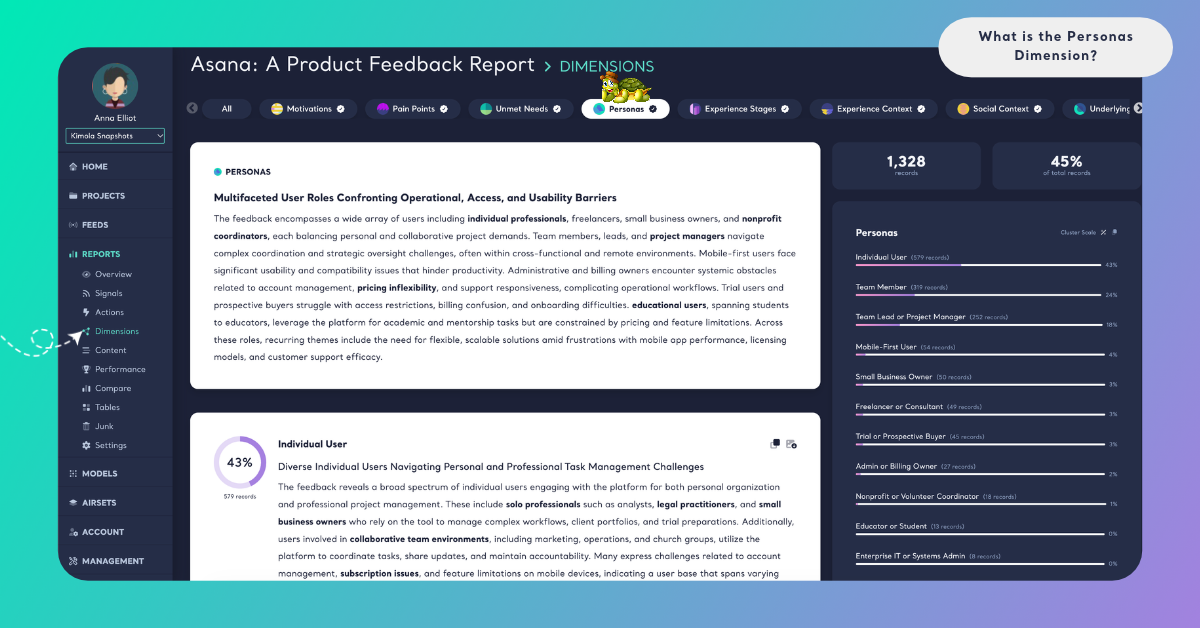
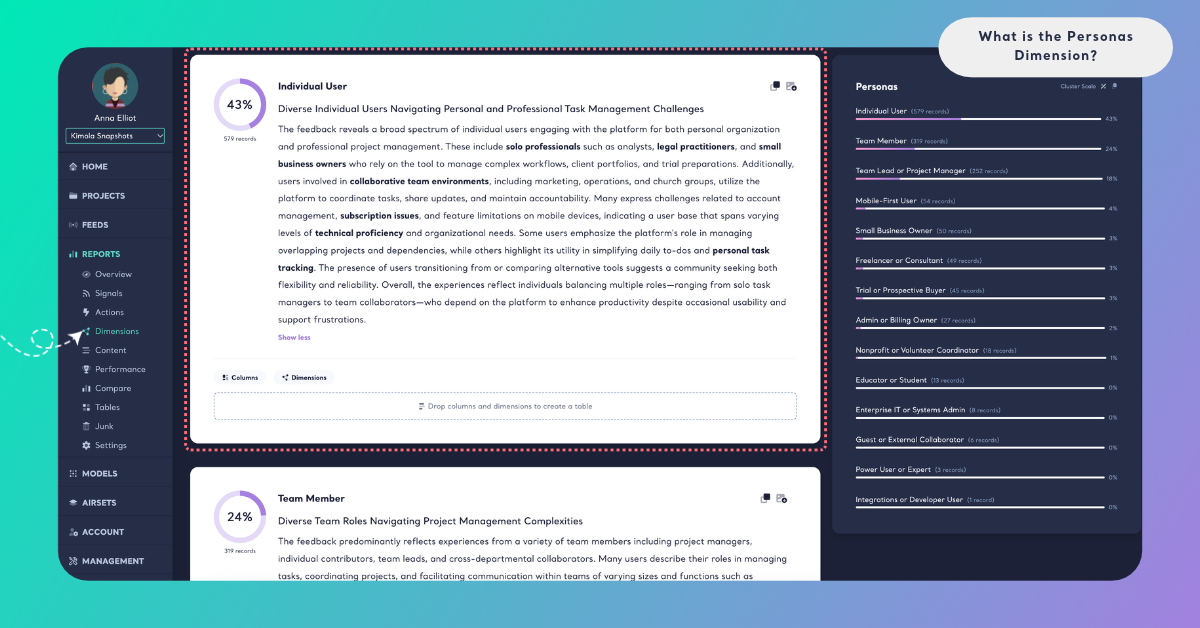
On the Report's Dimensions page, Personas has its own tab. A ring shows the share of the Report's records that answer the question. The summary card gives a headline and a few paragraphs on who your customers are, with key terms in bold. Below it, each persona is a cluster with its number of records, its share and a short summary. Because a persona is an inference, the quotations are its evidence: they show how people describe themselves, so you can judge each persona for yourself. A persona with very few records gets no summary, and the page says "Summaries are not available due to small cluster sizes."
Cluster Scale shows each persona's share of the records that answer Personas, and Dataset Scale shows its share of all the records in the Report. Because one record can point to several personas, the shares on Cluster Scale can add up to more than 100%. The Columns and Dimensions buttons on a cluster card show what lies behind a persona, for example the Pain Points it reports most often or the countries it writes from. See Dimensions in Reports.
In a Space
Spaces are available in the Enterprise package. On a Space's Dimensions page, Personas shows its answers under What they talk about and how they change Over time. A persona whose share changed significantly with the last upload is marked ▲ or ▼ "since the last upload", which can show a new group of people starting to write to you. Kimola writes Insights after every new file: What the answers say for Personas as a whole, and Why they answer so for each persona that at least 10 of the latest records give. In a Space, the answers come from the labels of the Funnel's Personas model. See Dimensions in Spaces.
In both Reports and Spaces, you can filter the Content and Performance pages by a persona, or cross Personas with a column or a classifier in Tables, for example Personas by country or by subscription plan.
An Example
Take this invented review of a language-learning app:
"I'm a nurse on rotating shifts, so I practice in 10-minute bursts on my breaks. We're moving to Madrid next spring and I need to get by in Spanish before then. Offline mode stopped syncing my progress twice this month."
Personas finds two answers in it. "Shift worker" comes from what the writer says about the job and from the behavior it explains: short sessions fitted into breaks. "Preparing to move abroad" comes from the planned move and the need to get by in Spanish before it. Personas needs no name, account or profile for this: the type of person comes from the context and the language of the text. The sync problem is not a persona; it is an answer for Pain Points. The breaks, the reason for learning and the "we" of the move are picked up by Experience Stages, Motivations and Social Context when those Dimensions are added.
A second review, "The listening exercises freeze on the last question.", says nothing about who wrote it, so it gets no Personas answer.
Across a dataset of 5,000 reviews, the same types of people gather into clusters. "Preparing to move abroad" might be the largest, with 740 records, followed by "Parent learning alongside a child" and "Retiree learning for travel". The summary would then say that many customers learn with a move ahead of them, and crossing Personas with Pain Points in Tables would show which persona reports the offline problems most often.
The answer names and numbers here are illustrative: Kimola names the personas of your own data in your customers' words.
When to Use It
Use Personas whenever a decision depends on knowing who your customers are and what each type of customer needs. It reads best in feedback where people describe themselves or their situation: product reviews, app store reviews, open-ended survey answers and support conversations. For how teams use this kind of research, see Personas.
Persona research from real feedback. Build personas from what thousands of customers write, and check the personas your team already works with against them. A large persona you never planned for is worth a closer look.
Product priorities. Cross Personas with Pain Points or Unmet Needs to see which problems each type of customer reports. A pain point that only one persona mentions calls for a different fix than one that every persona shares.
Messaging and targeting. The largest personas, and the words they use about themselves, tell you whom to address on a landing page, in an ad or in onboarding. Cross them with Motivations to lead with the reason that matters to each one.
Segments your columns don't hold. Your data may hold a plan, a country or a channel but nothing about the person's role or situation. Personas adds that layer from the text itself, and you can cross it with your columns in Tables, for example to see which personas sit behind each plan.
Competitors. Create a Report from the review pages of a rival's product to see who their customers are, and compare those personas with your own.
Change over time. In a Space, follow whether new types of customers start writing after a launch, a campaign or a move into a new market.
Personas works best together with Social Context, the other Dimension of the Actors group. Personas shows who has the experience, and Social Context ("With whom does this occur?") shows whether they have it alone or with others, such as a parent learning together with a child or a manager rolling a tool out to a team. Outside the group, Pain Points, Motivations and Unmet Needs give each persona its problems, its reasons for choosing you and what it still misses.
Use It in Kimola
How you add Personas depends on whether you work in a Report or a Space.
In a Report
Select Personas in the Dimensions step while you create a Report. It is listed under All and under Actors. Click it to add it to My List, then check the Required Query in the Review step. To add it to a Report that is already analyzed, open the Report's Dimensions page, click the Personas tab without a check mark and click Generate Now. Kimola classifies the Report's existing records with Personas and writes its analysis. The steps are in Add Dimensions to a Report.
Dimensions add to the queries a Report uses: queries = rows × models × Dimensions. For what your package includes, see kimola.com/pricing.
In a Space
A Space gets Personas from a Dimension model in its Funnel. In Models, click Create AI Model, choose By Prompt, click Dimension in the Purpose step and choose Personas under Which dimension?. Its Question and Description are filled in, and you can fine-tune them for your business. In Labels, define the personas your Spaces can find, such as "Shift worker" or "Small business owner", each with a short description. Then pick the model on the Dimensions tab of the Funnel wizard's Models step. Every file uploaded to the Funnel's Spaces after that is classified with Personas. The steps are in Add Dimensions to a Funnel.
If your team already works with defined personas, enter them in Labels, so every file is read against the same set.
Spaces are available in the Enterprise package. They are also available in Kimola On-Premises.