Kimola vs. Caplena
See how Kimola compares to Caplena and goes beyond coding open-ended responses to turn customer feedback into enterprise-grade market research.
















3,000+ growth-obsessed teams from 90+ countries
create 5 reports in every 30 minutes at Kimola.
Compare Kimola to Caplena
Caplena operates as a human-guided system that depends on manual configuration and researcher involvement. Kimola offers a streamlined, automated feedback analysis workflow that works across languages and makes insight generation fast and effortless.
-
KimolaCaplena
-
Kimola provides dynamic, fully automated classification that analyzes reviews instantly, while Caplena depends on a slower, human-guided classification process.
-
Kimola breaks down feedback into themes and assigns sentiment to each automatically—so you see exactly what excites customers and what holds them back—whereas Caplena requires sentiment analysis to be done manually for each aspect.
-
Scraping feedback from multiple sources—such as e-commerce sites, review platforms, and mobile app stores—saves valuable time and makes the research process far more efficient and effective. Kimola offers more channels than any other tool in the market.
★★★★★★★★☆☆ -
Kimola is designed for everyone—from small teams to large enterprises. With transparent plans starting at $49 and scalable enterprise options, it’s trusted by 1000+ companies across 90+ countries, making it easy to start analyzing feedback and gaining insights immediately.
Starting from $49Unknown
 No AI Training
Kimola needs no AI training to classify customer feedback. It automatically generates clusters based on the context rather than using pre-defined labels.
 No Data Hustle
Scraping reviews from leading platforms like Amazon, Google Business, Trustpilot, Tripadvisor, Google Play, and the App Store is a smooth process in Kimola.
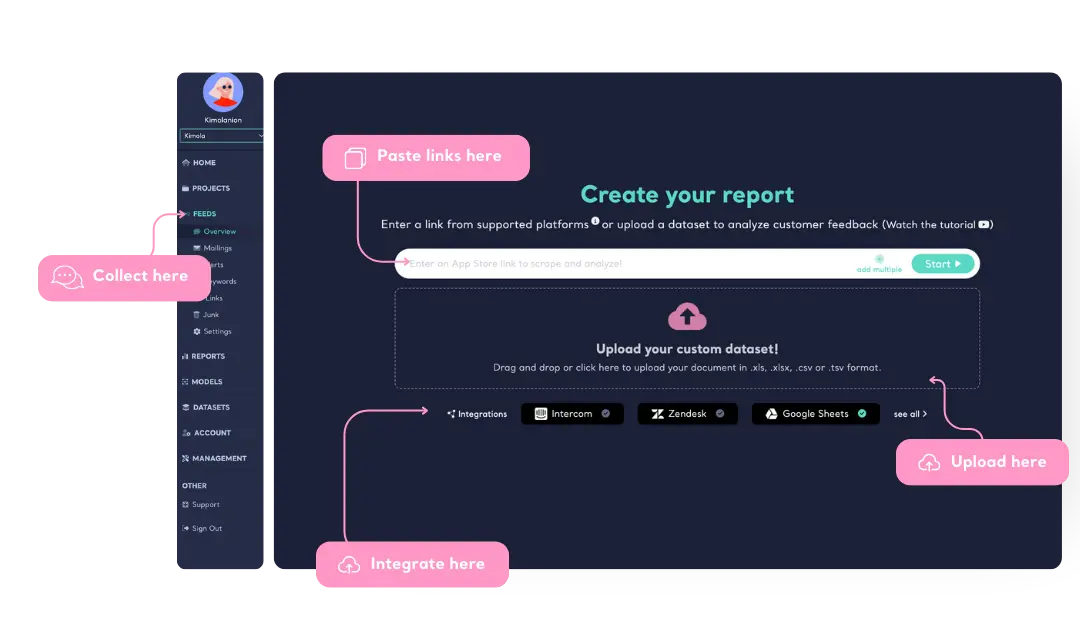
Collect, Upload or Integrate User Feedback
Kimola tracks conversations across social media, news sites, blogs, and forums, helping you stay informed about discussions around your product. Users can also enter links from platforms like Trustpilot, Google Play, and the App Store to continuously monitor user feedback.
For those already collecting user feedback, Kimola allows direct dataset uploads in Excel, CSV, or TSV formats to create structured qualitative research reports. Additionally, users can integrate their Google Sheets, Zendesk, or Intercom accounts, seamlessly connecting existing user interactions to Kimola for in-depth analysis.
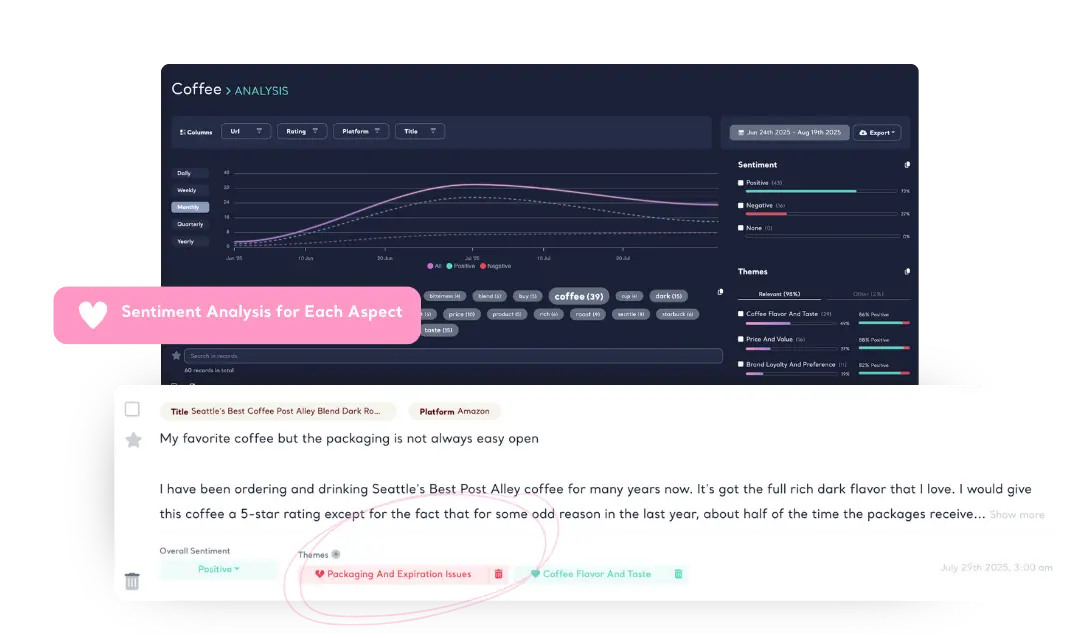
Sentiment and Themes with Aspect-Based Accuracy
Kimola assigns sentiment for each theme in a single user feedback, ensuring you capture every detail—what users like, dislike, and why. Even when a user mentions different topics within the same review, Kimola successfully breaks down feedback into multiple aspects and accurately assigns sentiment to each, so no insight is lost!
Learn about Aspect-based Sentiment Analysis
Kimola's Dynamic Classification™ technology understands context and generates relevant theme clusters without relying on pre-defined categories. It adapts to any dataset, eliminating the need for manual labeling or data annotation. This ensures precise categorization of unstructured feedback from online reviews, surveys, and social media—without human error.
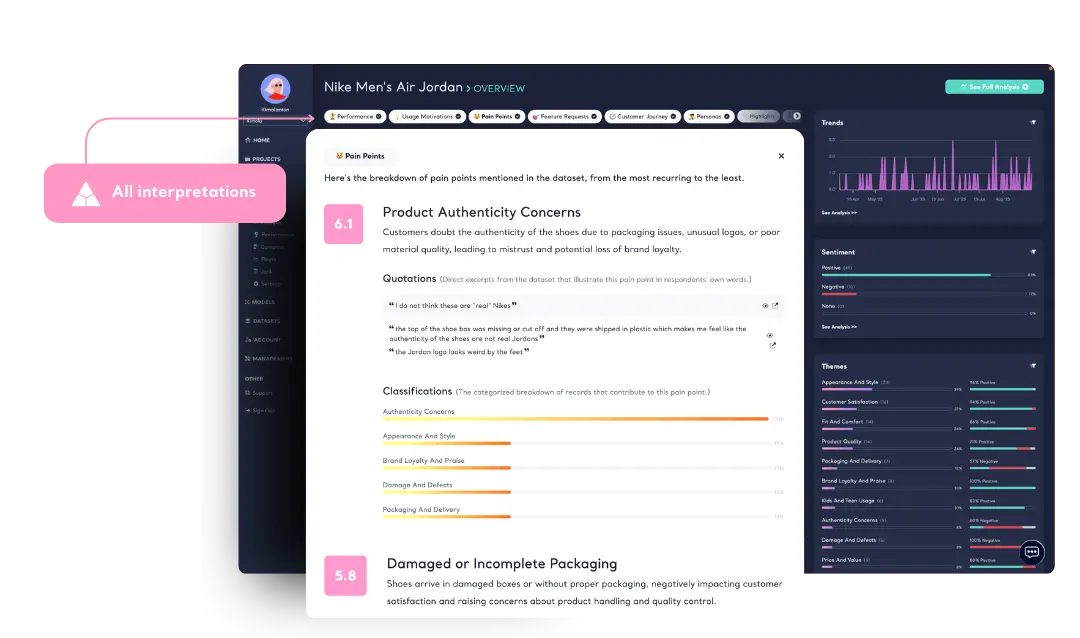
Summaries, Pain Points, Motivations and more
Kimola analyzes large-scale feedback and generates structured executive summaries around key topics and themes. Unlike generic AI-generated text, Kimola offers summaries with sub-sections and with sentiment and content classifications, which provides clarity, focus, and actionable insights.
Learn more about Executive Summary
Kimola analyzes user feedback to reveal what drives purchases, what causes frustration, and how your product is positioned in the market. AI-driven analysis detects patterns across any number of reviews, highlighting key motivations, recurring pain points, and competitive advantages.
Kimola analyzes customer feedback through a four-stage journey framework—Discovery, Purchase Experience, Usage & Support, and Loyalty & Advocacy. By applying its proprietary scoring algorithm, Kimola classifies feedback into these stages to reveal how customers perceive each step, measure satisfaction levels, and pinpoint the critical moments that define brand relationships.
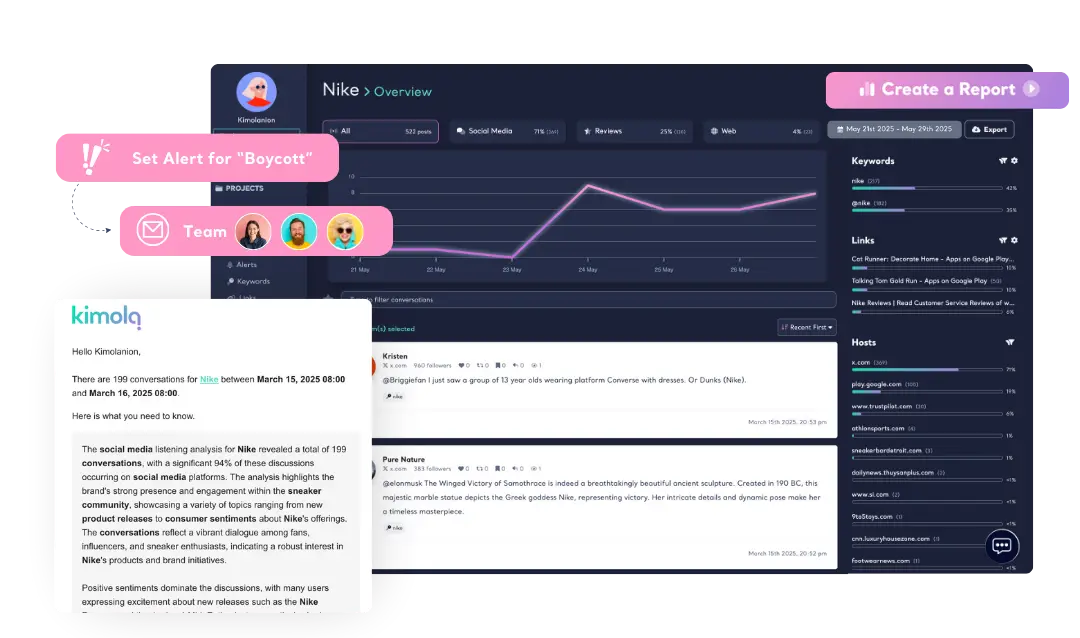
Get Automated Reports & Alerts
Stay informed without the hassle. Receive automated reports summarizing mentions in their original language. Set up alerts based on keywords, influence levels, or sudden volume spikes, ensuring you never miss a critical mention.
Analyze Multilingual Datasets
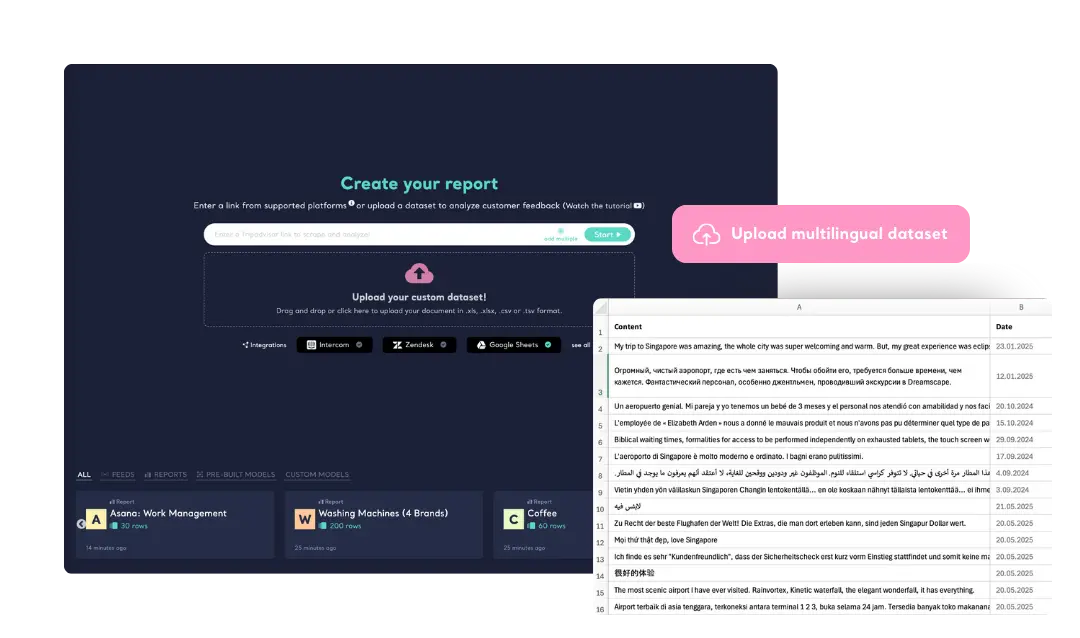
Kimola seamlessly analyzes datasets containing customer feedback in multiple languages. No need to segment feedback based on language—simply upload your dataset, and our AI processes all entries together, delivering insights in a unified format. This allows for a more comprehensive understanding of customer sentiment across diverse markets.
-
Track & Analyze
Customer Feedback -
TRACK
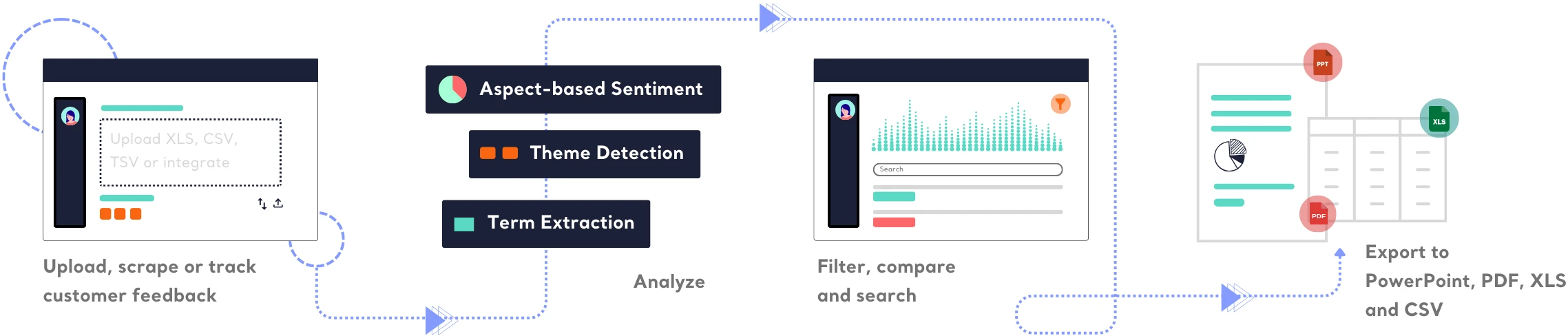
Collect and centralize feedback.
ANALYZEMake sense of large-scale feedback.
INSIGHTSTurn data into meaningful insights.
Find out how Kimola can improve your feedback analysis process.
-
![Kimola for Product Feedback Analysis]() Product Feedback Analysis
Product Feedback Analysis
Uncover customer needs, likes, and dislikes from product reviews and feedback.
-
![Kimola for E-commerce Feedback Analysis]() E-commerce Feedback Analysis
E-commerce Feedback Analysis
Analyze customer reviews and ratings to optimize online shopping experiences.
-
![Kimola for Social Feedback Analysis]() Social Feedback Analysis
Social Feedback Analysis
Extract insights from social media conversations and online discussions.



-
![Kimola for Open-ended Survey Analysis]() Open-ended Survey Analysis
Open-ended Survey Analysis
Make sense of free-text survey responses with AI-powered analysis.
-
![Kimola for Conversational Analysis]() Chatbot and Call Center Conversational Analysis
Chatbot and Call Center Conversational Analysis
Understand customer sentiment and concerns from chat and call transcripts.
-
![Kimola for Employee Feedback Analysis]() Employee Feedback Analysis
Employee Feedback Analysis
Identify workplace trends and employee sentiment from internal feedback and reviews.



Plans vary by query limits, data tracking, analysis and support options.
- 150 queries/month
-
- Track Mentions
- Track Reviews
- Custom AI Models
-
- TRACK
-
- Automated Reports & Alerts
- Integrations
- Scrape Customer Feedback
-
- ANALYZE
-
- Aspect-based Sentiment
- Topic & Theme Detection
- Pretrained AI Models
- 30+ Language Support
- Excel, PDF and PowerPoint Export
-
- INSIGHTS
-
- Executive Summary
- Personas
- Pain Points
- Usage Motivations
- 10+ others
-
- ADVANCED
-
- API
- Role-based Access
- User Logs
-
- SUPPORT
-
- Support Tickets (5 week-days SLA)
- Onboarding
- Account Manager
-
- LEGAL
-
- Custom Agreement
-
Basic$ 49 /monthbilled monthly
- 3,000 queries/month
-
- 3 keywords
- 5 links
- 1 Custom AI Model
-
- TRACK
-
- Automated Reports & Alerts
- Integrations
- Scrape Customer Feedback
-
- ANALYZE
-
- Aspect-based Sentiment
- Topic & Theme Detection
- Pretrained AI Models
- 30+ Language Support
- Excel, PDF and PowerPoint Export
-
- INSIGHTS
-
- Executive Summary
- Personas
- Pain Points
- Usage Motivations
- 10+ others
-
- ADVANCED
-
- API
- Role-based Access
- User Logs
-
- SUPPORT
-
- Support Tickets (72-hour SLA)
- Onboarding
- Account Manager
-
- LEGAL
-
- Custom Agreement
-
Standard$ 179 /monthbilled monthly
- 12,000 queries/month
-
- 10 keywords
- 15 links
- 3 Custom AI Model
-
- TRACK
-
- Automated Reports & Alerts
- Integrations
- Scrape Customer Feedback
-
- ANALYZE
-
- Aspect-based Sentiment
- Topic & Theme Detection
- Pretrained AI Models
- 30+ Language Support
- Excel, PDF and PowerPoint Export
-
- INSIGHTS
-
- Executive Summary
- Personas
- Pain Points
- Usage Motivations
- 10+ others
-
- ADVANCED
-
- API
- Role-based Access
- User Logs
-
- SUPPORT
-
- Support Tickets (48-hour SLA)
- 1 hour onboarding/month
- Account Manager
-
- LEGAL
-
- Custom Agreement
-
Business$ 359 /monthbilled monthly
- 30,000 queries/month
-
- 15 keywords
- 30 links
- 5 Custom AI Model
-
- TRACK
-
- Automated Reports & Alerts
- Integrations
- Scrape Customer Feedback
-
- ANALYZE
-
- Aspect-based Sentiment
- Topic & Theme Detection
- Pretrained AI Models
- 30+ Language Support
- Excel, PDF and PowerPoint Export
-
- INSIGHTS
-
- Executive Summary
- Personas
- Pain Points
- Usage Motivations
- 10+ others
-
- ADVANCED
-
- API
- Role-based Access
- User Logs
-
- SUPPORT
-
- Support Tickets (48-hour SLA)
- 2 hours onboarding/month
- Account Manager
-
- LEGAL
-
- Custom Agreement
Enterprise plans include custom contracts, flexible payment options, a dedicated account manager, role-based access controls, and full API usage. Contact us to learn how Kimola can support your organization at scale.
Frequently Asked Questions
About Caplena
-
What makes Kimola a faster alternative to Caplena?
Kimola analyzes feedback instantly using fully automated, dynamic classification—no human input required. Caplena, in contrast, relies on a human-guided process that takes more time and manual effort.
-
Is Kimola better than Caplena for analyzing large volumes of reviews?
Yes. Kimola automatically collects, scrapes, and analyzes reviews at scale, making it ideal for high-volume datasets. Caplena requires manual uploads or integrations, which can slow down the workflow when dealing with large or frequently updated data.
-
How does sentiment analysis differ between Kimola and Caplena?
Kimola assigns sentiment to each theme automatically using aspect-based sentiment analysis, also offering an "overall sentiment" giving a clear picture of what customers love or dislike. Caplena requires users to manually handle sentiment tagging for each aspect.
-
Does Kimola offer more automation than Caplena?
Absolutely. Kimola provides end-to-end automation—data collection, classification, sentiment analysis, and reporting—while Caplena depends heavily on human setup and manual adjustments to produce results.
-
Which tool is better for multilingual feedback analysis: Kimola or Caplena?
Kimola supports instant analysis in 30+ languages with high accuracy, making it ideal for global feedback. Caplena also supports multiple languages but typically requires more manual tuning for consistent results. So if you don’t speak the language you’re analyzing in Caplena, maintaining consistent, accurate results can be challenging because the system depends on manual tuning
-
How do Kimola and Caplena compare in terms of pricing transparency?
Kimola offers transparent, straightforward pricing with clear plans and no hidden costs, making it easy to understand exactly what you’re paying for. Caplena, on the other hand, uses a more customized pricing model that often requires contacting sales, which can make it harder to estimate total costs upfront.
Turn customer feedback into structured market research in 30+ languages—no AI training needed.
Create a Free Account No credit card · No commitment