Build and Deploy
Custom AI Models
Train AI models to classify customer feedback with your own labels. Upload your training set, build your model, and start analyzing—all no code!















3,000+ growth-obsessed teams from 90+ countries
create 5 reports in every 30 minutes at Kimola.
Build and Deploy
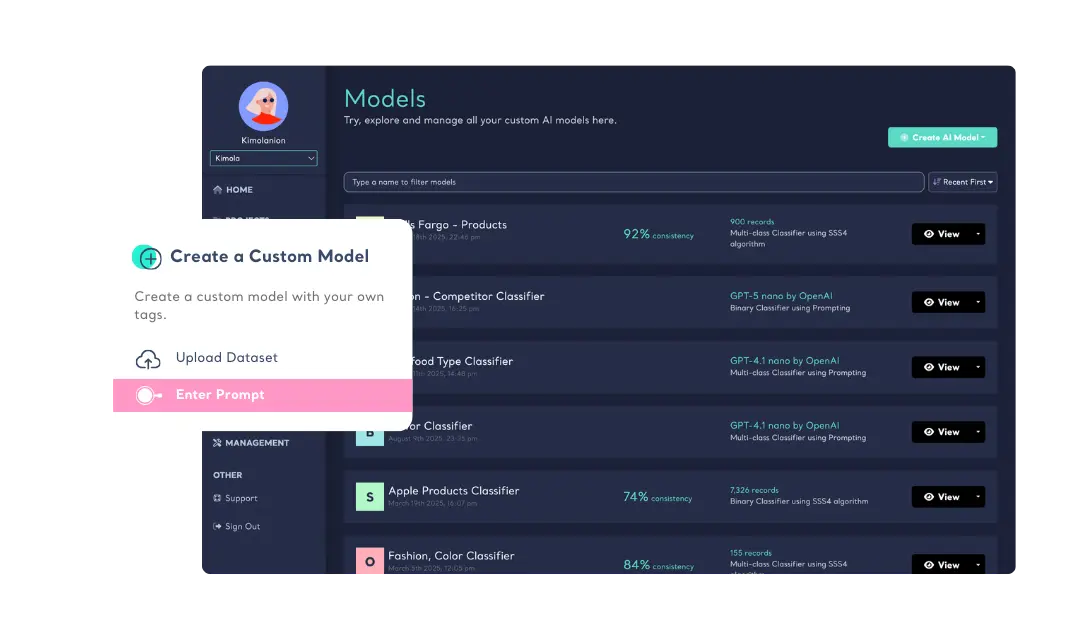
Kimola offers two different ways to build and deploy custom models. You can either upload your training set in .xlsx, .xls, .csv, or .tsv formats or enter label names & descriptions to train a model by prompt -and let Kimola analyze its suitability. Once your model is built, choose the model name after uploading your dataset to analyze and follow the advanced menu to use it. Developers can also integrate Kimola's AI into their applications without infrastructure investment.
Aim the Highest Accuracy with AutoML
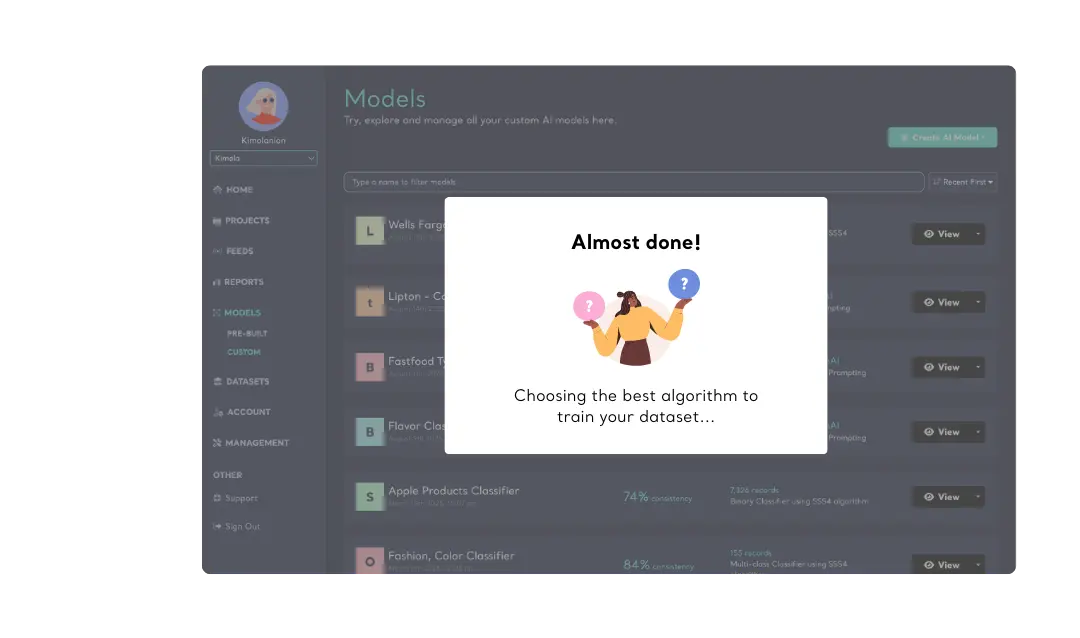
Kimola's AutoML ensures the highest accuracy, letting social scientists focus on content rather than technical complexity. When you update your training set, the model is automatically rebuilt using the best statistical method, keeping it accurate and up-to-date.
-
Track & Analyze
Customer Feedback -
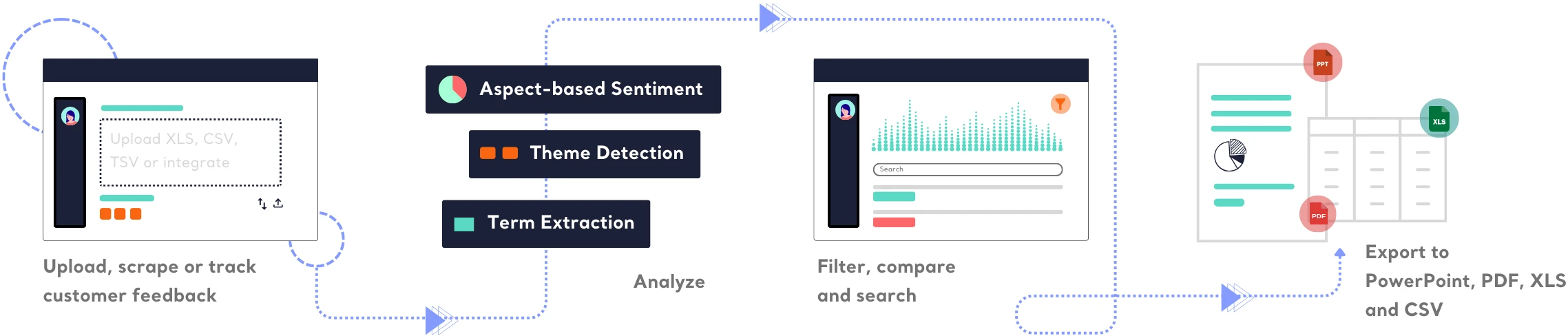
TRACK
Collect and centralize feedback.
ANALYZEMake sense of large-scale feedback.
INSIGHTSTurn data into meaningful insights.
Find out how Kimola can improve your feedback analysis process.
-
![Kimola for Product Feedback Analysis]() Product Feedback Analysis
Product Feedback Analysis
Uncover customer needs, likes, and dislikes from product reviews and feedback.
-
![Kimola for E-commerce Feedback Analysis]() E-commerce Feedback Analysis
E-commerce Feedback Analysis
Analyze customer reviews and ratings to optimize online shopping experiences.
-
![Kimola for Social Feedback Analysis]() Social Feedback Analysis
Social Feedback Analysis
Extract insights from social media conversations and online discussions.



-
![Kimola for Open-ended Survey Analysis]() Open-ended Survey Analysis
Open-ended Survey Analysis
Make sense of free-text survey responses with AI-powered analysis.
-
![Kimola for Conversational Analysis]() Chatbot and Call Center Conversational Analysis
Chatbot and Call Center Conversational Analysis
Understand customer sentiment and concerns from chat and call transcripts.
-
![Kimola for Employee Feedback Analysis]() Employee Feedback Analysis
Employee Feedback Analysis
Identify workplace trends and employee sentiment from internal feedback and reviews.



Frequently Asked Questions
About Custom AI Models
-
What is a custom AI model?
An AI model is a system trained to recognize patterns in data and make predictions or classifications based on those patterns. In Kimola, AI models help categorize customer feedback according to custom labels.
-
Why do I need a custom AI model to analyze customer feedback?
A custom AI model is trained specifically on data relevant to your industry, brand, or research goals—unlike generic models that provide broad, one-size-fits-all insights. With a tailored model, you get highly accurate, context-aware classifications that reflect the language, products, and priorities unique to your business. For example, if you're in the fashion industry, the model can be trained to recognize and differentiate subtle color terms in customer reviews—like distinguishing "red" from "blue"—giving you more precise insights into how customers perceive your products.
-
Is this all no-code?
Yes, just focus on creating a well-prepared training set. It may be in Excel format or, if you're not a fan of Excel, use your favorite software and export as CSV or TSV. Kimola accepts all these file formats to build your machine learning models. If anything is wrong with your training set, the wizard will notify you.
-
How to create a custom AI model with prompt?
Kimola allows you to enter labels and descriptions for each label to help you create a custom model. You don't need any training set to create a model by prompt, you just need to know the labels.
-
What are the limits for a training set?
You can upload a training set with a minimum of two labels and 100 samples for each label. A training set can contain a maximum of 60,000 rows and up to 15 labels.
-
Can I run my custom model on my computer?
No, Kimola is only available on the cloud. However, you can manage your custom model through a visual user interface or a well-documented API. If you have any concerns about data safety, contact us, and we'll provide all the necessary information.
-
What to do when a model has a low accuracy rate?
Kimola's AutoML works to achieve the best accuracy, but accuracy depends on the training set. If your model has a low accuracy rate, add more samples for your labels and upload your training set again. These experiments don't affect your package usage since we know they're a natural part of the process.
Turn customer feedback into structured market research in 30+ languages—no AI training needed.
Create a Free Account No credit card · No commitment