What is the Motivations Dimension?
min read - Updated on Oct 30, 2026Motivations is the Dimension that asks every piece of customer feedback "Why is this chosen or preferred?" It reveals the underlying reasons, intentions or needs that drive the experience described in the feedback: why customers bought a product, picked a service or keep coming back to it. Kimola groups the same reasons across all of your reviews, survey responses and support conversations and counts the records behind each one, so you see what draws customers to you and how many of them say so. Motivations belongs to the Drivers group and is available in every package.
A Dimension is a research question Kimola asks of every piece of feedback. Themes tell you what customers talk about, and sentiment tells you how they feel about it. Motivations answers a different question: what made them choose you in the first place, in their own words. Every answer stays tied to the feedback that gives it, so you can open the records behind a reason and read them.
To use Motivations, you need a Kimola account and customer feedback to analyze. If you don’t have an account yet, sign up first.
For a Report, sign in and open the report you want to work with from the Reports section. If you haven’t created a report yet, follow one of these guides: Create a Report by Uploading a Custom Dataset, Create a Report by Adding Links
You can select Motivations while creating the Report or add it later. See Use It in Kimola.
For a Space, you need a Funnel with a Motivations Dimension model. If you haven’t set these up yet, see Create a Funnel, Add Dimensions to a Funnel and Create a Space. Upload feedback to the Space after adding the model so it can be classified with Motivations.
The Question It Asks
Motivations asks one question of each record: "Why is this chosen or preferred?" Feedback that gives a reason, such as "I switched because…", "we picked it for…" or "I keep ordering here because…", gets an answer. A reason can be practical (a price, a feature, fast delivery), an intention (a goal the customer wants to reach) or a need (a situation that pushes them toward the product).
Feedback that says nothing about why the customer chose the product gets no answer for Motivations. That is expected: many reviews only describe a problem or a single moment. The share of records that answer Motivations tells you how often your customers explain their choice at all. One piece of feedback can give several motivations at once, and each one is counted.
Motivations covers the choice itself. When a review praises the price and then complains about a late delivery, the price is a motivation and the late delivery belongs to Pain Points. Motivations is also different from Underlying Causes, the other "why" question of the Drivers group: Underlying Causes asks "Why does this occur?" and explains the conditions behind a situation, while Motivations explains why the customer wanted the product.
What You Get
Kimola builds the answers of Motivations from your data. It reads the dataset, finds the reasons customers give and names each answer in their terms, so the motivations behind a meal kit subscription and those behind an accounting tool come out different. Across thousands of records, Kimola groups the same reason under one answer and counts the records that give it. The counts and shares come from the classification itself; an AI model writes the summaries afterwards, from numbers that are already computed.
In a Report
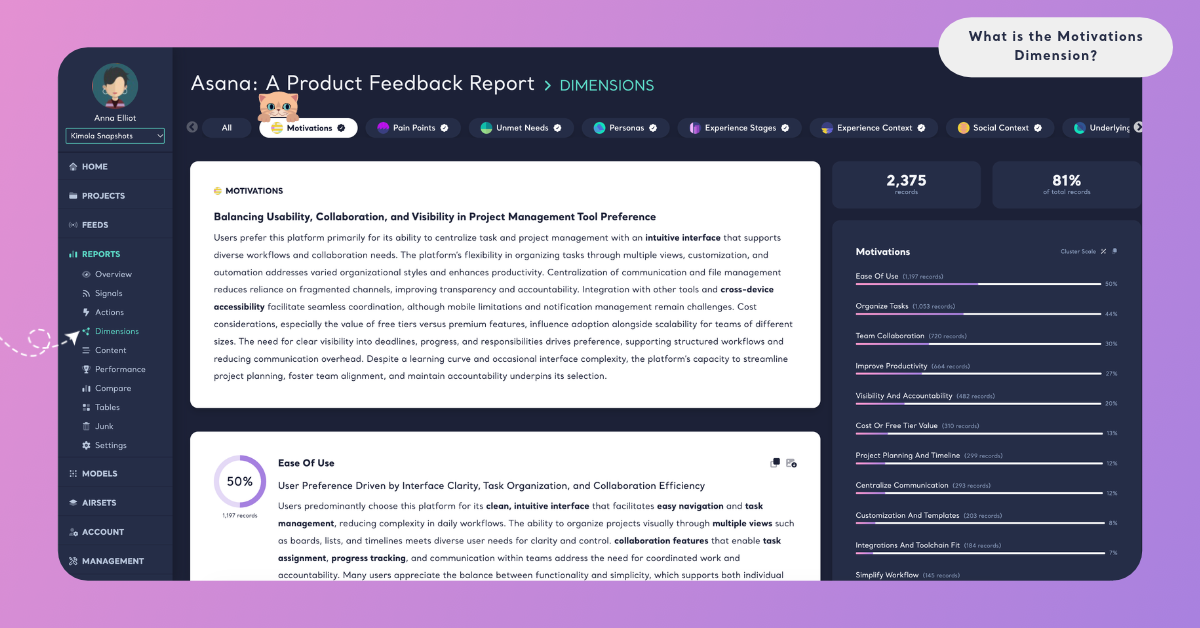
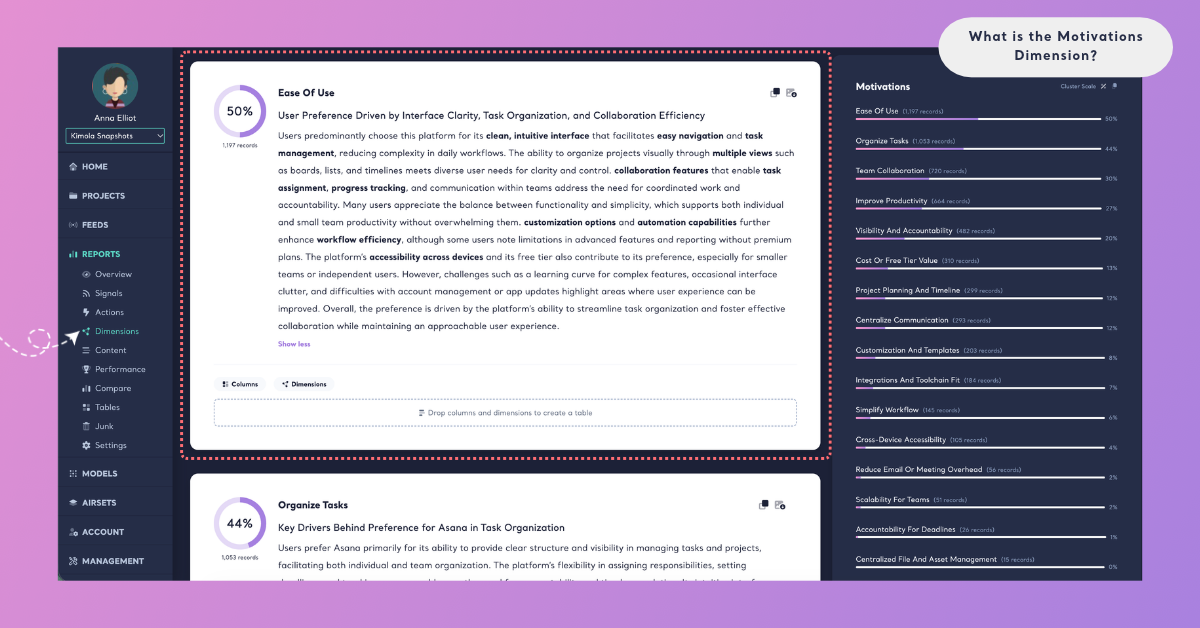
On the Report's Dimensions page, Motivations has its own tab. A ring shows the share of the Report's records that answer the question. The summary card gives a headline and a few paragraphs on why customers choose the product, with key terms in bold. Below it, each motivation is a cluster with its number of records, its share and a short summary.
Cluster Scale shows each motivation's share of the records that answer Motivations, and Dataset Scale shows its share of all the records in the Report. Because one record can give several motivations, the shares on Cluster Scale can add up to more than 100%. The Columns and Dimensions buttons on a cluster card show what lies behind a motivation, for example which Personas give it most often. See Dimensions in Reports.
In a Space
Spaces are available in the Enterprise package. On a Space's Dimensions page, Motivations shows its answers under What they talk about and how they change Over time. A motivation whose share changed significantly with the last upload is marked ▲ or ▼ "since the last upload". Kimola writes Insights after every new file: What the answers say for Motivations as a whole, and Why they answer so for each motivation that at least 10 of the latest records give. In a Space, the answers come from the labels of the Funnel's Motivations model. See Dimensions in Spaces.
In both Reports and Spaces, you can filter the Content and Performance pages by a motivation, or cross Motivations with a column or a classifier in Tables, for example Motivations by country or by subscription plan.
An Example
Take this invented review of a meal kit subscription:
"I signed up because I wanted to stop ordering takeout every night. Most recipes take about 30 minutes, so I can actually cook after work, and my kids are finally trying new vegetables. Two boxes arrived a day late, though."
Motivations finds three answers in it. "Cutting down on takeout" is an intention: the goal the customer wanted to reach. "Quick weeknight cooking" is a need set by their schedule. "Getting the kids to try new foods" is a reason they now prefer the service. The late boxes are not a motivation; they are an answer for Pain Points. The kids, the evening after work and the takeout the kit replaces are picked up by Social Context, Experience Stages and Substitutions when those Dimensions are added.
A second review, "The box was damaged and the ice packs had melted.", gives no reason for choosing the service, so it gets no Motivations answer.
Across a dataset of 4,000 reviews, the same reasons gather into clusters. "Quick weeknight cooking" might be the largest, with 620 records, followed by "Cutting down on takeout" and "Learning to cook". The summary would then say that customers choose the service mostly to fit cooking into busy evenings, and the quotations would show how they put it.
The answer names and numbers here are illustrative: Kimola names the motivations of your own data in your customers' words.
When to Use It
Use Motivations whenever a decision depends on knowing why people choose you, and read it in feedback where customers explain their choice: product reviews, app store reviews and open-ended survey answers to questions such as "Why did you choose us?". For how teams use this kind of research, see Usage Motivations.
Positioning and messaging. The largest motivations, in customers' own words, tell you which reasons to lead with on a landing page, in an ad or in a sales conversation.
Product decisions. Before you change a price, a feature or a delivery promise, check whether it is one of the reasons customers chose you. A change to a top motivation carries more risk than a change to something nobody mentions.
Segments. Cross Motivations with a column in Tables to see whether customers in different countries, plans or channels choose you for different reasons.
Competitors. Create a Report from the review pages of a rival's product to see why their customers chose them, and compare those reasons with your own.
Change over time. In a Space, follow whether the reasons customers give shift after a launch, a price change or a campaign.
Motivations works best together with the other Dimensions of the Drivers group. Unmet Needs ("What is missing or desired?") shows what customers still miss, next to what drew them in. Underlying Causes ("Why does this occur?") explains why the situations they describe happen. Outside the group, Personas shows who gives each motivation, and Substitutions shows what the product was chosen instead of.
Use It in Kimola
How you add Motivations depends on whether you work in a Report or a Space.
In a Report
Select Motivations in the Dimensions step while you create a Report. It is listed under All and under Drivers. Click it to add it to My List, then check the Required Query in the Review step. To add it to a Report that is already analyzed, open the Report's Dimensions page, click the Motivations tab without a check mark and click Generate Now. Kimola classifies the Report's existing records with Motivations and writes its analysis. The steps are in Add Dimensions to a Report.
Dimensions add to the queries a Report uses: queries = rows × models × Dimensions. For what your package includes, see kimola.com/pricing.
In a Space
A Space gets Motivations from a Dimension model in its Funnel. In Models, click Create AI Model, choose By Prompt, click Dimension in the Purpose step and choose Motivations under Which dimension?. Its Question and Description are filled in, and you can fine-tune them for your business. In Labels, define the motivations your Spaces can find, such as "Quick weeknight cooking" or "Price", each with a short description. Then pick the model on the Dimensions tab of the Funnel wizard's Models step. Every file uploaded to the Funnel's Spaces after that is classified with Motivations. The steps are in Add Dimensions to a Funnel.
Spaces are available in the Enterprise package. They are also available in Kimola On-Premises.