What is the Unmet Needs Dimension?
min read - Updated on Oct 30, 2026Unmet Needs is the Dimension that asks every piece of customer feedback "What is missing or desired?" It surfaces the explicit or implicit expectations customers have about what could be improved, added or changed: the feature they ask for, the option they wish they had or the gap they work around today. Kimola groups the same needs across all of your reviews, survey responses and support conversations and counts the records behind each one, so you see what customers still miss and how many of them miss it. Unmet Needs belongs to two groups, Issues and Drivers, and is available in every package.
A Dimension is a research question Kimola asks of every piece of feedback. Themes tell you what customers talk about, and sentiment tells you how they feel about it. Unmet Needs looks forward: it collects what customers want from the product next, in their own words. Every answer stays tied to the feedback that gives it, so you can open the records behind a need and read them.
To use Unmet Needs, you need a Kimola account and customer feedback to analyze. If you don’t have an account yet, sign up first.
For a Report, sign in and open the report you want to work with from the Reports section. If you haven’t created a report yet, follow one of these guides: Create a Report by Uploading a Custom Dataset, Create a Report by Adding Links
You can select Unmet Needs while creating the Report or add it later. See Use It in Kimola.
For a Space, you need a Funnel with an Unmet Needs Dimension model. If you haven’t set these up yet, see Create a Funnel, Add Dimensions to a Funnel and Create a Space. Upload feedback to the Space after adding the model so it can be classified with Unmet Needs.
The Question It Asks
Unmet Needs asks one question of each record: "What is missing or desired?" Some feedback states the need openly, with phrases such as "I wish it had…", "please add…" or "it would be great if…". Other feedback states it indirectly. A customer who writes "I export everything to a spreadsheet every week just to see my totals" asks for nothing directly; the workaround shows the need for totals inside the product. Unmet Needs picks up both: the explicit request and the implicit expectation behind a workaround or a complaint.
Feedback that expresses no wish, request or missing piece gets no answer for Unmet Needs. That is expected: many reviews only praise the product or describe a single problem. The share of records that answer Unmet Needs tells you how often your customers say what they would add or change. One piece of feedback can give several needs at once, and each one is counted.
Unmet Needs sits in two groups because a need works both ways. As an Issue, it marks a gap in what the product offers today. As a Driver, it points to what could make customers choose, stay or switch. It differs from Pain Points, the other Dimension of the Issues group: Pain Points asks "What goes wrong or creates difficulty?" and covers something that exists and fails, while Unmet Needs covers something that is absent or could be better. A review that says "the app crashes when I upload photos, and I wish I could schedule posts" gives the crash to Pain Points and scheduled posts to Unmet Needs. It also differs from Motivations in the Drivers group: Motivations explains why customers chose the product, and Unmet Needs explains what they still want from it.
What You Get
Kimola builds the answers of Unmet Needs from your data. It reads the dataset, finds the needs customers express and names each answer in their terms, so the needs of a language learning app and those of a project management tool come out different. Across thousands of records, Kimola groups the same need under one answer and counts the records that give it, whether customers ask for it outright or describe the workaround it would replace. The counts and shares come from the classification itself; an AI model writes the summaries afterwards, from numbers that are already computed.
In a Report
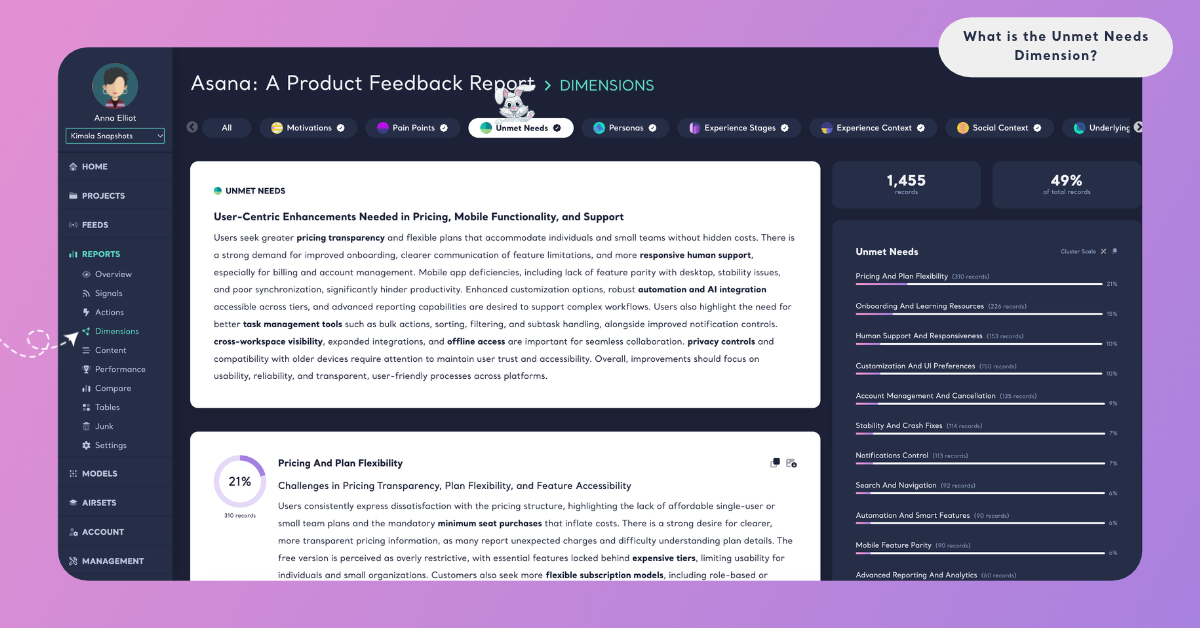
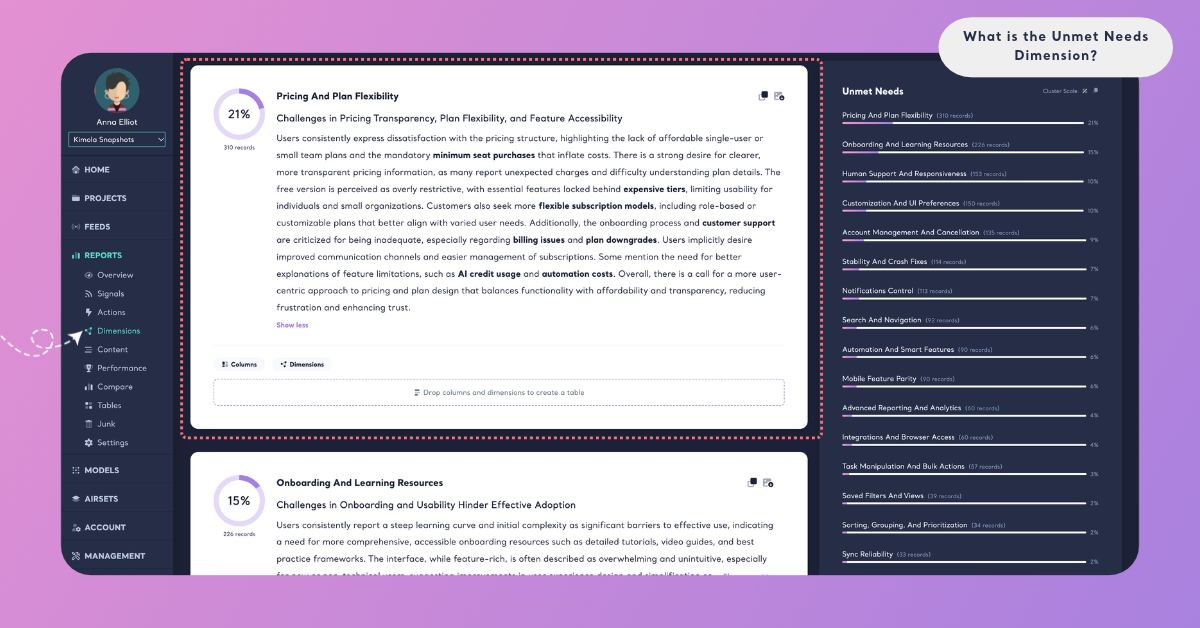
On the Report's Dimensions page, Unmet Needs has its own tab. A ring shows the share of the Report's records that answer the question. The summary card gives a headline and a few paragraphs on what customers miss and want, with key terms in bold. Below it, each need is a cluster with its number of records, its share and a short summary.
Cluster Scale shows each need's share of the records that answer Unmet Needs, and Dataset Scale shows its share of all the records in the Report. Because one record can give several needs, the shares on Cluster Scale can add up to more than 100%. The Columns and Dimensions buttons on a cluster card show what lies behind a need, for example which Personas ask for it most often or at which Experience Stage it comes up. See Dimensions in Reports.
In a Space
Spaces are available in the Enterprise package. On a Space's Dimensions page, Unmet Needs shows its answers under What they talk about and how they change Over time. A need whose share changed significantly with the last upload is marked ▲ or ▼ "since the last upload". Kimola writes Insights after every new file: What the answers say for Unmet Needs as a whole, and Why they answer so for each need that at least 10 of the latest records give. In a Space, the answers come from the labels of the Funnel's Unmet Needs model. See Dimensions in Spaces.
In both Reports and Spaces, you can filter the Content and Performance pages by a need, or cross Unmet Needs with a column or a classifier in Tables, for example Unmet Needs by platform.
An Example
Take this invented review of a language learning app:
"I've done a lesson every day for three months. I wish I could download lessons for my commute, because there's no signal on the underground. Speaking practice with real people would help too, not only typing answers. I keep a notebook of the words I get wrong so I can go over them later. The app logged me out twice this week."
Unmet Needs finds three answers in it. "Offline lessons" and "Speaking practice with people" are explicit: the customer asks for them. "A review list of mistakes" is implicit: the notebook the customer keeps shows the need without a request. Being logged out is not a need; it is an answer for Pain Points. The commute, the underground and the notebook used next to the app are picked up by Experience Stages, Experience Context and Co-Occurrences when those Dimensions are added.
A second review, "Short, fun lessons. I recommend it.", expresses nothing missing or desired, so it gets no Unmet Needs answer.
Across a dataset of 6,000 reviews, the same needs gather into clusters. "Offline lessons" might be the largest, with 540 records, followed by "Speaking practice with people" and "More advanced levels". The summary would then say that customers mostly want to keep learning where they have no connection, and the quotations would show how they put it.
The answer names and numbers here are illustrative: Kimola names the needs of your own data in your customers' words.
When to Use It
Use Unmet Needs whenever a decision depends on knowing what customers want next, and read it in feedback where they say what they would change: product and app store reviews, feature requests, support conversations and open-ended survey answers to questions such as "What would you improve?". For how teams turn this kind of feedback into product decisions, see Product Feedback Analysis.
Roadmap planning. The largest needs, with the number of records behind each one, show which requests come up most often across your feedback, beyond the loudest ones.
Prioritizing requests. Cross Unmet Needs with a column in Tables to see whether a need comes from a valuable segment, a specific plan or a specific market before you schedule it.
Retention. Needs that customers describe together with leaving or with a competitor show the gaps that cost you customers. Read them next to Substitutions.
Competitors. Create a Report from the review pages of a rival's product to see what their customers miss, and check whether your product already offers it.
Change over time. In a Space, follow whether a need fades after you ship the feature that answers it, or whether new needs appear after a launch.
Unmet Needs works best together with the other Dimensions of its two groups. In the Issues group, Pain Points ("What goes wrong or creates difficulty?") shows what fails today, next to what is missing. In the Drivers group, Motivations ("Why is this chosen or preferred?") shows what customers already value, and Underlying Causes ("Why does this occur?") explains the conditions behind a need. Outside its groups, Personas shows who has each need, and Substitutions shows the alternatives customers turn to when the need is not met.
Use It in Kimola
How you add Unmet Needs depends on whether you work in a Report or a Space.
In a Report
Select Unmet Needs in the Dimensions step while you create a Report. It is listed under All, under Issues and under Drivers. Click it to add it to My List, then check the Required Query in the Review step. To add it to a Report that is already analyzed, open the Report's Dimensions page, click the Unmet Needs tab without a check mark and click Generate Now. Kimola classifies the Report's existing records with Unmet Needs and writes its analysis. The steps are in Add Dimensions to a Report.
Dimensions add to the queries a Report uses: queries = rows × models × Dimensions. For what your package includes, see kimola.com/pricing.
In a Space
A Space gets Unmet Needs from a Dimension model in its Funnel. In Models, click Create AI Model, choose By Prompt, click Dimension in the Purpose step and choose Unmet Needs under Which dimension?. Its Question and Description are filled in, and you can fine-tune them for your business. In Labels, define the needs your Spaces can find, such as "Offline access" or "More payment options", each with a short description. Then pick the model on the Dimensions tab of the Funnel wizard's Models step. Every file uploaded to the Funnel's Spaces after that is classified with Unmet Needs. The steps are in Add Dimensions to a Funnel.
Spaces are available in the Enterprise package. They are also available in Kimola On-Premises.