Custom vs. Pretrained Models
3 mins read - Updated on Oct 28, 2026Kimola classifies customer feedback with two kinds of AI models. Pretrained models are ready-made by Kimola: you choose one and it starts classifying, with labels Kimola has set. Custom models are the ones you create from a prompt, a training dataset or a Report, with labels you define, so the themes match the names your teams already use. The difference between them is who defines the labels. Both kinds can classify the feedback of a Report, and both use queries by the same rule.
Pretrained models are available in every package, including the free Starter package. Custom models are available in the paid packages. Custom models are also the only kind a Funnel takes, so the feedback of a Space is always classified with custom models.
Custom models are available in the paid packages, not in Starter. See kimola.com/pricing.
Custom Models
A custom model classifies feedback with labels you define. Each label has a name and a short description of what it covers, and the model tags every piece of feedback with the labels that fit it. Because you write the labels, the results speak your organization's language: the products, processes and problems your teams already track.
You can create a custom model in three ways.
With a prompt: you choose what the model is for and write its labels, each with a name and a description. A model needs at least two labels.
With a training dataset: you upload a file with a text column and a label column, and the model learns from the labeled examples.
With a Report: you turn a Report you have already analyzed into a model, with Create a Custom AI Model under MODELLING in the Report's Settings.
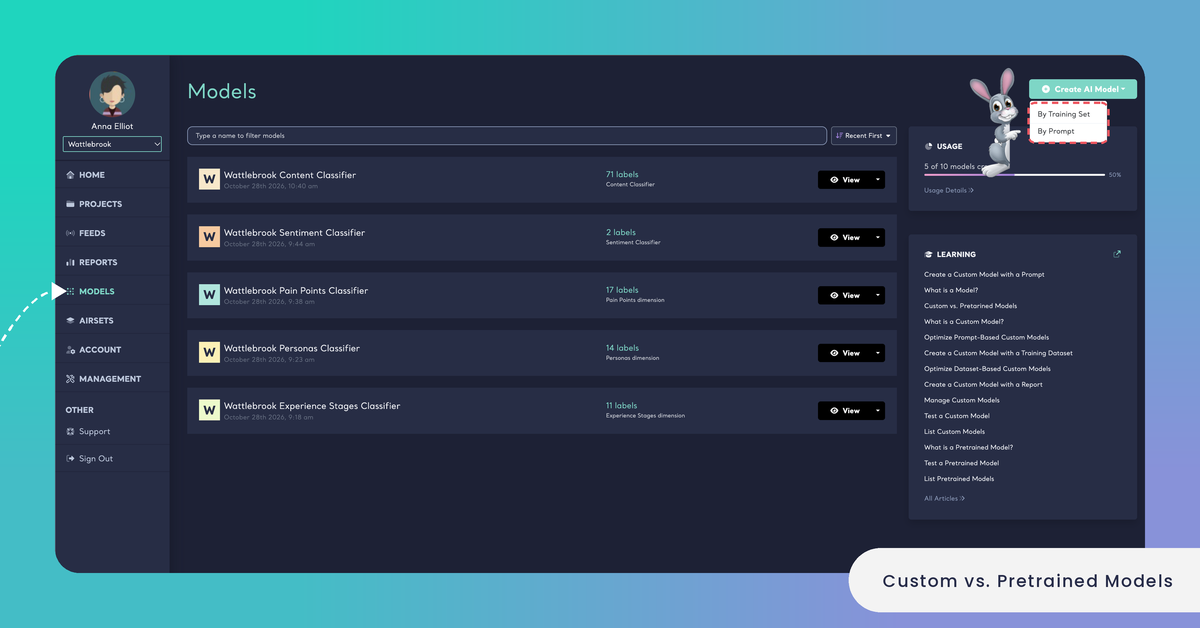
A model created with a prompt can be a classifier or a Dimension model. A classifier is either a content classifier, which sorts feedback into the topics that matter to your business, or a sentiment classifier, which always uses the labels Positive and Negative and lets you edit their descriptions. A Dimension model answers an analytical question about feedback, such as who is talking or what goes wrong: you choose one of the 10 Dimensions in Kimola's list or write a question of your own. A prompt-based model can also skip defining labels with Assign labels based on the dataset at runtime: the AI then discovers the labels from each dataset by answering your question, right before classifying it.
A project management software company might create a content classifier with the labels Onboarding, Billing Confusion, Integrations and Performance, each described in the team's own words. Every support ticket and app review it analyzes is then counted under the same four themes, in every Report that uses the model.
Custom models also come with tools of their own. You can group their labels into categories, so that a long list of themes reads like a table of contents in Reports and Spaces (see Organize Labels into Categories). Every custom model shows a consistency score, the percentage of semantically consistent pairs in its records (see What is Model Consistency?). You find your custom models under Models in the main menu.
Pretrained Models
Pretrained models are ready-made by Kimola and work without any setup. Their labels are set by Kimola, so you choose a model and start the analysis. There are 15: the Automatic Classifier, the Sentiment Classifier, the Entity Extractor, the Consumer Feedback Classifier, the E-Commerce, Mobile App, Mobile Game, Software, Online Course, HoReCa, Banking, Automotive and Mobile Network Feedback Classifiers, the News Classifier and the Hate Speech Detector. See List Pretrained Models.
Three of them work on any kind of feedback. The Automatic Classifier finds the themes in the data itself and names them after what customers say, so it needs no list of labels. The Sentiment Classifier detects how customers feel in each piece of feedback. The Entity Extractor picks out the people, organizations, brands, products and places that feedback names. The industry classifiers come with labels for the topics of their sector, the News Classifier sorts articles into topics, and the Hate Speech Detector finds hate speech and discrimination.
A new Report starts with the Automatic Classifier and the Sentiment Classifier. You choose pretrained models in the Classifiers step of the Report wizard, where they are listed as pre-built models next to your custom models (see Create a Report Using Pretrained Models). Each pretrained model also has a page on kimola.com/pretrained-ai-models with its labels and a console to try it.
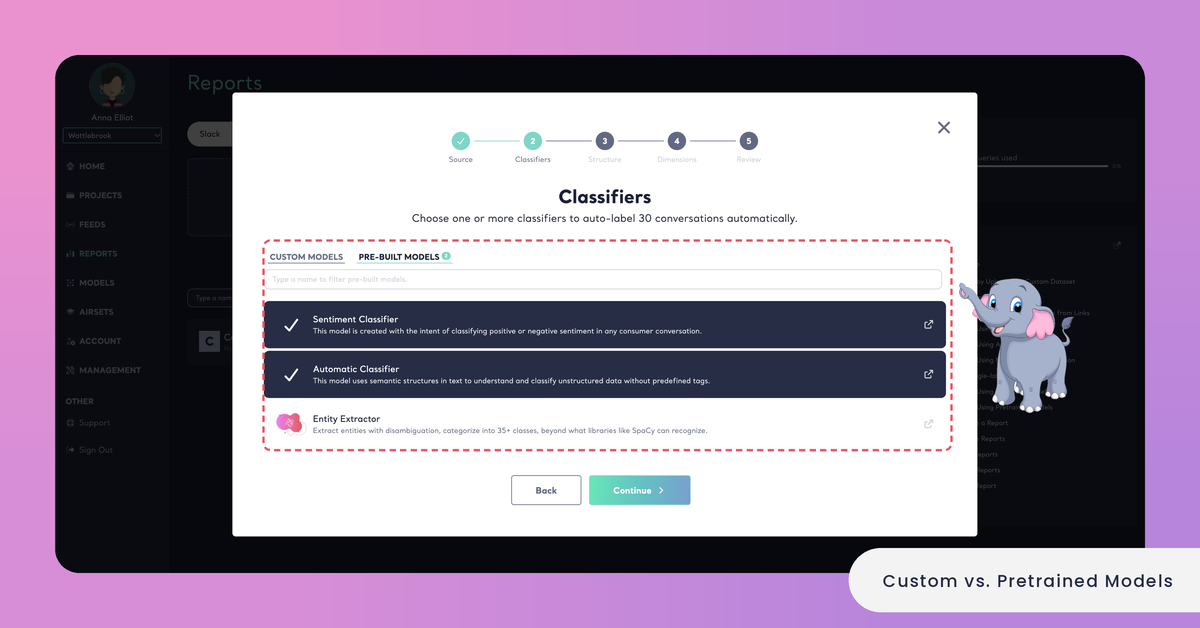
A restaurant chain analyzing the Google Maps reviews of its branches can start with the Automatic Classifier and the Sentiment Classifier. Without writing a single label, it might see themes such as Waiting Time, Staff Friendliness and Portion Size, each with its positive and negative feedback.
How They Differ
Inside a Report, both kinds of models do the same job: they tag every piece of feedback, and you read the results on the same screens. The differences are in who defines the labels, what you need before you start and where you can use them.
Labels: a pretrained model uses the labels Kimola has set, or in the case of the Automatic Classifier, the themes it finds in each dataset. A custom model uses the labels you define, or the ones the AI discovers at runtime when you choose that option.
Setup: a pretrained model needs none. A custom model needs a prompt with your labels, a labeled training dataset or a Report you have already analyzed.
Packages: pretrained models are in every package, Starter included. Custom models are in the paid packages.
Where you use them: both kinds classify Reports. Only custom models can be added to a Funnel, so only custom models classify the files of a Space. Funnels and Spaces are available in the Enterprise package.
The same labels every time: a custom content classifier applies the same labels to every dataset, so two Reports that use it can be compared theme by theme. The Automatic Classifier names its themes after each dataset, so the themes of two Reports can differ.
Categories and consistency: you can group a custom model's labels into categories and follow its consistency score. Pretrained models don't have these.
Testing: you can try both kinds on your own text or on a file in a test console before you use them, and pick Multi-Label there. The console of a custom model also offers Strict Mode. See Test a Custom Model and Test a Pretrained Model.
Queries: a pretrained model and a custom model use queries by the same rule: queries = rows × models × Dimensions. See How to Calculate Queries.
Which One Should I Use?
The choice depends on what you already know about your feedback and how often you will analyze the same kind of feedback.
A pretrained model fits when you look at a dataset for the first time and don't yet know what customers talk about: the Automatic Classifier shows you the themes. It also fits when one of the industry classifiers matches your feedback, when you need sentiment or the names customers mention, and when you work on the Starter package.
A custom model fits when your teams already have names for the topics they track, when you analyze the same kind of feedback again and again and want every Report to use the same labels, and when no pretrained model covers your sector or your question. A Dimension model goes one step further and asks every piece of feedback a research question of your own. If your organization uses Spaces, its Funnel needs custom models.
Many teams use both, one after the other. They read a first dataset with the Automatic Classifier, review the themes it finds, then turn the Report into a custom model with Create a Custom AI Model under MODELLING in the Report's Settings. From then on, every new dataset is classified with the same labels, which the team can rename, describe and group into categories.
A mobile game studio might read its first month of App Store and Google Play reviews with the Automatic Classifier and find themes such as Ads, Matchmaking and In-App Purchases. It turns that Report into a custom model, so the reviews of every later release are measured with the same labels.
To move from a pretrained model to a custom one without writing labels, create a custom model from a Report you have analyzed with the Automatic Classifier.