Supported Platforms for Creating Reports from Links
3 mins read - Updated on Nov 15, 2026Kimola can create a Report from a link when the link belongs to one of 20 supported platforms: 12 e-commerce and retail sites, 2 business review platforms, 2 complaint and community platforms, 2 app stores and 2 travel and aviation review sites. You paste the address of a product, business, app or topic page, and Kimola collects the public reviews or comments on that page, builds the dataset and analyzes it like any other Report. Creating a Report from links is available in every package.
This article lists the platforms, says what each one is used for and describes the fields Kimola collects from them. The steps for adding a link are in Create a Report by Adding Links. The list was last checked against the app on November 15, 2026.
E-Commerce and Retail Platforms
E-commerce and retail platforms host product pages where customers leave reviews and ratings about what they bought. A Report from these pages shows how a product, a seller or a competitor's product performs and what customers praise or complain about.
Amazon is a global marketplace with a large volume of product reviews.
Trendyol is one of Turkey's largest e-commerce platforms, widely used for local consumer research.
Hepsiburada is a major Turkish online marketplace with product-level customer feedback.
N11 is a Turkish online marketplace with product reviews.
Walmart is a large retailer whose online store shows product-level customer feedback.
Wildberries is a marketplace serving Eastern Europe and Russia, useful for regional demand analysis.
Detsky Mir is an e-commerce platform for baby, children and family products.
Belk is a department store retailer with product-level customer reviews.
JCPenney is a US retailer with customer feedback on its products.
Costco is a membership-based retailer where customers review the products they buy.
Kohl's is a retailer with product reviews and ratings.
Macy's is a department store retailer with product and seller feedback.
Business Review Platforms
Business review platforms collect reviews of a business as a whole rather than of one product. Reports from these pages fit research on brand reputation, customer satisfaction and how a branch or location is rated.
Trustpilot is a global review platform where customers rate and describe businesses.
Google Business (Google Maps) holds location-based reviews of businesses such as stores, restaurants and services. On the Review step of the Report, its Source appears as Google Business.
Complaint and Community Platforms
Complaint and community platforms hold what people write when they have a problem to report or an opinion to share. They are useful for finding the issues and expectations that customers raise on their own.
Şikayetvar is a Turkish consumer complaint platform where users report issues with services and products.
Ekşisözlük is a Turkish community-driven discussion platform where people share opinions and experiences about brands, products and current topics.
App Stores
App store pages hold the ratings and reviews of mobile apps, so they are the source for research on app experience and user satisfaction. You can paste the address of an app page, or search for the app by name, as described later in this article.
Google Play Store is the Android application marketplace, with detailed user reviews.
Apple App Store is the iOS application marketplace. Its reviews show how users rate the experience of an app.
Travel and Aviation Platforms
Travel and aviation platforms collect reviews of journeys, stays and airports. Reports from these pages fit research on hospitality, airlines and travel experience.
Tripadvisor is a travel and hospitality review platform covering airlines, hotels, restaurants and experiences.
Skytrax (Airlinequality.com) is a specialized platform for airline and airport reviews. It is especially useful for airline, airport and travel experience analysis.
Data Collected from Every Platform
Across all supported platforms, Kimola collects a core set of fields: the review text, the rating, the title, the URL, the platform name and the date, when the platform provides one. The review text is what Kimola classifies into themes and sentiment. When the dates are available, the Report can also show trends over time.
Data Collected from Specific Platforms
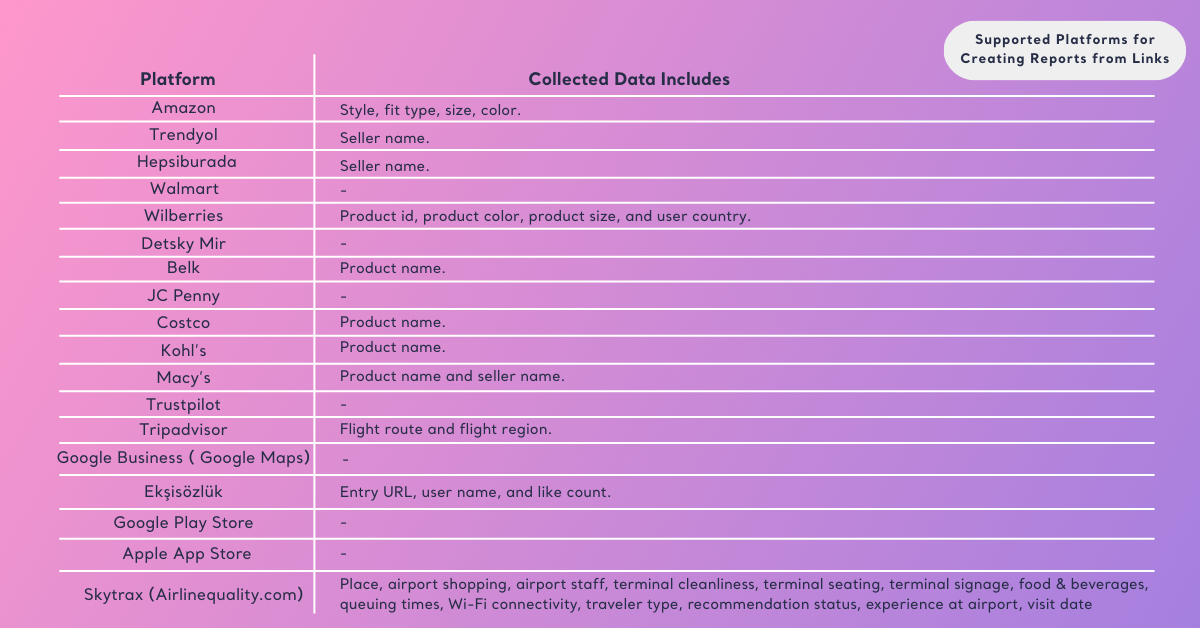
Some platforms provide fields of their own. Kimola adds them to the dataset as columns, so you can use them to filter records and to compare groups of records in the Report. See Filter Records in Reports and Compare in Reports.
Amazon adds style, fit type, size and color.
Trendyol and Hepsiburada add the seller name.
Macy's adds the product name and the seller name.
Belk, Costco and Kohl's add the product name.
Wildberries adds the product ID, product color, product size and user country.
Tripadvisor adds the flight route and the flight region.
Ekşisözlük adds the entry URL, the user name and the like count.
Skytrax (Airlinequality.com) adds the place, airport shopping, airport staff, terminal cleanliness, terminal seating, terminal signage, food and beverages, queuing times, Wi-Fi connectivity, traveler type, recommendation status, experience at the airport and visit date.
Walmart, Detsky Mir, JCPenney, Trustpilot, Google Business, Google Play Store and Apple App Store add no fields beyond the common ones.
For an airport's Skytrax page, traveler type is one of the columns, so a Report can compare what business travelers and families say about queuing times.
How Link Data Becomes a Report
When you add a supported link, Kimola recognizes the platform from the address and shows it as the Source on the Review step. You use a slider to choose how many records to collect. Kimola then collects that amount of public content from the page, builds the dataset and analyzes it. The Report shows outputs such as sentiment distribution, themes, summaries and, when the platform provides dates, trends.
You add one link in the field at the top of the Reports page. To add several links to a single Report, select add multiple and enter each link on a new line, so you can combine pages from different platforms, such as the product pages of several competitors. The window shows sample addresses such as amazon.com/my-product, trustpilot.com/review/my-business, maps.app.goo.gl/my-place and apps.apple.com/us/app/my-app. Kimola checks every link before you continue and shows how many are valid, for example 20/24 links are valid, with All, Valid and Invalid tabs to review them. A link from a platform that is not on this list is marked invalid.
To analyze an app, you can type its name in the same field instead of a link. Kimola searches the app stores, you choose the country and the store, App Store or Google Play, and then pick the app from the results.
To analyze an app, type its name in the link field and choose it from the results.
Before the Report is created, you confirm that you will use the extracted reviews for research purposes only and that you comply with the platforms' terms and copyright rules.
You confirm research-only use of the extracted reviews before Kimola creates the Report.
Platforms That Are Not Supported
A link from a platform that is not listed in this article cannot be used to create a Report. When the list was last checked, links from Booking.com, Yelp, G2 and Capterra were marked invalid.
To analyze feedback from another source, you can upload it as a file, as described in Create a Report by Uploading a Custom Dataset. You can also open the data of Zendesk, Intercom or Google Sheets, as described in Create a Report Using Integrations, or collect reviews with the Kimola Chrome extension and create a Report from the Airset, as described in Create a Report with an Airset.
Links that you follow in a Feed use a different and shorter list of platforms. See Supported Platforms for Links for that list.
Supported platforms and available data fields may change over time because of platform policies or technical limitations. Platforms not listed here are not currently supported for creating Reports from links.