Chattermill Alternatives & Competitors: 7 Tools Compared
Oct 23, 2026 - 17 minute read
If you are looking for a Chattermill alternative, the right choice depends on what you need from customer feedback. Thematic, Medallia and Wonderflow suit large organizations running enterprise feedback programs, Caplena is strong at coding open-ended survey responses, Enterpret is built around product teams and their workflows, and Keatext offers customer experience text analytics with published pricing. Kimola fits teams that want to turn the feedback they already have, or public reviews they collect, into research that explains why customers feel the way they do.
Chattermill is a customer experience analytics plaotform that brings feedback from surveys, support tickets, reviews and social channels into one place and analyzes it for themes and sentiment. Teams usually look for an alternative because their needs differ from what Chattermill is designed for: they want a lighter setup for a single feedback channel, pricing they can see before a sales call, or research output that goes beyond CX metrics.
This guide is written by the Kimola team. Kimola is our product, so we explain where it fits and where it doesn't, and we describe every other tool based on its public documentation.
What Is Chattermill?
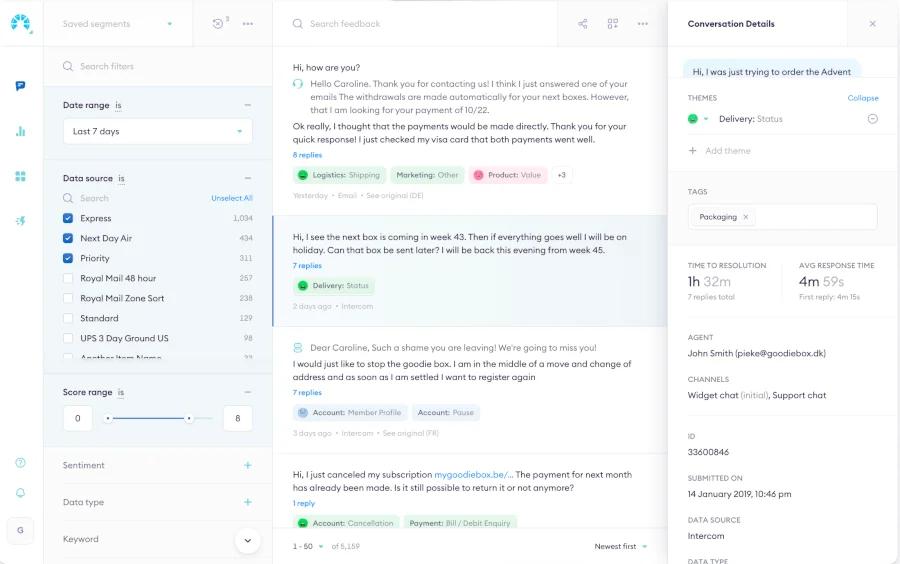
Chattermill is a customer experience analytics platform. It describes itself as CX intelligence software that combines feedback from surveys, support tickets, reviews, social media and app stores into a single analytics layer.
Chattermill uses AI to identify themes and sentiment across this feedback, in multiple languages, and connects them to experience metrics such as NPS, CSAT and CES. Anomaly detection alerts teams when a metric shifts unexpectedly, and customizable dashboards make the results available to the wider organization. Integrations cover survey, CRM, support and data warehouse tools.
Chattermill is designed for CX, insights and product teams at mid-market and enterprise organizations. Its strength is giving these teams a unified view of feedback across many channels, tied to the metrics they already report on.
Why Teams Look for Chattermill Alternatives
The most common reason is scope. Chattermill is built for organizations that analyze feedback from many channels on an ongoing basis. A team that needs to analyze one survey, one review source or one quarter of support tickets may find a full CX analytics rollout heavier than the job requires.
Pricing is another factor. Chattermill does not publish its prices; pricing is based on feedback volume and the number of connected data sources, and is available through a demo. Teams that want to evaluate a tool with their own data before involving procurement often look for options they can try first.
Some teams are also looking for a different kind of output. Chattermill connects feedback to CX metrics, while research, insights and product teams sometimes need to understand motivations, unmet needs or differences between customer segments. Others want to analyze competitors' public reviews, which requires collecting data rather than only connecting existing channels.
How We Compared These Tools
We looked at each tool through the same criteria: the types of feedback it works with, how deep the analysis goes beyond themes and sentiment, how much setup it needs before a team sees results, and how easy it is to evaluate, including whether pricing is published and whether a free plan or trial is available. Product information comes from each vendor's own website.
1. Kimola
Kimola is an AI platform that turns customer feedback into enterprise-grade market research. Teams analyze the feedback they already have, such as survey responses, support tickets, call transcripts and social conversations, or collect public reviews by pasting a link to a product page on Amazon, Trustpilot, Google Play, the App Store and other platforms.
Kimola finds themes in the data itself, without predefined categories, and gives every theme mentioned in a comment its own sentiment. Where Chattermill is built for customer experience analytics, Kimola structures feedback into research Dimensions such as motivations, pain points and unmet needs, and works self-service without custom model setup.
Strengths
Research questions on every comment. Classifying topics is only the first step in Kimola. It asks every comment research questions called Dimensions: what motivates customers, what pain points they face, what needs are still unmet, which personas and experience stages they represent, and what underlying causes sit behind a complaint. This moves the analysis from "what are customers talking about" to "why, in what context and for whom."
Findings that are statistically tested. Kimola crosses every theme and Dimension with the columns in your data, such as country, product or customer segment, and with time. This usually produces thousands of combinations, and Kimola tests each one. Only statistically significant differences and trends become Signals, ranked so that what needs attention comes first. If delivery complaints are concentrated in one country, Kimola surfaces that as a Signal only if the difference is significant. Action Plans then form hypotheses from the analysis, test each one against the feedback, and keep only the actions the evidence supports, with every figure and quote checked.
Deterministic scoring. Many tools rank themes by volume, so the most discussed topics always stay on top. Kimola scores findings deterministically, and the same data always produces the same ranking. Scores take the number of comments into account as well as the ratio, so a theme with 43 positive comments out of 50 ranks above a theme with 5 positive comments out of 5, even though the second has a higher percentage.
Feedback you don't have yet. Kimola can collect public reviews from a link to a product, business or app page on platforms such as Amazon, Google Business, Trustpilot, Tripadvisor, Google Play and the App Store, and a browser extension covers more than 30 sources. This makes it possible to analyze a competitor's reviews with the same depth as your own feedback. Kimola analyzes feedback in more than 30 languages within the same analysis.
Easy to evaluate. Every account starts on a free Starter plan with no credit card, paid plans start at $49 per month, and pricing is public. Smaller teams use Kimola self-service, while larger organizations work with an account manager to set up Spaces and custom models on the same platform.
Limitations
Kimola analyzes feedback; it does not design or send surveys, so teams that need to run survey programs will use it alongside a survey tool. It is not designed as a real-time monitoring dashboard for social media. Spaces, which keep a growing feedback channel such as a call center or an NPS survey consistently classified over time, and related features such as Funnels, Customers and Tasks are available only on the Enterprise plan. The free Starter plan is limited to 150 queries per month.
Pricing
Kimola has a free Starter plan, and paid plans start at $49 per month. Usage is measured in queries, and the full plan details are on the pricing page. Enterprise plans are priced individually.
Best For
Kimola is a good fit for research, insights, product and marketing teams that want to understand why customers feel the way they do, using feedback they already have or public reviews they collect, and that want to evaluate a tool with their own data before talking to sales. For a detailed side-by-side view, see our Kimola vs Chattermill comparison.
2. Thematic
Thematic describes itself as a customer intelligence layer for enterprise CX. Thematic is built for theme and sentiment analysis of the feedback a team already collects, and it is designed to work alongside an existing CX stack rather than replace it.
Strengths
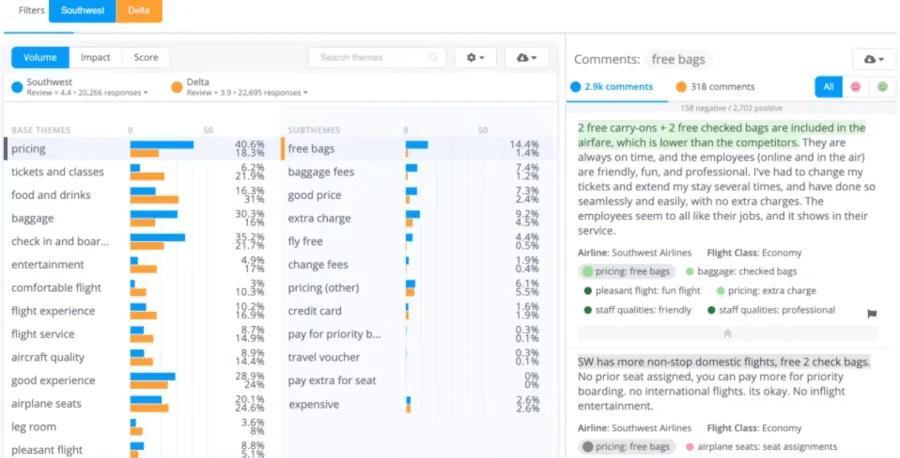
Thematic ingests surveys, support tickets, call transcripts, app reviews and CRM notes, with translation and redaction of personal information. It builds themes from customers' own language, and every theme can be traced back to the comments behind it and adjusted by the team. Beyond themes, it predicts scores such as NPS, churn propensity and effort from feedback, and ranks themes by the revenue tied to them. Workflows route insights to other teams and tools.
Limitations
Thematic is aimed at enterprise organizations, and its entry plan is priced for annual programs. Teams with a small volume of feedback or a one-off project may find this more than they need. Instead of a free trial, Thematic offers a paid pilot.
Pricing
Thematic's Foundation plan is listed at $25,000 per year, and Enterprise pricing is available as a custom proposal.
Best For
Thematic fits enterprise CX and insights teams that want a dedicated feedback analytics layer on top of their existing survey and support tools, with predicted scores and revenue impact. Kimola adds research Dimensions, statistically tested Signals and the ability to collect public reviews directly; see our Kimola vs Thematic comparison.
3. Caplena
Caplena describes itself as an intelligence layer for customer feedback. Caplena is built for coding open-ended responses, and it serves both brands and market research agencies.
Strengths
Caplena analyzes open-ended responses in more than 100 languages with topic and sentiment analysis, and lets teams cross-tabulate results with quantitative survey variables. Driver analysis helps identify what to prioritize, and trend monitoring alerts teams to shifts. It integrates with platforms such as Qualtrics, Medallia, Zendesk and Power BI, and also accepts file uploads. A dedicated plan for agencies supports ad hoc and tracking studies with consistency across projects and languages.
Limitations
Caplena's focus is survey and research data, so teams whose main need is analyzing support conversations in product workflows may find other tools closer to their use case. Pricing is not published, and the website offers a free sample report rather than a free trial.
Pricing
Caplena lists Team, Enterprise and Agency plans. Pricing is not published and is available on request.
Best For
Caplena fits market research agencies and brand-side teams that code large volumes of open-ended survey responses and want to combine them with quantitative data. Kimola goes further by structuring feedback into research Dimensions and showing how patterns differ across segments and over time; see our Kimola vs Caplena comparison.
4. Enterpret
Enterpret is a customer feedback platform built for product teams. It describes itself as a customer context layer for AI-native product teams, connecting feedback to accounts, revenue and product releases.
Strengths
Enterpret pulls in feedback from support, sales call, review and community sources through more than 30 connectors. Its adaptive taxonomy builds themes from customers' own language and updates as new themes appear. Each conversation is linked to its theme, account and revenue, which helps product teams prioritize. Issues can be routed to Slack, Linear or Jira, and an MCP server makes customer context available inside AI assistants and coding tools.
Limitations
Enterpret is designed around product development workflows. Research teams that need survey-style analysis, segment comparisons or a written research output may find its product-team focus narrower than their use case. List pricing is not published.
Pricing
Enterpret does not publish list pricing. Quotes are available through sales, and the website offers a product try-out.
Best For
Enterpret fits product, CX and VoC teams that want feedback tied to accounts and revenue, and routed directly into the tools where product work happens.
5. Keatext
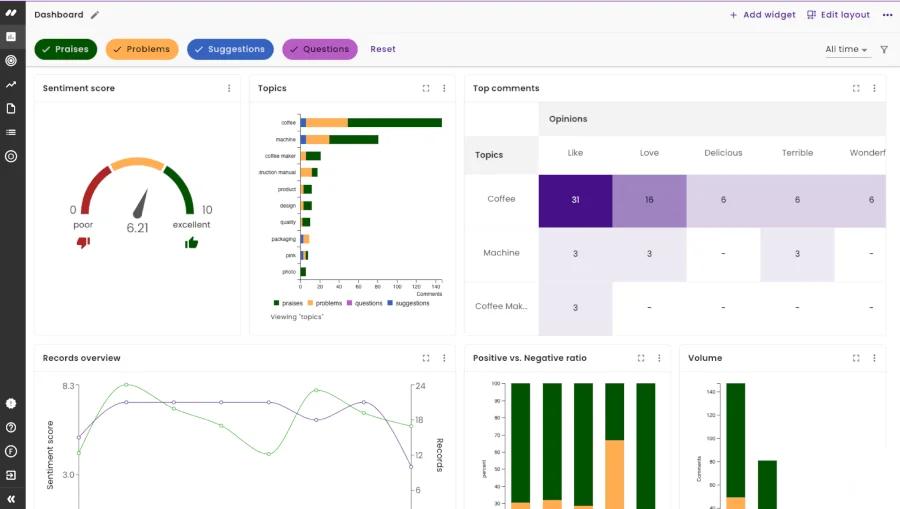
Keatext is an AI-based text analytics platform for customer experience teams. It analyzes feedback from surveys, reviews and support tickets.
Strengths
Keatext publishes its pricing, which makes it easier to budget for than many tools in this category. It offers a free two-week proof of concept with your own data, so teams can see results before committing. Its focus on CX feedback from surveys, reviews and support channels makes it a direct option for teams that want a dedicated text analytics tool.
Limitations
There is no free plan, and the proof of concept is arranged through a demo request. Plans are sized by annual record volume, so teams with very small or irregular volumes should check which plan fits before committing.
Pricing
Keatext's Basic plan is $550 per month for up to 10,000 records a year, Pro is $999 per month for up to 20,000 records a year, and Enterprise starts at $1,650 per month for 30,000 or more records a year.
Best For
Keatext fits CX teams that want a dedicated text analytics tool with published pricing and a structured trial on their own data.
6. Wonderflow
Wonderflow describes itself as an agentic consumer intelligence platform and a Voice of Customer platform for enterprise organizations. It has been working with global brands since 2015.
Strengths
Wonderflow is focused on product and consumer feedback at scale, including customer reviews from e-commerce and retail channels. It serves product, R&D, e-commerce and retail teams that need to understand how consumers talk about specific products and categories. It has also introduced AI agents for consumer intelligence work, which it calls Wonder Agents.
Limitations
Wonderflow is built for enterprise organizations with large product portfolios. Teams analyzing a single feedback channel or a small set of products may find the scope larger than they need. Pricing is not published.
Pricing
Wonderflow's pricing depends on data sources, product categories and the scale of analysis, and is available as a custom proposal.
Best For
Wonderflow fits enterprise consumer brands, especially product and R&D teams, that need to analyze reviews and feedback across many products and markets.
7. Medallia
Medallia is an experience management platform. Medallia is built to run experience management programs across large organizations, covering customer experience, employee experience, contact centers and market research. Text analytics is one part of this wider platform.
Strengths
Medallia combines feedback capture, analytics and workflows in a single suite. Its text analytics detects themes, sentiment, intent, effort and emotion across many languages, with prebuilt industry topic models and low-code tools for building custom ones. Real-time alerts route emerging issues to the right people, and role-based reporting serves different teams across the organization. For large companies that want survey programs, feedback collection and analysis managed together, this breadth is the main reason to choose it.
Limitations
Medallia is designed for organization-wide experience programs, so teams that only need to analyze a single feedback channel may find the rollout heavier than the job requires. Pricing is not published, and evaluation runs through demos and sales conversations rather than a free trial.
Pricing
Medallia prices its platform in annual tiers based on Experience Data Records, a unit that covers the data tied to each customer or employee interaction. Pricing is available through sales.
Best For
Medallia fits large organizations that want to replace or consolidate their survey, feedback collection and analytics tools into one experience management program. Kimola reveals why customers feel the way they do from the feedback a team already has, without a lengthy rollout; see our Kimola vs Medallia comparison.
How to Choose the Right Chattermill Alternative
If you want survey programs, feedback collection and analytics managed together across a large organization, Medallia is the broader platform. If you need an enterprise feedback analytics layer on top of your existing CX tools, with predicted scores and revenue impact, consider Thematic. If your work centers on coding open-ended survey responses, especially across languages or for agency clients, Caplena is a strong fit.
If you are a product team that wants feedback tied to accounts and routed into Jira or Linear, look at Enterpret. If you analyze reviews across a large consumer product portfolio, Wonderflow is designed for that. If you want a CX text analytics tool with published pricing and a structured trial, Keatext is worth evaluating.
If you want to understand why customers feel the way they do, from the feedback you already have or from public reviews of your products and competitors, and you want to try it with your own data before talking to sales, Kimola is built for that.
Frequently Asked Questions
Is there a free alternative to Chattermill?
Kimola has a free Starter plan with 150 queries per month and no credit card required, so you can analyze your own data before choosing a paid plan. Among the other tools in this guide, Keatext offers a free two-week proof of concept, and most others provide demos or paid pilots.
How much does Chattermill cost?
Chattermill does not publish its pricing. According to Chattermill, pricing is based on feedback volume and the number of connected data sources, and quotes are available through a demo.
Can I analyze competitor reviews without a survey tool?
Yes. Public reviews on platforms such as Amazon, Trustpilot, Google Play and the App Store can be collected and analyzed directly. In Kimola, you paste a link to a product, business or app page, and Kimola collects and analyzes the reviews on that page.
Why not just use ChatGPT to analyze customer feedback?
General-purpose AI assistants are good at summarizing a small set of comments. Classifying thousands of records consistently, testing differences between segments statistically, getting the same result from the same data every time and showing the source of every number require a dedicated setup. That is the gap feedback analysis tools are built to fill.
Conclusion
Chattermill is a strong option for CX analytics across many channels, and the right alternative depends on whether you need a broader experience management suite, a survey coding tool, a product feedback workflow or research that explains customer behavior. If you want to see how Kimola handles your own data, you can start on the free Starter plan.