Amazon Comprehend Alternatives for Customer Feedback Analysis: 9 Tools
Oct 23, 2026 - 15 minute read
Amazon Comprehend is still available, but it now does less than it used to: AWS has closed topic modeling, event detection and prompt safety classification to new customers. If you are looking for an alternative for customer feedback analysis, the right choice depends on who will do the work. Developers who want to add text analysis to their own products can look at Google Cloud Natural Language API, Azure Language in Foundry Tools, Hugging Face or spaCy. Teams that want to analyze feedback directly, without building a pipeline, will find Kimola, Thematic, Caplena, Kapiche and Relative Insight closer to the job.
Amazon Comprehend is a natural language processing service that developers call through an API. It is reliable, priced transparently and easy to fit into an AWS stack. But its output is labels and scores, so turning thousands of reviews or survey responses into findings still takes engineering work and analysis on top.
This guide is written by the Kimola team. Kimola is our product, so we explain where it fits and where it doesn't, and we describe every other tool based on its public documentation.
What Is Amazon Comprehend Today?
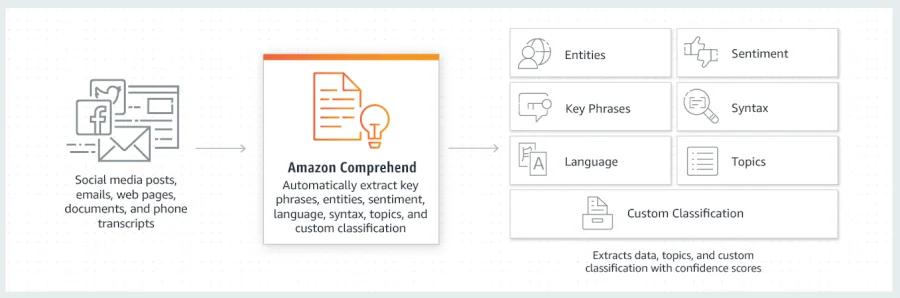
Amazon Comprehend is the natural language processing service of Amazon Web Services. It analyzes text without requiring you to train a model: it detects the language, assigns overall sentiment (positive, negative, neutral or mixed), measures targeted sentiment toward the specific entities a text mentions, recognizes entities, extracts key phrases, analyzes syntax, and detects personal information and toxic content. Its custom classification and custom entity recognition features let teams train models with their own labels and terms.
The product has narrowed recently. AWS states that topic modeling, event detection and prompt safety classification are no longer available to new customers. Accounts that used these features within the last 12 months keep access, and other Comprehend features are not affected. For feedback analysis this matters, because topic modeling was the Comprehend feature that grouped documents by what they talked about.
Language coverage is another point to know. Comprehend's language detection recognizes more than 100 languages, while its text analysis features support 12: English, German, Spanish, Italian, Portuguese, French, Japanese, Korean, Hindi, Arabic, and simplified and traditional Chinese. For other languages, AWS suggests translating the text first with Amazon Translate.
Comprehend remains a strong choice for engineering teams that work in AWS and need dependable building blocks at scale, from sentiment scoring to removing personal information before data is stored.
Why Teams Look for Amazon Comprehend Alternatives
The most direct reason is the change in features. A team that planned to use Comprehend to discover topics in customer feedback cannot start doing that with a new AWS account, so it needs another way to find themes.
Other reasons are situational. Comprehend needs developers to send data, call the API and store the results, and there is no ready-made reporting layer for business users. Its sentiment and classification outputs answer what a comment says, but explaining why customers feel that way, which issues matter most and where segments differ is left to the team. Teams with feedback in languages outside the supported 12 have to add a translation step.
There is also a wider shift. Cloud providers are moving custom text analysis toward large language models. Google shut down AutoML text models on Vertex AI in June 2025 and recommends Gemini prompting and tuning instead, and Microsoft has announced that sentiment analysis and custom text classification will retire from Azure Language on March 31, 2029. Teams reviewing their text analysis stack often use this moment to compare their options.
How We Compared These Tools
We looked at each tool through the same criteria: the types of data it works with, how much setup and technical skill it needs, how far the analysis goes beyond sentiment and classification, language coverage, and how easy it is to evaluate, including whether pricing is published and whether a free plan or trial is available. The tools fall into two groups. Kimola, Thematic, Caplena, Kapiche and Relative Insight are built for analyzing customer feedback. Google Cloud Natural Language API, Azure Language in Foundry Tools, Hugging Face and spaCy are services and libraries that developers use to build their own text analysis. Product information comes from each vendor's own website.
1. Kimola
Kimola is an AI platform that turns customer feedback into enterprise-grade market research. Teams analyze the feedback they already have, such as survey responses, support tickets, call transcripts and social conversations, or collect public reviews by pasting a link to a product page on Amazon, Trustpilot, Google Play, the App Store and other platforms.
Compared with Amazon Comprehend, Kimola does not ask you to build a pipeline before the analysis starts. You upload a file or paste a link, and the output is research rather than a set of labels.
Strengths
Themes and sentiment without a pipeline. Kimola's pretrained models work without setup. The Automatic Classifier finds themes in the data itself, without predefined categories, and gives each theme a clear name, which covers the job many teams used topic modeling for. Sentiment is assigned to every theme a comment mentions, so a review that praises the interface but complains about response times is positive on one and negative on the other. Data can come from a file, from integrations such as Zendesk, Intercom and Google Sheets, or from public reviews collected with a link, including reviews of competitors' products.
Research output instead of labels. In Kimola, classifying topics is only the first step. Kimola asks every comment research questions called Dimensions, such as what motivates customers, what pain points they face and what needs are still unmet. It then crosses every theme and Dimension with the columns in your data, such as country, product or customer segment, and with time. Only statistically significant differences and trends become Signals: if delivery complaints are concentrated in one country, Kimola surfaces that as a Signal only if the difference is significant. Action Plans form hypotheses from the analysis, test each one against the feedback, and keep only the actions the evidence supports, with every figure and quote checked. Scores are deterministic, so the same data always produces the same ranking.
Multilingual analysis and easy evaluation. Kimola analyzes feedback written in more than 30 languages and processes different languages together in the same analysis. Every account starts on a free Starter plan with no credit card, paid plans start at $49 per month, and pricing is public. The pricing page lists API access on every plan. For organizations that cannot send customer data outside their own environment, Kimola On-Premises runs on the organization's own infrastructure, and no data is sent to external AI services.
Limitations
Kimola is built for analyzing customer feedback, not as a general-purpose NLP service for developers to embed in their own applications. If you need building blocks such as entity recognition, syntax analysis or personal information redaction inside your product, the cloud APIs later in this guide are a better fit. Kimola does not design or send surveys. Custom models are available on paid plans, not on the free Starter plan, which is limited to 150 queries per month. Spaces and Funnels, which keep a growing feedback channel consistently classified over time, are available only on the Enterprise plan, and the On-Premises version does not include Feeds or third-party integrations.
Pricing
Kimola has a free Starter plan, and paid plans start at $49 per month. Usage is measured in queries, and the full plan details are on the pricing page. Enterprise plans are priced individually.
Best For
Kimola is a good fit for research, insights, product and marketing teams that want to understand why customers feel the way they do from reviews, survey responses, support tickets or social conversations, in many languages, without developers building the analysis first.
2. Thematic
Thematic describes itself as a customer intelligence layer for enterprise CX. Thematic is built for theme and sentiment analysis of the feedback a team already collects, and it is designed to work alongside an existing CX stack.
Strengths
Thematic ingests surveys, support tickets, call transcripts, app reviews and CRM notes. It builds themes from customers' own language, and every theme can be traced back to the comments behind it and adjusted by the team, which gives analysts control over the results without writing code. API access and one-click integrations are included in its plans.
Limitations
Thematic is aimed at enterprise organizations, and its entry plan is priced for annual programs. Smaller teams, or teams that analyze feedback occasionally, may find this more than they need. Instead of a free trial, Thematic offers custom demos and a paid pilot, and it recommends at least 2,000 rows of feedback for best results.
Pricing
Thematic's Foundation plan is listed at $25,000 per year for up to 25,000 comments, and Enterprise pricing is available as a custom proposal.
Best For
Thematic fits enterprise CX and insights teams that want a dedicated feedback analytics layer on top of their existing survey and support tools. Kimola adds research Dimensions, statistically tested Signals and the ability to collect public reviews directly; see our Kimola vs Thematic comparison.
3. Caplena
Caplena describes itself as an intelligence layer for customer feedback. Caplena is built for coding open-ended responses, and it serves both brands and market research agencies.
Strengths
Caplena analyzes open-ended responses in more than 100 languages with topic and sentiment analysis, and lets teams cross-tabulate results with quantitative survey variables. It integrates with survey and support platforms, accepts file uploads and provides API documentation. A dedicated plan for agencies supports ad hoc and tracking studies with consistency across projects and languages.
Limitations
Caplena's focus is survey and research data, so teams that mainly analyze support tickets or product reviews should check how well it fits those sources. Pricing is not published, and the website offers a free sample report rather than a free trial.
Pricing
Caplena lists Team, Enterprise and Agency plans. Pricing is not published and is available on request.
Best For
Caplena fits market research agencies and brand-side teams that code large volumes of open-ended survey responses. Kimola goes further by structuring feedback into research Dimensions and showing how patterns differ across segments and over time; see our Kimola vs Caplena comparison.
4. Kapiche
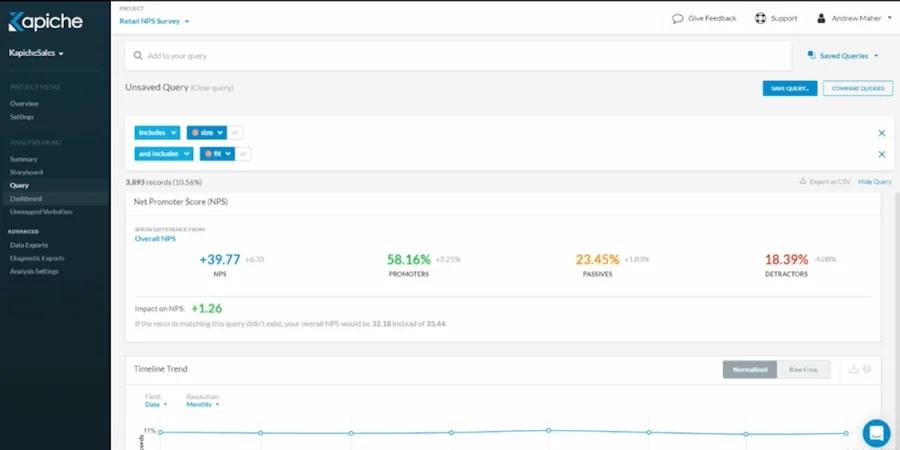
Kapiche describes itself as a customer intelligence platform for CX teams. It analyzes customer conversations from support, surveys, reviews and social media, and turns them into structured insights such as reason for contact and satisfaction.
Strengths
Kapiche brings feedback from many channels into one place and connects to an existing customer tech stack for ongoing analysis. Its AI Themes feature groups conversations into themes, and its focus on support conversations as well as surveys suits teams that want to understand contact reasons and satisfaction across the whole customer base. Seats are split into creators, explorers and unlimited viewers, so insights can be shared widely.
Limitations
Kapiche is priced for teams that run feedback analysis as an ongoing program, so it may be more than a team needs for occasional studies. The pricing page offers demos rather than a free trial.
Pricing
Kapiche's Bronze plan starts at $2,000 per month, with up to 50,000 rows and 10 fields per project. Silver, Gold and Custom plans are priced through sales.
Best For
Kapiche fits CX and support teams that want to analyze every customer conversation, not only survey responses, and track contact reasons and satisfaction over time.
5. Relative Insight
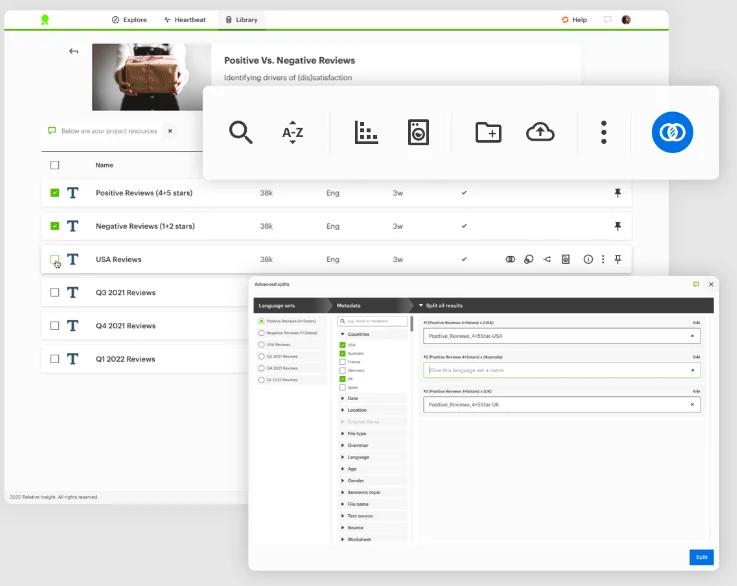
Relative Insight describes itself as AI for customer intelligence that gives grounded, auditable answers from an organization's own data. Its foundation is comparative text analytics: it compares two sets of text to show what is different between them.
Strengths
Instead of only counting the most frequent topics, Relative Insight measures topics, phrases, words, emotion and grammar against a reference point, so the analysis highlights what has shifted. This works well for questions such as how this quarter's feedback differs from last quarter's, how one customer segment talks compared with another, or how a brand's messaging compares with a competitor's. The company positions this as a way to explain the drivers behind changes in metrics such as CSAT or NPS.
Limitations
The comparative approach is most useful when you have a clear comparison in mind. Teams that first want a broad overview of everything customers mention may need to frame their data into comparisons before they get value from it. Pricing is not published, and a free trial is not listed.
Pricing
Relative Insight does not publish its prices. Pricing is available on request.
Best For
Relative Insight fits insights, brand and marketing teams that want to compare language across periods, audiences or competitors and explain what changed.
6. Google Cloud Natural Language API
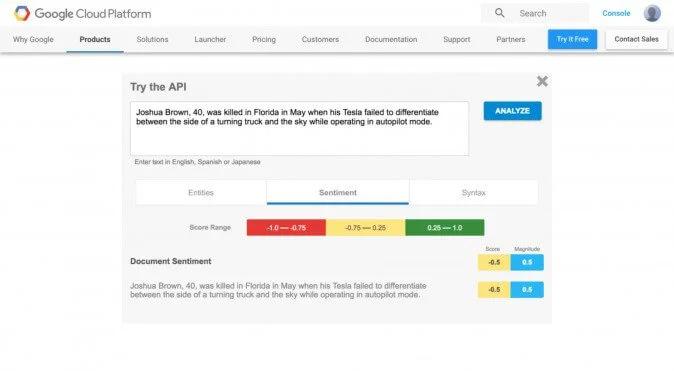
Google Cloud Natural Language API is Google Cloud's text analysis service. Like Comprehend, it is called through an API and is aimed at developers.
Strengths
The API offers sentiment analysis, entity analysis, sentiment for each entity, syntax analysis, content classification and text moderation, and it detects the language automatically when none is specified. Pricing is published per feature and includes a monthly free allowance, which makes it easy to test. For teams already on Google Cloud, it is the most natural equivalent of Comprehend.
Limitations
As with Comprehend, the output is scores and labels, and developers need to build the reporting and analysis around it. Content classification uses Google's own predefined categories rather than your business-specific themes. Custom models have moved: Google shut down AutoML text models on Vertex AI on June 15, 2025 and recommends Gemini prompting and tuning for custom text classification and sentiment instead.
Pricing
Google charges per 1,000-character unit. The first 5,000 units per month are free for each feature (30,000 for content classification), and sentiment analysis then costs $1.00 per 1,000 units, with lower rates at higher volumes. Full details are on the Google Cloud pricing page.
Best For
Google Cloud Natural Language API fits engineering teams on Google Cloud that need sentiment, entities or content categories inside their own applications.
7. Azure Language in Foundry Tools
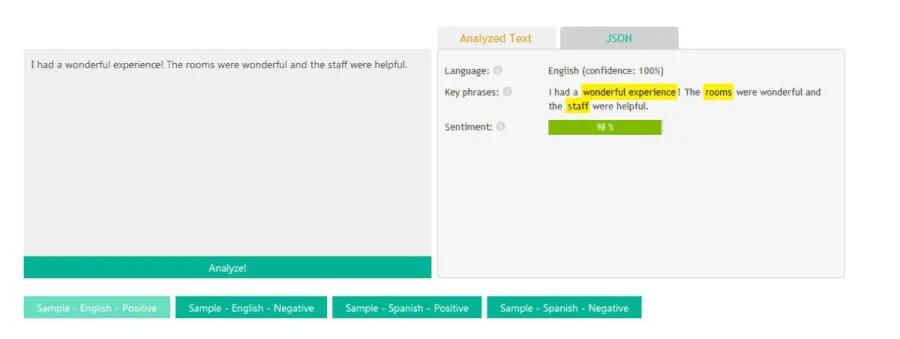
Azure Language in Foundry Tools, previously known as Azure AI Language and, before that, Text Analytics, is Microsoft's natural language processing service for developers. It is part of Microsoft Foundry.
Strengths
Azure Language covers sentiment analysis with opinion mining, which links sentiment to specific aspects of a product or service, along with key phrase extraction, named entity recognition, personal information detection, summarization and custom text classification with single-label and multi-label projects. A free tier lets developers try it, and it fits naturally into Microsoft's cloud and data tools.
Limitations
Microsoft has announced that sentiment analysis and opinion mining, as well as custom text classification, will retire from Azure Language on March 31, 2029, and it directs new projects to models in Microsoft Foundry. Teams starting a new feedback analysis project should factor this into their plans. Like the other APIs in this guide, it requires developers to integrate and maintain.
Pricing
Azure Language has a free tier with 5,000 text records per month, and paid usage is billed per text record, where each record is a 1,000-character unit. Prices depend on region and volume and are listed on the Azure pricing page.
Best For
Azure Language fits engineering teams in Microsoft's ecosystem that need text analysis in their applications today and are planning their move to Foundry models.
8. Hugging Face
Hugging Face is a platform for open machine learning models, datasets and tools. For text analysis, it gives developers access to a large library of open models, including sentiment and text classification models, and several ways to run them.
Strengths
Instead of a single vendor's model, teams can choose from many open models, including ones tuned for specific kinds of text, such as financial news or social media posts, and fine-tune them on their own labels. Models can be called through Inference Providers, deployed on dedicated Inference Endpoints on AWS, Azure or Google Cloud, or downloaded and run on the team's own infrastructure. This gives technical teams more control over the model, the cost and where the data is processed than a closed API.
Limitations
That flexibility comes with responsibility. Someone has to choose a model, test it on the team's own feedback, monitor its quality and maintain the deployment. Model quality and licenses vary from model to model, and the output is still labels and scores rather than finished analysis.
Pricing
Using the Hugging Face Hub is free, the PRO account is $9 per month, and dedicated Inference Endpoints are billed by the minute, starting at $0.033 per hour for the smallest CPU instance, with GPU instances priced higher.
Best For
Hugging Face fits machine learning teams that want to choose, fine-tune and host their own text analysis models, especially when they need control over cost or data location.
9. spaCy
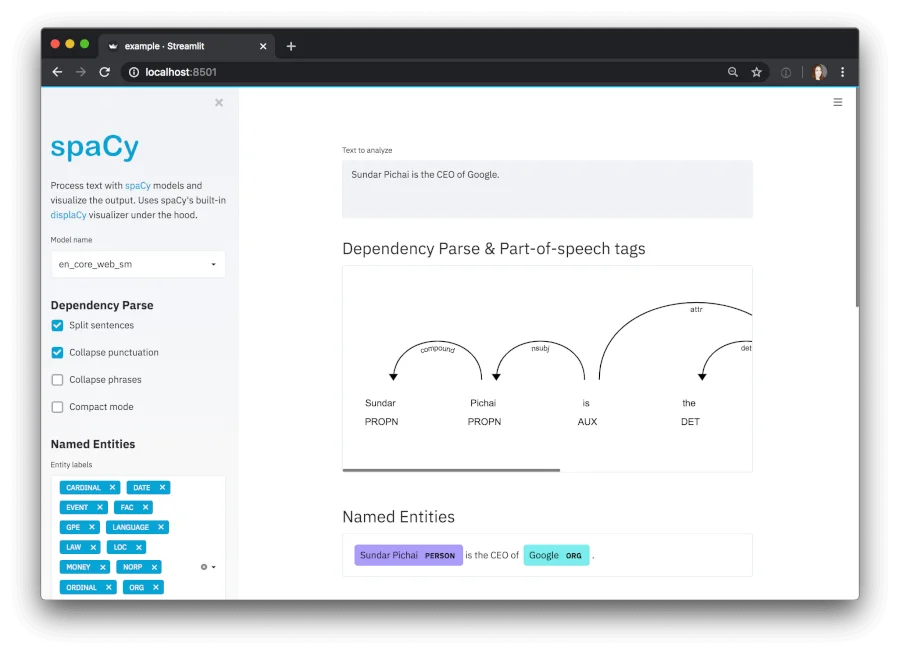
spaCy is a free, open-source Python library for natural language processing, developed by Explosion and released under the MIT license. It is built for production use rather than research.
Strengths
spaCy supports more than 75 languages and provides trained pipelines for 25 of them, with components for tokenization, entity recognition, part-of-speech tagging, dependency parsing and text classification. Teams can train their own text classifiers, plug in transformer models, and use the spacy-llm package to add large language models to a pipeline. Because it runs entirely on your own infrastructure, there is no per-request cost and no data leaves your environment.
Limitations
spaCy is a library, not a service. Hosting, scaling, monitoring and any user interface are up to the team, and analyzing customer feedback means training or connecting a model for the labels you need. It suits teams with Python and machine learning skills.
Pricing
spaCy is free and open source under the MIT license. Costs come from the infrastructure and engineering time needed to run it.
Best For
spaCy fits engineering teams that want full control over a text processing pipeline running on their own servers, without license fees.
How to Choose the Right Amazon Comprehend Alternative
If you build on AWS and only need sentiment, entities or custom classification, staying with Comprehend is a reasonable choice. If you work on Google Cloud, the Natural Language API is the closest equivalent. If you are in Microsoft's ecosystem, Azure Language works today, but plan around its 2029 retirement dates. If your machine learning team wants to choose and host its own models, Hugging Face gives the most choice, and spaCy gives full control on your own servers at no license cost. Many teams now also test large language models through APIs for flexible classification, which works best with the evaluation and engineering work to keep results consistent.
If you want to analyze feedback without building a pipeline, the purpose-built tools are a better fit. Thematic and Kapiche are designed for ongoing customer experience programs across many channels, Caplena is built for coding open-ended survey responses, and Relative Insight is strongest when you want to compare periods, audiences or competitors. If you want to understand why customers feel the way they do, from the feedback you already have or public reviews you collect, in many languages and with statistically tested findings, Kimola is built for that, and you can start without a sales call.
Frequently Asked Questions
Is Amazon Comprehend topic modeling still available?
Not for new customers. AWS has made topic modeling, event detection and prompt safety classification unavailable to new customers, while accounts that used them in the last 12 months keep access. Other Comprehend features, including sentiment analysis and custom classification, are not affected.
Is there a free alternative to Amazon Comprehend?
spaCy is free and open source, and many open models on Hugging Face can be downloaded and run at no license cost, though both need engineering work. Google Cloud Natural Language API and Azure Language have monthly free allowances. Kimola has a free Starter plan with 150 queries per month and no credit card, for teams that want to analyze feedback directly.
Should I use a large language model instead of Amazon Comprehend?
Large language models are flexible and good at summarizing a small set of comments, and cloud providers increasingly recommend them for custom text tasks. Classifying thousands of records consistently, getting the same result from the same data every time, testing differences between segments statistically and tracing every number back to its source still requires additional infrastructure. Whether you build that yourself or use a tool that provides it depends on your team.
Do I need a developer to analyze customer feedback?
Not necessarily. NLP APIs and libraries such as Comprehend, Google Cloud Natural Language, Azure Language, Hugging Face and spaCy need developers to set up and maintain. Tools built for feedback analysis, such as Kimola, Thematic, Caplena, Kapiche and Relative Insight, let business teams upload data and get themes and sentiment without code.
Conclusion
Amazon Comprehend is still a dependable NLP service, but with topic modeling closed to new customers, many teams are rethinking how they analyze feedback. Developer APIs and open-source tools give engineering teams flexibility, while feedback analysis tools take the pipeline and the interpretation off your plate. If you want to see how Kimola handles your own data, you can start on the free Starter plan.