Dovetail Alternatives & Competitors: 7 Tools Compared
Oct 26, 2026 - 18 minute read
The right Dovetail alternative depends on what you use Dovetail for. If you need a research repository for interviews and usability sessions, Condens is the closest match with published pricing, Looppanel suits solo researchers and small teams who want fast interview analysis, and Marvin offers a broader insights platform that includes AI-moderated interviews. Great Question adds participant recruiting and scheduling, and ATLAS.ti is the long-standing choice for rigorous qualitative coding. If most of your feedback comes from surveys, reviews and support tickets rather than interviews, Kimola and Thematic are built to analyze it at scale.
Dovetail is a well-established tool for organizing qualitative research, and many research teams rely on it. Teams usually look elsewhere for practical reasons: Dovetail now offers only a free plan and an Enterprise plan, its product has grown into a broad customer intelligence platform, and some teams need either a simpler repository or quantified analysis of large feedback volumes.
This guide is written by the Kimola team. Kimola is our product, so we explain where it fits and where it doesn't, and we describe every other tool based on its public documentation.
What Is Dovetail?
Dovetail is built to organize qualitative research such as interviews and usability tests. Researchers upload recordings or connect their sources, get transcripts with speaker labels and timestamps, highlight and tag what people say, and turn those tags into insights that the rest of the company can search and share.
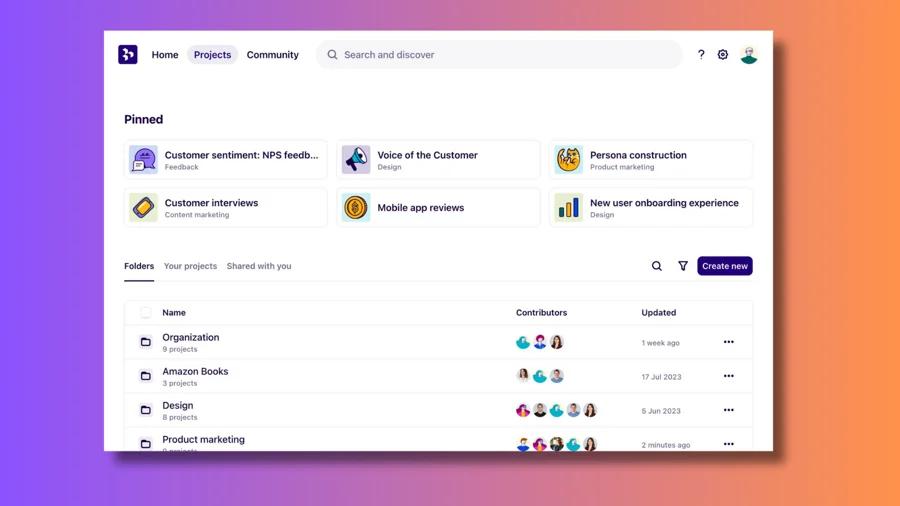
Dovetail now describes itself as a customer intelligence platform. Beyond interviews, it connects to more than 30 sources, including sales call, support, survey and review tools, and it offers Channels for classifying incoming feedback, a chat that answers questions with citations, agents that route work to tools such as Jira and Linear, and dashboards. Its strengths include high-quality transcription with translation and redaction of personal information, and enterprise governance such as SSO, granular permissions and audit logs.
Why Teams Look for Dovetail Alternatives
The first reason is pricing structure. Dovetail has a free plan with one channel and one project, and an Enterprise plan with custom pricing. There is no paid self-serve plan in between, so solo researchers and small teams who outgrow the free plan often look for a tool with published, mid-range pricing.
The second reason is scope. Dovetail has expanded from a research repository into a customer intelligence platform. Teams that only need a place to store, transcribe and tag interviews may prefer a more focused tool, while teams that also want to recruit participants and run studies may want a platform that covers that part of the workflow.
The third reason is the type of data. Repository tools are designed around a researcher reading and tagging sessions. When a team's feedback comes mostly from thousands of survey responses, reviews or support tickets, the need shifts toward analysis that classifies everything consistently, measures it and compares it across segments.
How We Compared These Tools
We looked at each tool through the same criteria: which types of data it works with, from recordings and transcripts to surveys, reviews and support tickets; how deep the analysis goes; which part of the research workflow it covers; how much setup and learning it needs; and how easy it is to evaluate, including whether pricing is published and whether a free plan or trial is available. Product information comes from each vendor's own website and documentation.
1. Kimola
Kimola is an AI platform that turns customer feedback into enterprise-grade market research. Teams analyze the feedback they already have, such as survey responses, support tickets, call transcripts and social conversations, or collect public reviews by pasting a link to a product page on Amazon, Trustpilot, Google Play, the App Store and other platforms.
Where Dovetail is built to organize qualitative research such as interviews and usability tests, Kimola analyzes large volumes of customer feedback and turns it into research you can quantify and compare.
Strengths
Qualitative feedback, measured at scale. Reading and tagging works well for a few dozen interviews, but not for 10,000 open-ended survey responses or a year of support tickets. Kimola finds themes in the data itself, without predefined categories, and gives each theme a comment mentions its own sentiment. A comment that praises the interface but complains about slow response times gets two themes: interface positive, response time negative. Scores are deterministic, so the same data always produces the same ranking. They also account for volume: a theme where 5 out of 5 comments are positive scores 100%, and one where 43 out of 50 are positive scores 86%, but Kimola ranks the second higher because 5 comments say very little.
Research questions on every comment. The questions a researcher brings to an interview, such as why people choose a product, what goes wrong and what they still need, are built into Kimola as Dimensions. Motivations, Pain Points and Unmet Needs are the most used, alongside Dimensions such as Personas, Experience Stages and Underlying Causes. Kimola then crosses every theme and Dimension with the columns in your data, such as customer segment, region or product, and with time. Only statistically significant differences and trends become Signals. If onboarding complaints rise only among one customer segment in the last quarter, Kimola surfaces that as a Signal only if the difference is significant.
Public feedback from a link, and easy to evaluate. Kimola can collect public reviews when you paste the link to a product, business or app page, so you can study a competitor's customers with the same method you use for your own, without recruiting anyone. Kimola analyzes feedback in more than 30 languages within the same analysis. Every account starts on a free Starter plan with no credit card, paid plans start at $49 per month, and pricing is public. Smaller teams use Kimola self-service, while larger organizations work with an account manager to set up Spaces and custom models on the same platform.
Limitations
Kimola analyzes feedback; it does not run interviews, recruit participants or run usability tests. It is not a repository for video and audio recordings: it works with text, so interview or call transcripts are uploaded as files. For a small qualitative study of a handful of interviews, the repository tools in this list are a better fit. The free Starter plan is limited to 150 queries per month, and Spaces and Funnels, which keep continuous feedback channels comparable over time, are part of the Enterprise plan only.
Pricing
Kimola has a free Starter plan, and paid plans start at $49 per month. Usage is measured in queries, and the full plan details are on the pricing page. Enterprise plans are priced individually.
Best For
Kimola is a good fit for research, insights, product and marketing teams whose feedback comes in volume, from surveys, reviews, support tickets or transcripts, and who want research output they can quantify and compare across segments and over time. For a detailed side-by-side view, see our Kimola vs Dovetail comparison.
2. Condens
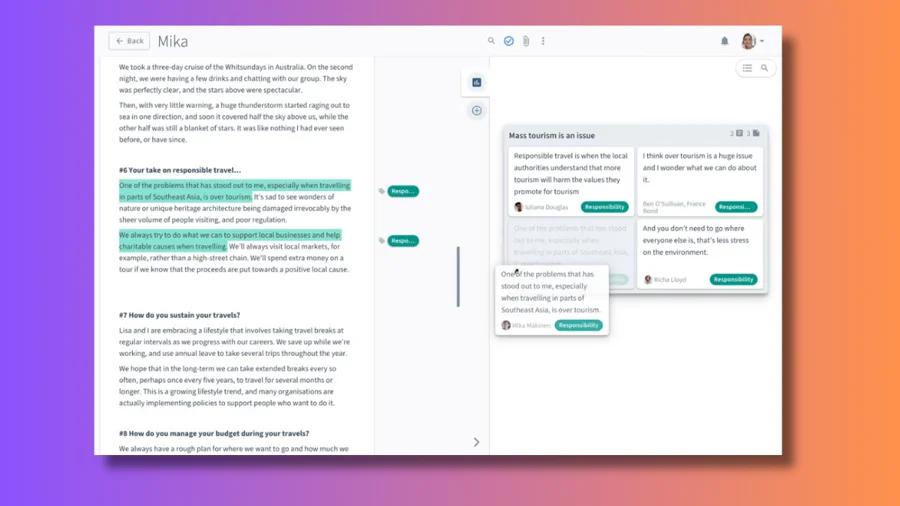
Condens describes itself as a UX research repository and AI analysis platform. It is the closest alternative to Dovetail's original role: a central place to store research data, analyze it and share evidence-backed findings with stakeholders.
Strengths
Condens transcribes recordings and notes, lets researchers pull raw data into findings in a split view, and keeps every insight linked to the evidence behind it. Its AI answers questions from your own research data, with anonymization and redaction for sensitive content, and the team keeps the final say on outputs. Business plans add customizable insights repositories for stakeholders, unlimited viewers, sentiment analysis and auto-clustering for large datasets, and connections to ChatGPT and Claude. Integrations include Zoom, Google Drive and Typeform for imports, and Figma, Miro and Slack for sharing.
Limitations
Condens is centered on UX research data such as interviews and notes, so teams that mainly need to analyze high volumes of survey, review or support feedback may find it less suited to that job. Its entry plan covers a single contributor, and team features such as stakeholder repositories start on the Business plan.
Pricing
Condens publishes its prices in euros. Lite costs €15 per month or €165 per year for one contributor, Business costs €500 per month billed annually (€6,000 per year) for five contributors with unlimited viewers, and Enterprise is priced on request. Every plan has a 15-day free trial with no credit card, and Condens is free for educational use. Details can be seen on Condens's pricing page.
Best For
Condens fits UX research teams that want a focused research repository with published pricing, and a structured way to share findings with stakeholders.
3. Marvin
Marvin describes itself as an AI-native customer insights platform for customer, brand and market research. It combines a research repository with tools for running new research, including AI-moderated interviews.
Strengths
Marvin brings interviews, surveys, calls and other research into one repository, and its Ask AI feature answers questions across that data with citations back to the source. It identifies themes, sentiment and patterns across large datasets, creates highlight reels and reports, and blurs personal information automatically. For collecting new data, Marvin runs AI-moderated interviews at scale and offers Live Intercept, a voice-based AI interviewer embedded in a digital product. It connects to more than 30 tools and shares insights with AI assistants such as Claude, ChatGPT and Copilot through its MCP server.
Limitations
Marvin's breadth is also its trade-off: teams looking for a simple place to store and tag interviews may get more platform than they need. Prices for paid plans are not published, so comparing costs requires a demo.
Pricing
Marvin has a free plan with no credit card required. Pricing for the Starter, Pro and Enterprise plans is not published and is available through a demo or the sales team. Details can be seen on Marvin's pricing page.
Best For
Marvin fits research and insights teams that want one platform to centralize existing research and run new studies, including AI-moderated interviews.
4. Looppanel
Looppanel describes itself as an AI UX research tool for qualitative research analysis and building a repository of insights. It focuses on getting from interview recordings to findings quickly.
Strengths
Looppanel connects to Zoom and Google Meet, produces transcripts and translations in more than 96 languages, and takes notes automatically, with live note-taking during sessions. Its AI assistant tags interviews, surveys and other research and makes them searchable, and findings can be organized by question or by theme and shared as video clips. Pricing is published, and the solo plan can be tried for free.
Limitations
Looppanel's plans set monthly limits on transcription hours and uploads, so teams with heavy interview volumes need to check which plan covers their workload. Its focus is interview and session analysis rather than large-scale analysis of reviews or support tickets.
Pricing
Solo costs $49 per month or $540 per year and includes a 15-day free trial. Pro costs $395 per month or $4,200 per year, and Enterprise is priced on request. Details can be seen on Looppanel's pricing page.
Best For
Looppanel fits solo researchers, freelancers and small teams who run regular interviews and want fast transcription, notes and analysis at a published price.
5. Great Question
Great Question describes itself as a UX research platform for every team. Unlike Dovetail, it covers running research as well as analyzing it: participant management, scheduling, interviews, surveys and a repository in one place.
Strengths
Great Question includes a research CRM for managing participants, so teams can recruit their own customers without per-participant fees, and it can also recruit external participants through Respondent and User Interviews. Interviews, scheduling, surveys and prototype tests are included on the self-serve plan, and its AI-powered repository handles analysis and sharing of findings. Observers and view-only stakeholders do not need paid seats.
Limitations
Great Question has no free plan, and the self-serve plan is limited to five seats. Some methods, such as card sorting, tree testing, focus groups and AI moderation, are available only on Enterprise. Teams that already have a recruiting process and only need analysis may not use much of the platform.
Pricing
The self-serve plan costs $129 per seat per month or $1,290 per seat per year, for up to five seats, with a 14-day free trial and no credit card required. Enterprise is priced on request, with a five-seat minimum. Details can be seen on Great Question's pricing page.
Best For
Great Question fits research and product teams that want to recruit participants, run studies and store findings in a single platform, especially when they research their own customers often.
6. ATLAS.ti
ATLAS.ti is qualitative data analysis software used by academic and professional researchers. It is available as desktop apps for Windows and Mac and as a web version, and projects can move between platforms.
Strengths
ATLAS.ti supports detailed, methodical coding of qualitative data, which matters when a study needs a rigorous and documented analysis. Its AI features include automatic coding, intentional AI coding guided by the researcher's goals, conversational analysis across documents, summaries, sentiment analysis and automatic transcription. One license covers all platforms, and multi-user licenses are available for teams.
Limitations
ATLAS.ti is built for the analysis step rather than for sharing insights across a company, so it is less suited to teams that want stakeholders to browse a living repository. Its depth comes with a learning curve for people new to qualitative coding.
Pricing
ATLAS.ti offers a free trial. Licenses are sold through its website, with multi-user licenses for teams and discounts for non-profits, and current prices are listed there.
Best For
ATLAS.ti fits researchers who need rigorous qualitative coding, such as academic teams, research agencies and in-house researchers working on methodologically demanding studies.
7. Thematic
Thematic describes itself as a customer intelligence layer for enterprise CX. Thematic is built for theme and sentiment analysis of the feedback a team already collects, and it is designed to work alongside an existing CX stack rather than replace it.
Strengths
Thematic ingests surveys, support tickets, call transcripts, app reviews and CRM notes, with translation and redaction of personal information. It builds themes from customers' own language, and every theme can be traced back to the comments behind it and adjusted by the team. Beyond themes, it predicts scores such as NPS, churn propensity and effort from feedback, and ranks themes by the revenue tied to them.
Limitations
Thematic is aimed at enterprise organizations, and its entry plan is priced for annual programs. Teams with a small volume of feedback, a one-off project or an interview-based research practice may find this more than they need. Instead of a free trial, Thematic offers demos on your own data and a paid pilot.
Pricing
Thematic's Foundation plan is listed at $25,000 per year for up to 25,000 comments and three datasets, and Enterprise pricing is available as a custom proposal. Details can be seen on Thematic's pricing page.
Best For
Thematic fits enterprise CX and insights teams that want a dedicated feedback analytics layer on top of their existing survey and support tools, with predicted scores and revenue impact. Kimola adds research Dimensions, statistically tested Signals and the ability to collect public reviews directly; see our Kimola vs Thematic comparison.
How to Choose the Right Dovetail Alternative
Start with the kind of data you work with and the part of the research process you need help with. If you want what Dovetail originally did, a repository for interviews and usability sessions, with published pricing, Condens is the closest fit. If you are a solo researcher or a small team running regular interviews, Looppanel gets you from recording to findings quickly. If you want one platform that also runs new research, including AI-moderated interviews, consider Marvin.
If recruiting and scheduling participants takes most of your time, Great Question covers that alongside analysis. If your work requires rigorous, documented qualitative coding, ATLAS.ti is built for it. If you run an enterprise CX program across many survey and support channels, Thematic is designed for that scale.
If your feedback comes mostly from surveys, reviews and support tickets, and you want to understand why customers feel the way they do with findings you can quantify and compare, Kimola is built for that, and you can try it with your own data on a free plan. Usability testing is a separate job: tools such as Maze run tests and prototype studies, and teams often use them alongside a repository or an analysis tool.
Frequently Asked Questions
Is there a free alternative to Dovetail?
Several tools on this list have a free plan or trial. Kimola and Marvin both have free plans with no credit card required, Condens and Looppanel offer 15-day free trials, Great Question offers a 14-day trial, and ATLAS.ti has a free trial version. Dovetail itself also has a free plan limited to one channel and one project.
Does Dovetail still have a paid self-serve plan?
Dovetail's pricing page lists two plans: Free and Enterprise. Enterprise pricing is custom and available through Dovetail's sales team, so there is no paid plan you can buy on your own between the two.
What is the difference between a research repository and a feedback analysis tool?
A research repository stores recordings, transcripts and notes, helps researchers tag them, and makes findings easy for others to find. A feedback analysis tool classifies large volumes of text, such as survey responses, reviews and support tickets, and measures how themes and sentiment change across segments and time. Many teams need both, because interviews and large-scale feedback answer different questions.
Can I use Kimola alongside a research repository?
Yes. Many teams keep interviews and usability sessions in a repository and use Kimola for the feedback that arrives in volume, such as open-ended survey responses, reviews and support tickets. Interview transcripts can also be uploaded to Kimola as files when a team wants to analyze them together with other feedback.
Why not just use ChatGPT to analyze interviews or feedback?
General-purpose AI assistants are good at summarizing a small set of transcripts or comments. Classifying thousands of records consistently, testing differences between segments statistically, getting the same result from the same data every time and showing the source of every number require a dedicated setup. That is the gap research and feedback analysis tools are built to fill.
Conclusion
Dovetail remains a strong option for organizing qualitative research, and the right alternative depends on whether you need a focused repository, faster interview analysis, a platform for running studies, rigorous coding or analysis of feedback at scale. If you want to see how Kimola handles your own data, you can start on the free Starter plan.