Ask Viable Alternatives: 6 Feedback Analysis Tools to Use Instead
Oct 27, 2026 - 11 minute read
Viable, the AI feedback analysis tool often called Ask Viable, is no longer available. Its website, askviable.com, no longer hosts the product, and we could not find an official shutdown announcement. If you used Viable to analyze support tickets, call transcripts and reviews, Enterpret is the closest fit for product teams that want feedback tied to accounts and revenue, Thematic and Chattermill suit enterprise feedback analytics programs, and SentiSum and Unwrap work closely with support operations. Kimola fits teams that want to turn the feedback they already have, along with public reviews, into research that explains why customers feel the way they do.
Viable connected to tools such as Zendesk, Intercom and Gong, grouped feedback into themes, reported changes week over week and let teams ask questions about their data in plain English. Former users now need a tool that covers the same jobs, and readers who find Viable in older lists of feedback tools need to know it is no longer an option.
This guide is written by the Kimola team. Kimola is our product, so we explain where it fits and where it doesn't, and we describe every other tool based on its public documentation.
What Happened to Viable?
Viable is no longer available as a product. The askviable.com domain now shows unrelated content, and third-party directories of AI tools list Viable as inactive. Neither the company nor its founders have published an announcement we could find, so we cannot say why or exactly when the product stopped.
Viable was founded in 2020 and was one of the early companies to build a feedback analysis product on OpenAI's GPT models. According to OpenAI's customer story, it analyzed support conversations, support tickets, online reviews and recorded transcripts, synced continuously with tools such as Zendesk, Intercom and Gong, and turned feedback into themes, week-over-week analysis and answers to questions about the data. Its paid plans started at $600 per month, which made it accessible to mid-sized support, CX and product teams.
What Viable Users Need From a Replacement
Most former Viable users have a support or CX data flow that still needs analysis. The replacement has to take in tickets, chats and call transcripts from the tools the team already uses, either through an integration or as exported files.
They also need the analysis itself: themes found without building a taxonomy by hand, sentiment for each theme, and a regular view of what changed. Many Viable users relied on asking questions in plain language, and several tools in this guide offer a similar assistant. Finally, Viable was priced for mid-sized teams, so budget and how quickly a team can start matter as much as features.
How We Compared These Tools
We looked at each tool through the same criteria: the types of feedback it works with and how it connects to support and call tools such as Zendesk, Intercom and Gong; how deep the analysis goes beyond themes and sentiment; how it reports findings and answers questions; how much setup it needs before a team sees results; and how easy it is to evaluate, including whether pricing is published and whether a free plan or trial is available. Product information comes from each vendor's own website.
1. Kimola
Kimola is an AI platform that turns customer feedback into enterprise-grade market research. Teams analyze the feedback they already have, such as support tickets, call transcripts, survey responses and social conversations, or collect public reviews by pasting a link to a product page on Amazon, Trustpilot, Google Play, the App Store and other platforms.
Kimola finds themes in the data itself, without predefined categories, and gives every theme mentioned in a comment its own sentiment. For former Viable users, the main difference is what comes after the themes: Kimola treats support conversations as research data and answers why customers contact you, what frustrates them and what they need next.
Strengths
Research questions on every conversation. Classifying topics is only the first step in Kimola. It asks every comment research questions called Dimensions: what pain points customers face, what underlying causes sit behind a complaint, what needs are still unmet, and which personas and experience stages they represent. This turns "customers contact us about delivery" into "customers contact us about delivery because tracking stops updating after the parcel leaves the warehouse."
Findings that are statistically tested. Kimola crosses every theme and Dimension with the columns in your data, such as country, product, customer segment or channel, and with time. This usually produces thousands of combinations, and Kimola tests each one. Only statistically significant differences and trends become Signals, ranked so that what needs attention comes first. If refund complaints rise in one market over recent weeks, Kimola surfaces that as a Signal only if the change is significant. Scores are deterministic, so the same data always produces the same ranking, and they take the number of comments into account as well as the ratio. Action Plans then form hypotheses from the analysis, test each one against the feedback, and keep only the actions the evidence supports, with every figure and quote checked.
Support data and public reviews in one analysis. Kimola connects to Zendesk, Intercom and Google Sheets, and accepts Excel, CSV and TSV files, including chat and call center transcripts. It can also collect public reviews from a link to a product, business or app page, including a competitor's, so support conversations and public reviews can be studied with the same research questions. Kimola analyzes feedback in more than 30 languages within the same analysis. On the Enterprise plan, Spaces keep a growing channel such as a support queue classified the same way with every new file, so results stay comparable over time.
Easy to evaluate. Every account starts on a free Starter plan with no credit card, paid plans start at $49 per month, and pricing is public. Smaller teams use Kimola self-service, while larger organizations work with an account manager to set up Spaces and custom models on the same platform.
Limitations
Kimola does not connect directly to call recording tools such as Gong, so call transcripts are uploaded as files. It does not route or prioritize tickets, it is not designed as a real-time support operations dashboard, and it does not design or send surveys. Spaces, Funnels, Customers, Tasks and the Jira integration are available only on the Enterprise plan. The free Starter plan is limited to 150 queries per month.
Pricing
Kimola has a free Starter plan, and paid plans start at $49 per month. Usage is measured in queries, and the full plan details are on the pricing page. Enterprise plans are priced individually.
Best For
Kimola is a good fit for CX, product, insights and research teams that want to understand why customers feel the way they do, from support tickets, transcripts and public reviews, and that want to evaluate a tool with their own data before talking to sales.
2. Enterpret
Enterpret describes itself as the customer context layer for AI-native product teams. It covers several jobs Viable users relied on: connecting support and call data, answering questions about feedback and producing regular reports.
Strengths
Enterpret ingests feedback from support tools such as Zendesk and Intercom, call recordings from Gong, app stores, review sites, community and social channels, and product analytics, through more than 30 connectors and an API. An adaptive taxonomy classifies feedback in customers' own language, and a customer context graph links each conversation to its theme, account, revenue and product release. Enterpret Agent answers questions in plain language with answers traced to real conversations, and prebuilt automations include a weekly VoC report. Findings can be sent to Slack, Jira, Linear, Salesforce, HubSpot and Notion, or used in AI tools over MCP.
Limitations
Enterpret is designed for ongoing, connected feedback programs inside product organizations, so teams that want to analyze a single file or a one-off project may find it more than the job requires. Pricing is not published.
Pricing
Enterpret does not publish its pricing. The website offers a short, no-commitment product try-out and a demo.
Best For
Enterpret fits product, VoC and CX teams that want feedback from support, sales calls and public channels connected to accounts, revenue and the product roadmap.
3. Thematic
Thematic describes itself as AI feedback analytics that turns unstructured feedback into insights at scale. Thematic is built for theme and sentiment analysis of the feedback a team already collects.
Strengths
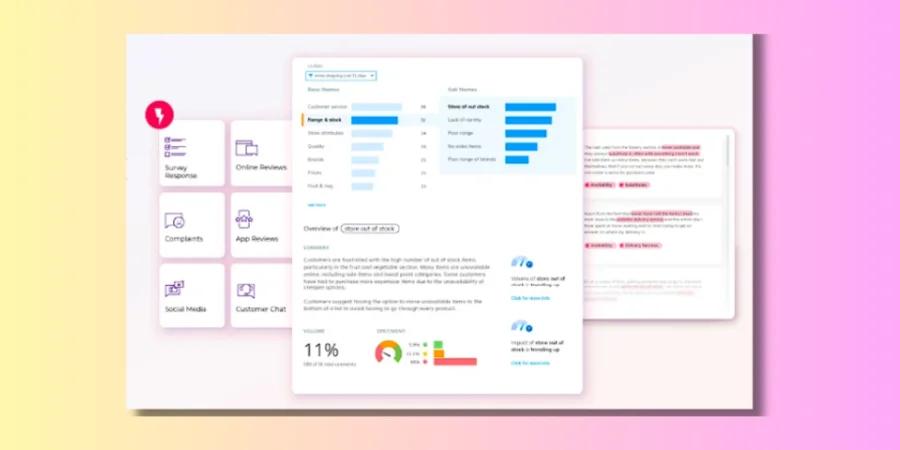
Thematic builds themes from customers' own language, and its approach is to give teams AI they can inspect and steer: every theme can be traced back to the comments behind it and adjusted. It includes dashboards and reports, workflows, a summarizer and Thematic Answers, a natural-language interface for asking questions about feedback. One-click integrations, CSV uploads and an API connect it to survey and support tools.
Limitations
Thematic is aimed at annual enterprise programs, and it notes that it works best with at least 2,000 rows of feedback. Teams with a small volume of feedback or a one-off project may find this more than they need. Thematic offers demos on your own data and a paid pilot instead of a free trial.
Pricing
Thematic's Foundation plan is listed at $25,000 per year for up to 25,000 comments and 3 datasets. Enterprise pricing is available as a custom proposal.
Best For
Thematic fits CX and insights teams that want a dedicated feedback analytics layer they can inspect and adjust, on top of their existing survey and support tools. Kimola adds research Dimensions, statistically tested Signals and the ability to collect public reviews directly; see our Kimola vs Thematic comparison.
4. Chattermill
Chattermill describes itself as an AI-native voice of customer and feedback analysis platform. Chattermill is built for customer experience analytics, bringing feedback from many channels into one view.
Strengths
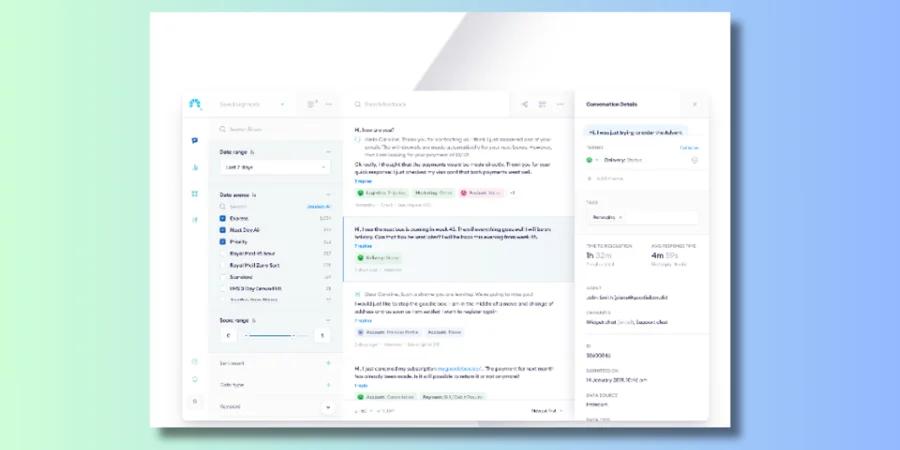
Chattermill analyzes surveys, reviews, support tickets, chats, voice calls and social media through more than 65 native integrations, including Zendesk, Intercom, Qualtrics, Trustpilot and Salesforce. Lyra Agent answers questions with quantified evidence and linked customer quotes, and proactive insights surface trends without being asked. Impact analysis shows what drives experience metrics, anomaly alerts go to Slack, email and Jira, and an MCP server connects Chattermill data to AI tools. Chattermill does not charge per user.
Limitations
Chattermill is designed for ongoing analysis at volume. By its own description, it is not a good fit for teams that do not consistently collect more than 5,000 pieces of feedback per month or that need a one-off analysis. Pricing is not published.
Pricing
Chattermill does not publish its pricing. The website offers a demo.
Best For
Chattermill fits CX, insights and product teams at enterprises and fast-growing brands that want continuous, multi-channel feedback analytics tied to experience metrics. Kimola structures feedback into research Dimensions such as motivations, pain points and unmet needs, and works self-service without custom model setup; see our Kimola vs Chattermill comparison.
5. SentiSum
SentiSum describes itself as AI-native CX intelligence software that reads and scores customer conversations. Like Viable, it is centered on support data, and it goes further into support operations.
Strengths
SentiSum takes in support tickets, calls, chats, bot transcripts, NPS and CSAT surveys, reviews, social posts and CRM notes, with native connectors for tools such as Zendesk, Intercom, Freshdesk, Gorgias, Salesforce, Trustpilot and NICE. Its engine, Kyo, answers plain-English questions, and its agents cover insights and root causes, early warning for complaint spikes and churn risk, and conversation quality. It also routes and prioritizes issues, tracks fixes and delivers insights to Slack, Microsoft Teams and AI assistants.
Limitations
SentiSum is built around support operations, so teams whose most important feedback comes from surveys, public reviews or competitor reviews may look for a tool organized around those sources. It is sold as an annual partnership, and some agents, such as quality and automation, are priced as add-ons.
Pricing
SentiSum does not publish its pricing. According to its pricing page, the core platform is sold as an annual partnership with volume-based pricing and unlimited users. Instead of a standard free trial, it offers a free, scoped audit on a portion of your own data, and annual contracts include the right to walk away in the first 90 days.
Best For
SentiSum fits support and CX teams that want analytics, early warning and quality built into their support operations.
6. Unwrap
Unwrap describes itself as a customer intelligence platform that proactively uncovers what matters most. It serves CX, support, product and VoC teams and surfaces trends without manual tagging.
Strengths
Unwrap brings together surveys, support tickets, calls and reviews. Auto Tagger categorizes incoming feedback, dashboards give each team its own view, Assistant answers questions in natural language and alerts surface new issues automatically. Responder helps teams reply to customers, and SupportIQ, a separate product for support teams, covers automated quality scoring, agent coaching and root-cause analysis.
Limitations
Unwrap combines feedback analytics with support tooling and annual pricing, so teams that only want to analyze an existing dataset, or that are working with a smaller budget, may not need its full scope.
Pricing
Unwrap's pricing page lists plans starting at $24,000 per year, priced by monthly feedback volume and integrations, with no per-seat fees. It mentions an option to start with a 30-day trial based on your own data.
Best For
Unwrap fits CX, support and product teams that want feedback analytics, alerts, support quality assurance and customer responses in one platform.
How to Choose the Right Viable Alternative
If you used Viable to connect support tickets and Gong calls and want that feedback tied to accounts, revenue and the product roadmap, Enterpret is built for product teams. If you want a feedback analytics layer whose themes your analysts can inspect and adjust, consider Thematic. If you run a high-volume, multi-channel feedback program tied to experience metrics, look at Chattermill. If you want analytics, early warning and quality inside your support operations, SentiSum focuses on that, and if you want feedback analytics, alerts and support quality assurance in one platform, Unwrap covers that combination.
If you want to understand why customers feel the way they do, from support tickets, transcripts and public reviews in the same analysis, and you want to try it with your own data before talking to sales, Kimola is built for that.
Frequently Asked Questions
Is Viable still available?
No. The askviable.com website no longer hosts the Viable product, and third-party directories list it as inactive. We could not find an official announcement explaining what happened, so former users should plan to move their data and workflows to another tool.
Is there a free alternative to Viable?
Kimola has a free Starter plan with 150 queries per month and no credit card required, so you can upload support tickets or connect Zendesk or Intercom and analyze them before choosing a paid plan. Enterpret offers a short product try-out, and the other tools in this guide work through demos, audits, trials or paid pilots.
Can I analyze Zendesk or Intercom tickets without an annual contract?
Yes. Kimola connects to Zendesk and Intercom and also accepts exported ticket files, and its plans can be bought monthly and canceled at any time. Paid plans start at $49 per month, and the free Starter plan is available for a first test.
Why not just use ChatGPT to analyze customer feedback?
General-purpose AI assistants are good at summarizing a small set of tickets or reviews. Classifying thousands of conversations consistently, testing differences between markets, products or time periods statistically, getting the same result from the same data every time and showing the source of every number require a dedicated setup. That is the gap feedback analysis tools are built to fill.
Conclusion
Viable is no longer available, but the jobs it did, from analyzing support conversations to reporting what changed, are covered by several active tools. The right choice depends on whether you need product-focused feedback intelligence, enterprise feedback analytics, analytics built into support operations or research that explains customer behavior. If you want to see how Kimola handles your own support data, you can start on the free Starter plan.