9 Tools for CX Researchers: From Journey Maps to Feedback Analysis
Oct 27, 2026 - 14 minute read
CX research moves through a handful of steps, and each step has its own typical tools. To map the customer journey, researchers use UXPressia for structured journey maps and personas and Lucid for collaborative workshops. To ask customers questions at scale, they use survey tools like SurveySparrow. To talk to customers, they recruit and interview them in Great Question and organize what they learn in Dovetail. To observe behavior, they use Mixpanel inside the product and Mouseflow on the website. Brand24 follows public conversations about a brand, and Kimola analyzes large volumes of customer feedback to explain why customers feel the way they do.
This guide focuses on the research workflow: the tools a researcher uses to understand customers, not the platforms that run a customer experience program or the dashboards that track its metrics. For those, see our guides to customer experience management tools and tools for tracking customer experience. For a broader introduction to the discipline, see our guide to CX research.
This guide is written by the Kimola team. Kimola is our product, so we explain where it fits and where it doesn't, and we describe every other tool based on its public documentation.
What CX Researchers Need From Their Tools
CX research is the work of understanding how customers experience a company across every touchpoint, from first discovering it to buying, using, getting support and deciding whether to stay. A CX researcher's job is to find out where that experience breaks down, why it breaks down, and which problems matter most.
A typical project starts with the team's assumptions about the journey, often drawn as a journey map. The researcher then tests those assumptions: asking customers through surveys, talking to them in interviews, observing what they actually do, and reading what they already say in reviews, support conversations and on social media. Each source answers a different question. Scores and behavioral data show what is happening and how often. Open-ended feedback and interviews explain why.
The best toolkits cover both sides. A satisfaction score that drops by ten points tells a team that something is wrong, but only the comments, conversations and interviews behind it tell them what to fix.
How We Chose These Tools
We included a tool only if it is a primary tool for at least one step of a CX research project. For each tool, we looked at what it does at that step, whether it can be evaluated on a free plan or trial, whether its pricing is published, and how well it works alongside the other tools on the list. Pricing for each tool comes from its own pricing page.
We left out customer experience management suites, CRMs, help desks and customer success platforms. Teams use them every day and they hold valuable data, but they run operations rather than research. They are covered in our other customer experience guides.
Mapping the Customer Journey
UXPressia
UXPressia is a journey mapping and persona tool. Teams use it to build customer journey maps, personas, impact maps and service blueprints in one shared workspace, with templates and libraries that keep maps consistent across projects. It can pull in data from web analytics and feedback tools, and maps can be exported as PNG, PDF, CSV or PPTX for presentations. AI features can generate a first draft of a journey map or persona.
For CX researchers, UXPressia is a structured place to record what the team believes the journey looks like and to update it as research comes in. A journey map is only as good as the research behind it, so the tool works best when its stages and pain points are backed by the survey, interview and feedback data that the other tools on this list provide.
Pricing: UXPressia has a free plan with up to 3 journey maps, 3 personas and 3 impact maps. Pro costs $36 per month ($360 per year), Business costs $95 per month ($950 per year), and Enterprise is priced on request.
Lucid
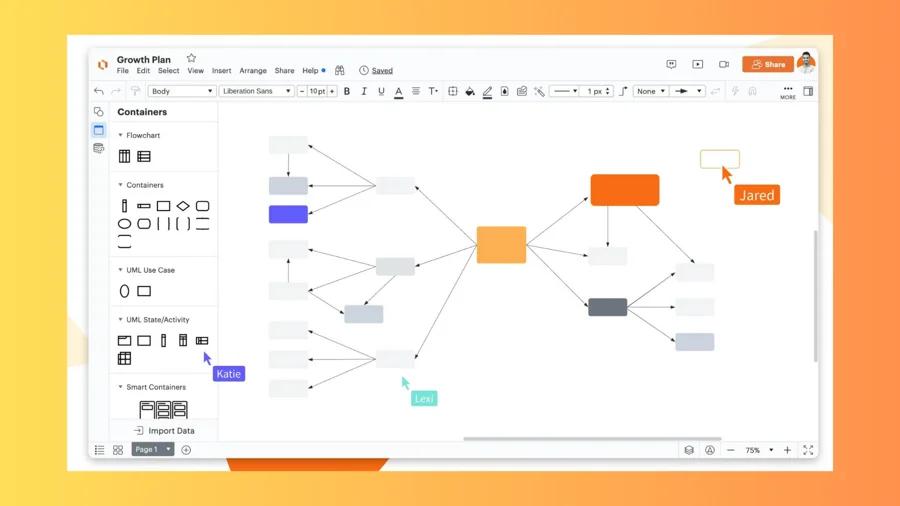
Lucid makes two connected tools: Lucidchart for diagrams and Lucidspark for virtual whiteboarding. Both include templates for customer journey maps and service blueprints, and teams can work on the same board in real time.
CX researchers use Lucid for the collaborative side of journey work: running a mapping workshop with colleagues from support, product and marketing, sketching the processes behind a touchpoint, or drawing a service blueprint that connects what the customer sees to what happens behind the scenes. Lucid is a general-purpose visual tool, so it doesn't offer the persona libraries or journey-specific structure of a dedicated mapping tool.
Pricing: Lucid offers free versions of Lucidchart and Lucidspark. Paid plans for individuals and teams are listed on Lucid's pricing page, and Enterprise plans are priced by the sales team.
Asking Customers
SurveySparrow
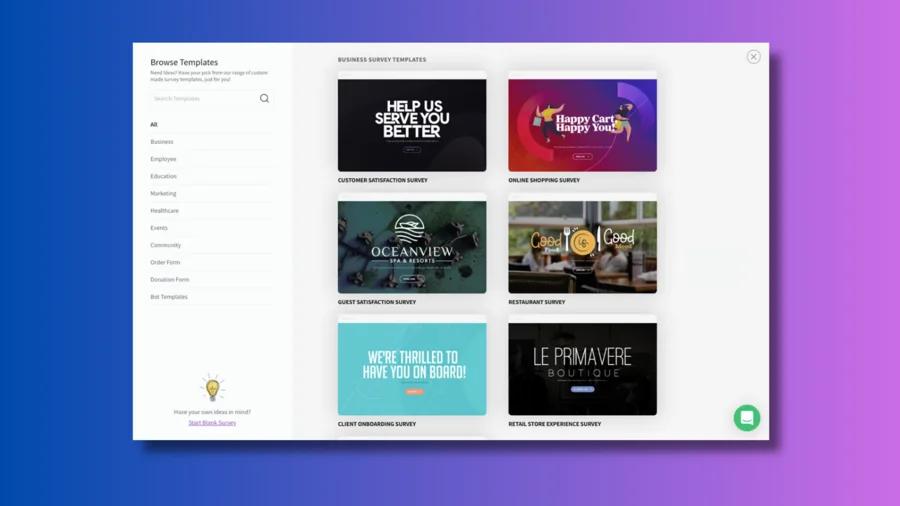
SurveySparrow is an online survey platform known for its conversational, chat-style survey format, which presents one question at a time. Alongside general surveys, its CX Suite covers the standard customer experience metrics: Net Promoter Score (NPS), Customer Satisfaction (CSAT) and Customer Effort Score (CES).
For CX researchers, surveys are the main way to measure an experience consistently and to ask about a specific touchpoint right after it happens. The scores show where satisfaction is high or low, and the open-ended questions that follow them collect the reasons. One limit to plan around: every plan below Enterprise allows one active CX survey (NPS, CSAT or CES) at a time.
Pricing: SurveySparrow has a free plan and a 14-day trial with no credit card required. Paid plans are billed quarterly or yearly, yearly billing saves up to 40%, and current rates are listed on SurveySparrow's pricing page.
Talking to Customers
Great Question
Great Question is a UX research platform that brings recruitment, studies and insights into one place. Teams can import their own customer list by CSV or API, filter it, and invite customers to interviews or surveys without paying a per-participant fee. Interviews run over Zoom, Google Meet or Microsoft Teams, incentives are paid automatically through an integration covering more than 80 countries, and recordings and transcripts go into a shared repository with AI analysis. When a study needs people outside the customer base, Great Question can also recruit from an external panel on a pay-as-you-go basis.
For CX researchers, the biggest practical hurdle in qualitative work is getting real customers into a conversation. Great Question handles the recruiting, scheduling and incentive steps that otherwise take up much of a researcher's week. It comes from the UX research world, so some features, such as card sorting and tree testing, are aimed at product design teams, and syncing directly with a CRM like Salesforce is available only on the Enterprise plan.
Pricing: The Self-serve plan costs $129 per seat per month or $1,290 per seat per year, for up to 5 seats with unlimited observers. There is a 14-day free trial with no credit card required and no free plan. Enterprise pricing is custom.
Dovetail
Dovetail is a customer intelligence platform built for qualitative research such as interviews and usability tests. Researchers upload recordings and transcripts, tag and highlight the important moments, cluster them into themes, and share findings through a repository the whole company can search. Dovetail has also expanded beyond interviews: it connects to more than 30 sources, including sales and support call platforms, survey tools and app review sites, and tracks themes across them.
For CX researchers, Dovetail is a strong home for interview findings, especially when several researchers contribute to the same repository and stakeholders need to see the evidence behind a recommendation. Its strength is qualitative depth, so projects that need statistically tested comparisons across thousands of comments and customer segments may need a dedicated feedback analysis tool alongside it.
Pricing: Dovetail has a free plan for individuals with one channel, one project and one dashboard. Enterprise pricing is custom.
Observing Customer Behavior
Mixpanel
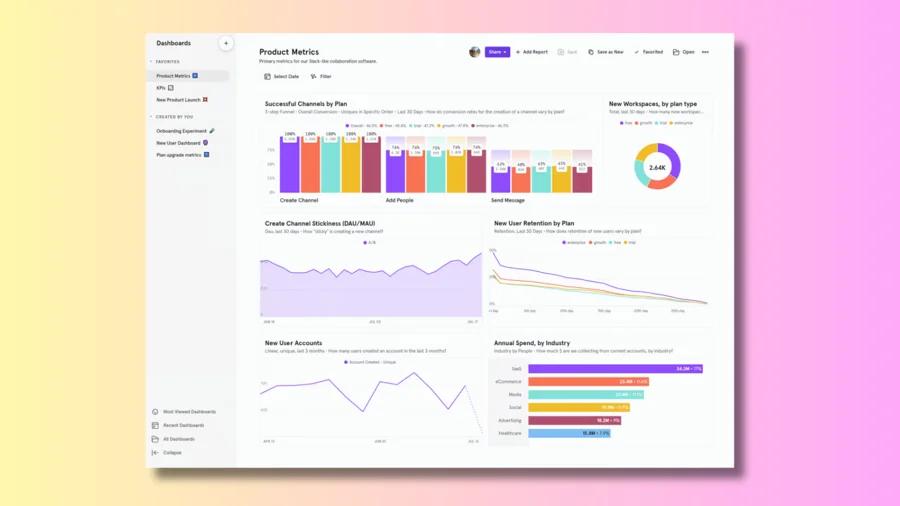
Mixpanel is a product analytics platform. It tracks events inside a website or app, such as signing up, adding an item to a cart or using a feature, and shows how users move through funnels and whether they come back. Session replay and heatmaps are included on every plan, so researchers can watch the sessions behind a drop-off in the numbers.
For CX researchers, Mixpanel shows what customers do, which is often different from what they say. If customers complain that checkout is confusing, Mixpanel can show where exactly they abandon it and how many are affected. It requires event tracking to be set up in the product, which usually means working with an engineering team.
Pricing: The free plan includes up to 1 million events and 10,000 session replays per month. The Growth plan is priced by event volume, with the first 1 million events included; for example, 5 million events per month costs $438 per month when billed yearly. Enterprise pricing is custom.
Mouseflow
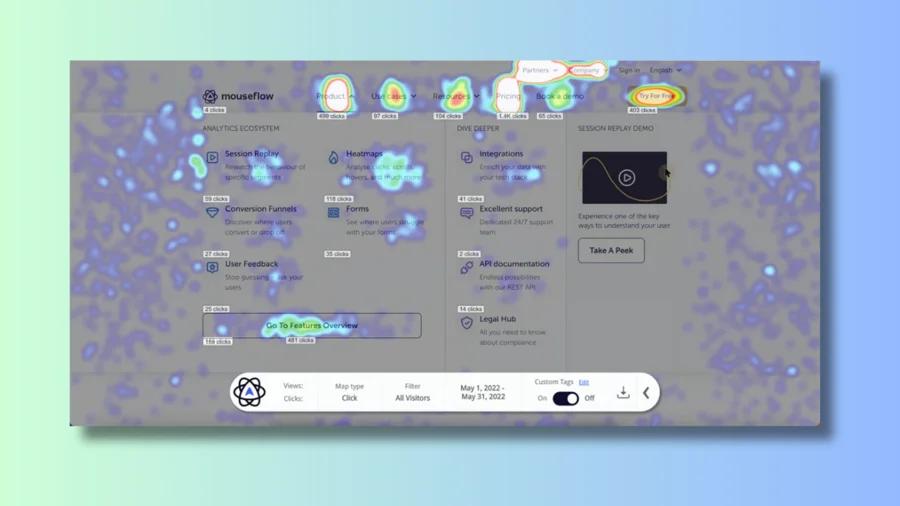
Mouseflow is a behavior analytics tool for websites. It records visitor sessions, builds click, scroll and geo heatmaps, detects friction points, and includes conversion funnels, form analytics and on-page feedback surveys. Setup requires only adding a tracking script to the site.
For CX researchers, Mouseflow is a quick way to see where the website experience gets in the way, for example which form field makes visitors give up. Pairing a short feedback survey with the session recordings connects what visitors say to what they did. Mouseflow focuses on websites, so teams that need deep analytics inside a mobile or web app usually pair it with, or choose, a product analytics tool.
Pricing: Mouseflow has a free plan with 500 sessions per month and one month of data retention. Paid plans start at $25 per month, annual billing saves up to 35%, and paid plans come with a 14-day free trial.
Following Public Conversations
Brand24
Brand24 is built for monitoring online mentions and measuring their reach. It tracks the keywords a team chooses across social networks, news sites, blogs, forums, video platforms, podcasts and review sites, classifies mentions by sentiment, and measures how far conversations spread.
For CX researchers, Brand24 shows what customers say about a brand when nobody asks them, and how the volume and tone of that conversation change over time. That makes it useful for catching emerging issues early and for checking how a change lands in public. Monitoring tools are designed to follow conversations as they happen; understanding the reasons behind them across a large volume of comments is a separate research step.
Pricing: Brand24 plans start at $249 per month, or $199 per month billed annually, for 3 keywords and 2,000 mentions per month. There is a 14-day free trial with no credit card required.
Analyzing Customer Feedback at Scale
Kimola
Kimola is an AI platform that turns customer feedback into enterprise-grade market research. Teams analyze the feedback they already have, such as survey responses, support tickets, call transcripts and social conversations, or collect public reviews by pasting a link to a product page on Amazon, Trustpilot, Google Play, the App Store and other platforms. In a CX research toolkit, Kimola sits after the tools that collect feedback: it reads the open-ended text at scale and turns it into research findings.
Checking the journey map against real feedback. Kimola finds themes in the data itself, without predefined labels, and gives every theme mentioned in a comment its own sentiment. It then asks every comment research questions called Dimensions. For CX researchers, Experience Stages is especially useful: it places each comment at a stage of the customer journey, such as Discovery, Purchase Experience, Usage & Support, or Loyalty & Advocacy. Combined with Pain Points, Unmet Needs and Underlying Causes, this shows which problems cluster at which stage, so a journey map drawn from the team's assumptions can be checked against thousands of real comments.
Showing which differences are real. Kimola tests combinations of themes, Dimensions, segments and time periods, and only statistically significant differences and trends become Signals. If customers in one region or on one channel complain about delivery far more than others, that appears as a Signal only when the gap is large enough to be real. Scores are deterministic, so the same data always produces the same ranking. They also account for volume: a theme with 5 comments that are all positive does not outrank a theme with 50 comments that are mostly positive, because 5 comments say very little. Action Plans then form hypotheses from the analysis, test each one against the feedback, and keep only the actions the evidence supports, so a researcher can show stakeholders where every recommendation comes from.
Benchmarking against competitors. Survey tools reach a company's own customers, but a competitor's customers are harder to ask. In Kimola, public reviews from app stores, Trustpilot, Amazon and other platforms can be collected by pasting a link, including a competitor's pages, and analyzed with the same models and Dimensions. Feedback written in more than 30 languages is analyzed together in one report, which helps when a journey spans several markets. Survey exports can be uploaded as a file, and Kimola connects directly to Zendesk, Intercom and Google Sheets.
Kimola does not design or send surveys, recruit participants, run interviews, record sessions or draw journey maps, so it works alongside the tools above rather than replacing them. It is not a customer experience management platform and is not built as a real-time social media monitoring dashboard. If a team receives only a few dozen comments a month, reading them directly may be enough. The free Starter plan is limited to 150 queries per month, and Spaces, which analyze a growing feedback channel such as a quarterly NPS survey with the same models every time, are available only on the Enterprise plan.
Pricing: Kimola has a free Starter plan with no credit card required, and paid plans start at $49 per month. Usage is measured in queries, and the full plan details are on the pricing page. Enterprise plans are priced individually and include an account manager.
How to Build Your CX Research Toolkit
Most CX research teams don't need all nine tools at once. Start with the question you need to answer and the data you already have.
If you need a shared picture of the customer journey, UXPressia gives you structured maps and personas, while Lucid suits workshops and service blueprints built together with other teams. If you need to measure an experience consistently, a survey tool like SurveySparrow collects scores and the comments behind them. If you need depth from real conversations, Great Question gets customers into interviews, and Dovetail organizes and shares what you learn.
If you need to see what customers actually do, Mixpanel covers behavior inside a product and Mouseflow covers friction on a website. If you need to know what people say about the brand in public as it happens, Brand24 monitors those conversations.
If you already have thousands of survey comments, support tickets or reviews and want statistically tested answers to why customers feel the way they do, at which stage of the journey and in which segment, Kimola is built for that. If your feedback is small enough for the team to read every comment, a spreadsheet and careful reading may be all you need.
Frequently Asked Questions
What does a CX researcher do?
A CX researcher studies how customers experience a company across the journey and identifies where and why that experience falls short. The work combines journey mapping, surveys, interviews, behavioral data and the analysis of open-ended feedback, and ends with prioritized recommendations for the teams that own each touchpoint.
What is the difference between CX research and CX management?
CX management is the ongoing operation of a customer experience program: collecting feedback, tracking metrics, routing issues and closing the loop with customers. CX research is the investigation behind it, answering why customers feel the way they do and which problems matter most. Management platforms often hold the data; research tools turn it into understanding.
Are there free tools for CX research?
Yes. UXPressia, Lucid, SurveySparrow, Dovetail, Mixpanel and Mouseflow all have free plans, and Brand24 and Great Question offer free trials. Kimola's Starter plan is free, includes 150 queries per month, and requires no credit card.
How do I combine journey maps with customer feedback?
Start with a journey map that reflects the team's assumptions, then tag real feedback by journey stage to see where problems actually cluster. In Kimola, the Experience Stages Dimension does this automatically for every comment, so you can compare the pain points at each stage with what the map predicted and update the map with evidence.
Why not just use ChatGPT to analyze customer feedback?
Chat assistants are good at summarizing a small set of comments. Classifying thousands of records consistently, testing whether differences between segments are statistically significant, getting the same result from the same data every time, and showing the source of every figure require dedicated infrastructure. For a quick read of a few dozen comments, a chat assistant can be enough; for research that stakeholders will act on, a purpose-built tool is more reliable.
Conclusion
A CX research toolkit works best when each tool covers one step: mapping the journey, asking and talking to customers, observing behavior, following public conversations and analyzing the feedback that explains it all. Most teams already collect more feedback than they analyze, and that feedback is often the fastest route to understanding why customers feel the way they do. If you want to see how Kimola handles your own data, you can start on the free Starter plan.