How to Scrape and Analyze TripAdvisor Reviews
7 mins read - Created on Mar 12, 2026TripAdvisor reviews contain traveler feedback about hotels, restaurants, and attractions. These reviews often describe aspects of the visitor experience such as service quality, cleanliness, location, pricing, and overall satisfaction.
Analyzing TripAdvisor reviews helps identify recurring service issues, understand visitor expectations, and detect patterns in customer satisfaction.
Kimola allows you to collect and analyze TripAdvisor reviews without requiring any technical setup. The platform gathers publicly available reviews and converts them into structured insights that can support research, service improvement, and competitive analysis.
Create a free account or sign in to your existing Kimola account.
TripAdvisor reviews can be collected directly by adding listing links to Kimola. This guide explains how the data collection process works and how the resulting dataset can be analyzed within the platform. By the end of this tutorial, you will be able to gather TripAdvisor reviews and generate structured reports that support travel research, service improvement, and competitive analysis.
Let's begin.
Automatically Scrape TripAdvisor Reviews
Automatic scraping allows you to analyze TripAdvisor reviews simply by providing the URL of a listing. There is no need to manually collect reviews or prepare a dataset before starting the analysis.
When a TripAdvisor link is added, Kimola automatically detects the platform, retrieves publicly available traveler reviews, and prepares the dataset in the background. The collected reviews are then processed through Kimola’s report creation workflow according to the analysis settings you choose.
This approach is particularly useful when evaluating visitor sentiment, identifying recurring service complaints, or comparing traveler experiences across multiple hotels, restaurants, or attractions.
Follow the steps below to create your first report.
Step 1: Get the TripAdvisor Listing Link
Open the TripAdvisor page for the hotel, restaurant, or attraction you want to analyze and copy the URL from your browser’s address bar. The link should point directly to the listing page rather than a search results page, location directory, or category listing.
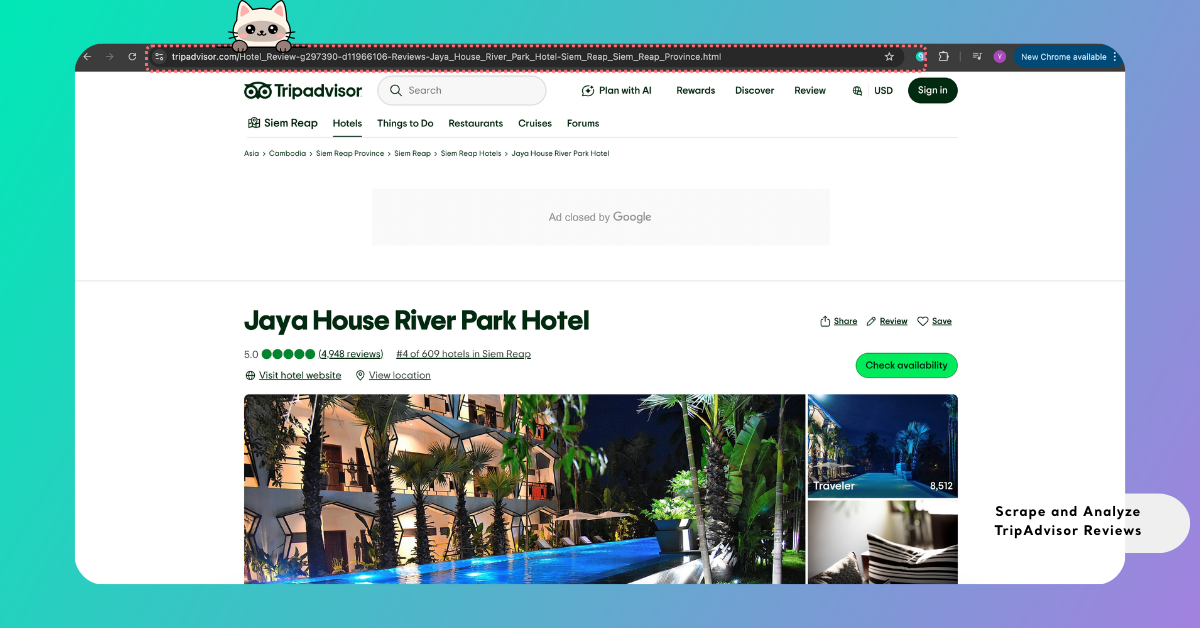
You can analyze reviews from a single listing to understand overall visitor feedback, or include multiple listing links to compare traveler experiences across different businesses.
Including multiple listings in the same report can help reveal differences in service quality, customer expectations, or satisfaction patterns across competing venues.
For the complete list of platforms supported for automatic data collection, see Supported Platforms for Creating Reports from Links, which includes platform-specific details.
Step 2: Enter the Link into Kimola
Open the Kimola Dashboard and locate the Create your report section on the home screen. Paste the TripAdvisor link you copied in the previous step into the input field, then select Start to continue.
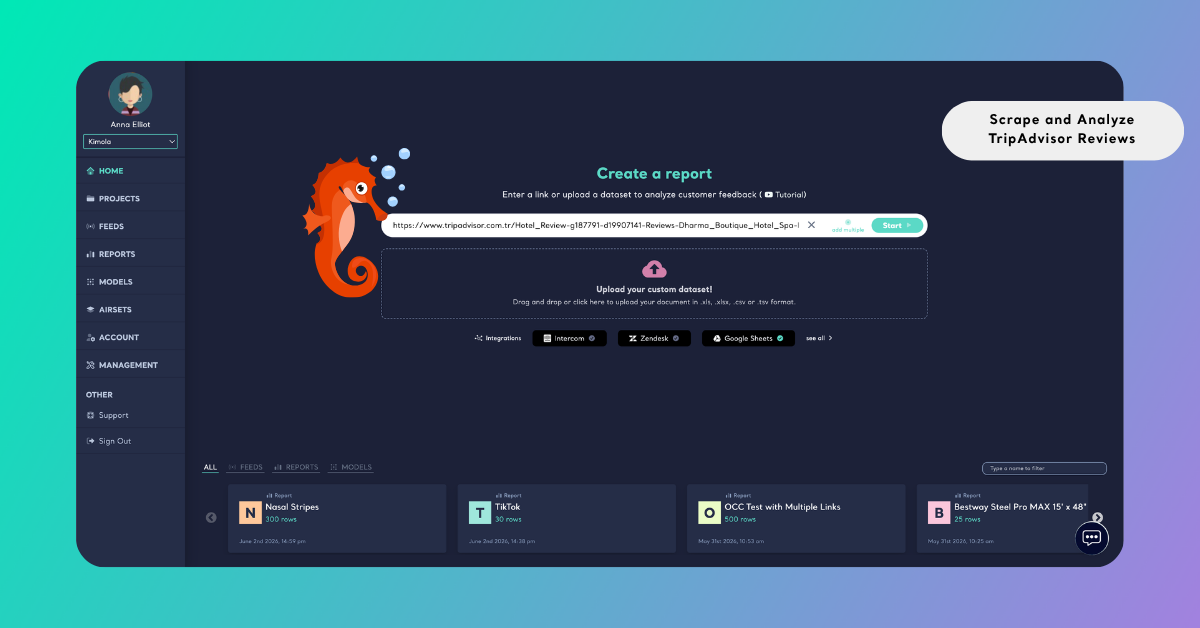
If your analysis requires reviews from multiple listings, select Add Multiple and enter each TripAdvisor URL on a separate line. This approach is useful when comparing hotels in the same destination, analyzing several restaurants within a neighborhood, or evaluating attractions that offer similar visitor experiences.
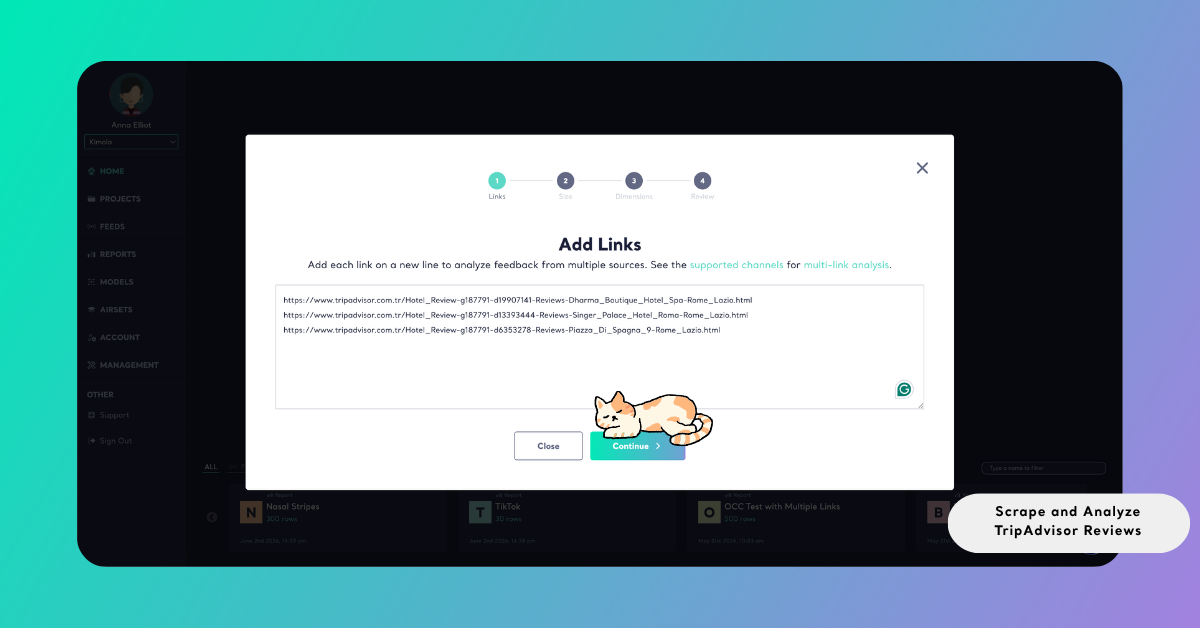
After submitting the links, Kimola automatically validates each URL to ensure that the pages are supported and accessible. If any issues are detected, a validation screen highlights the problematic links so they can be corrected or removed before continuing.
Once the links are confirmed, Kimola collects the available traveler reviews from the selected listings and combines them into a single dataset used to generate the report.
Step 3: Select the Report Size
Kimola then asks you to define how many reviews will be collected and analyzed. Using the slider, you can specify the dataset size that will be used to generate the report.
When multiple listing links are included, Kimola distributes the selected dataset size across all listings. If one listing contains fewer available reviews than expected, the remaining portion is automatically filled using reviews from the other listings.
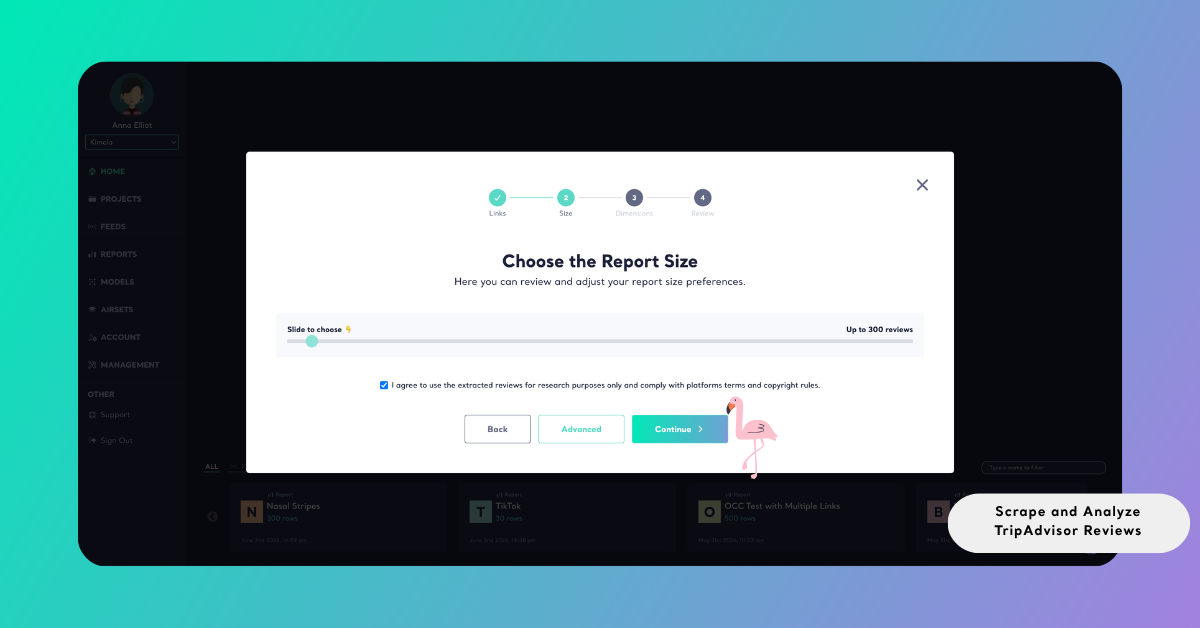
This ensures that the dataset reaches the selected size whenever sufficient data is available while also helping you manage query usage efficiently.
Understanding TripAdvisor Review Data
TripAdvisor reviews often contain detailed descriptions of traveler experiences. Visitors frequently comment on factors such as service quality, cleanliness, staff behavior, location convenience, pricing perceptions, and overall atmosphere.
Many reviews also describe specific travel contexts — such as family trips, romantic getaways, or business travel — which can influence expectations and satisfaction levels.
When TripAdvisor reviews are collected automatically, Kimola captures the main fields available on the platform, including review text, rating, date, and source URL. These fields can later be used to filter insights by rating level, analyze sentiment trends over time, or identify recurring themes in traveler feedback.
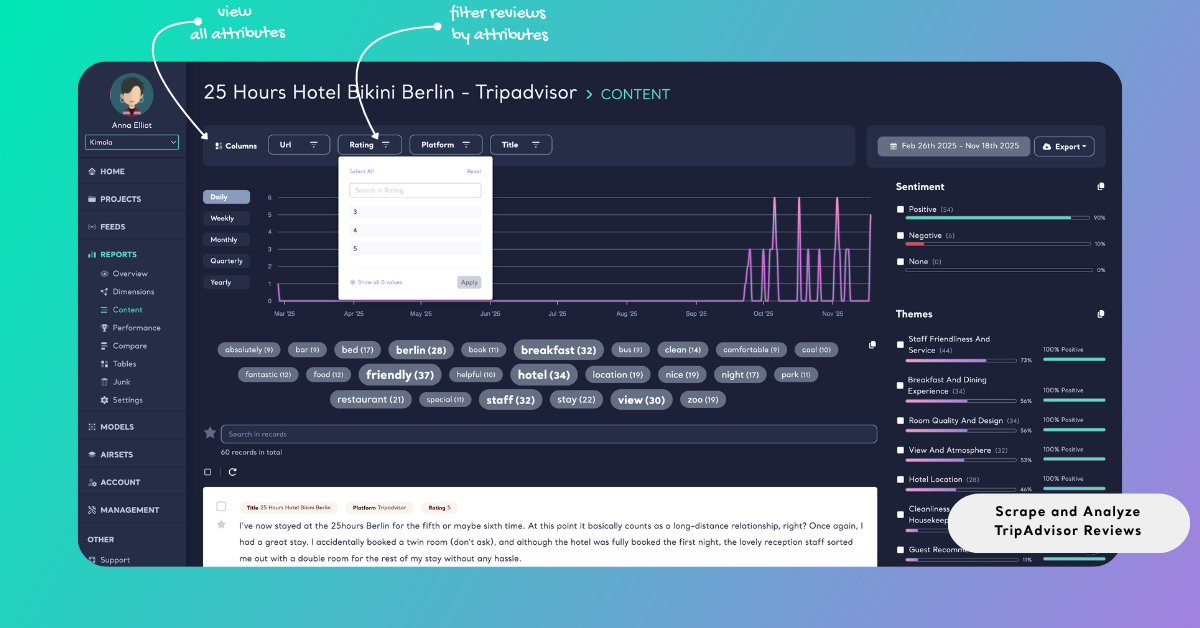
By organizing this information into a structured dataset, Kimola enables researchers and teams to explore patterns in visitor sentiment, detect operational issues, and understand which aspects of the travel experience most strongly influence customer satisfaction.
Analyze TripAdvisor Reviews
Once the reviews are collected, they can be analyzed to identify recurring themes, sentiment patterns, and common visitor experiences. This analysis transforms large volumes of unstructured traveler feedback into structured insights that can support service improvements, marketing strategies, and competitive benchmarking.
Kimola applies a unified report generation workflow to ensure that analyses remain consistent across different datasets. The following steps focus on configuring the analysis to align with your research objectives.
In addition to one-time analysis, you can automatically monitor TripAdvisor reviews by creating a Feed, which generates regular reports and alerts.
Choose Dimensions
Beyond standard sentiment analysis and classifications, Kimola allows you to apply higher-level dimensions to TripAdvisor reviews. These dimensions help reveal deeper insights such as common service complaints, traveler expectations, experience drivers, and satisfaction patterns across different types of visitors.
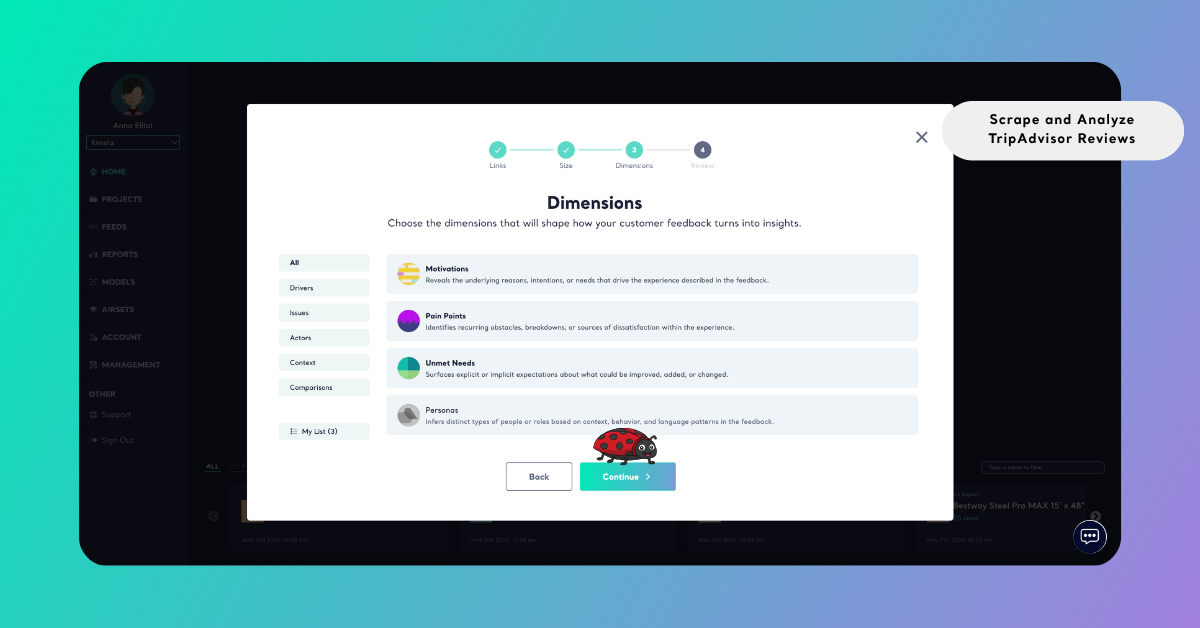
Selected dimensions appear under My List, where they can be reviewed and adjusted before generating the report.
Review Report Settings
Before running the analysis, Kimola displays the Review screen, where the report settings can be checked and adjusted if necessary.
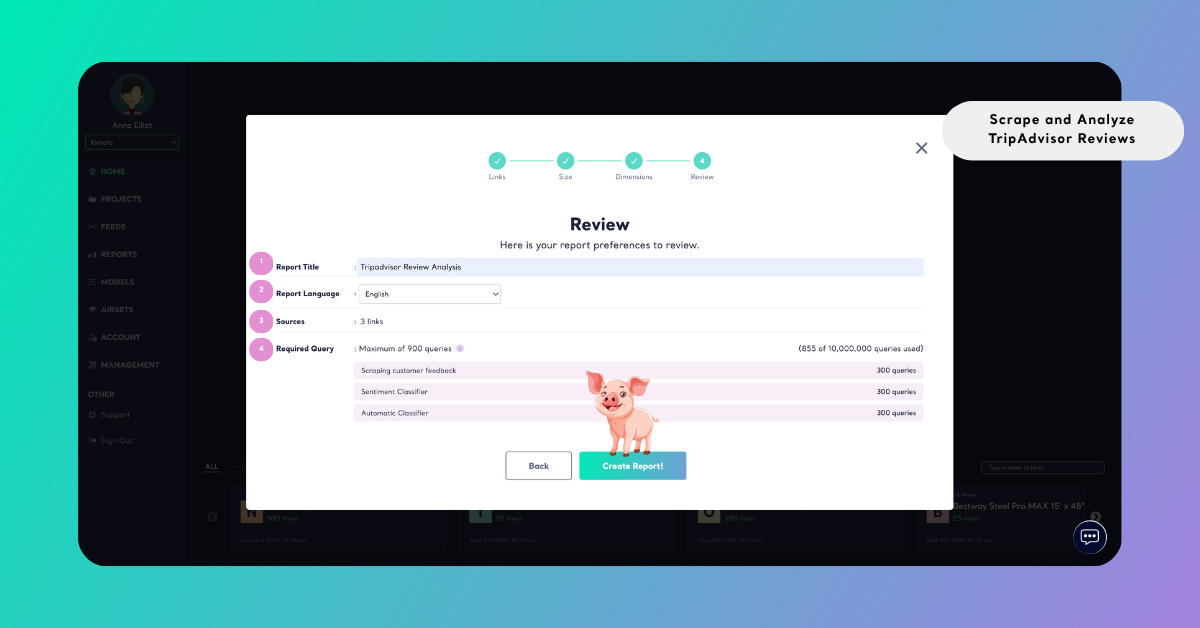
If the report is created from a single TripAdvisor listing, the report title is generated automatically based on the listing name. When multiple listing links are included, the title must be entered manually before continuing.
The Source / Dataset field shows where the data used in the report comes from, such as the TripAdvisor links added during the data collection step.
You can also choose the Report Output language from the dropdown menu. This setting determines the language used for analysis results, including sentiment labels, themes, summaries, and dimension outputs.
Finally, the Required Query section displays how many queries will be used to generate the report and how they are distributed across the data collection and analysis steps. Reviewing this information helps you understand how the selected dataset size and dimensions may affect your plan usage before starting the analysis.
Create the Report
Select Create Report to start the analysis. Kimola collects the selected TripAdvisor reviews, applies the configured analyses, and generates the report automatically.
Once the report is ready, it appears in the Reports section of the dashboard. From there, you can explore the analysis results, organize the report under a Project, or export the outputs for further use.
Reports can be exported in several formats depending on your workflow:
- Excel for deeper data analysis
- PowerPoint or PDF for presentations and stakeholder reporting
- Email for scheduled or on-demand sharing
This flexibility makes it easy to convert TripAdvisor review insights into outputs that support decision-making and reporting processes.
Conclusion
TripAdvisor reviews provide rich qualitative insight into how travelers experience hotels, restaurants, and attractions. By analyzing this feedback, organizations can better understand visitor expectations, identify operational issues, and improve service quality.
Kimola simplifies the process of collecting and analyzing TripAdvisor reviews by automating data collection and transforming large volumes of traveler feedback into structured insights. This enables teams to focus on interpreting results and applying them to improve customer experiences.
All TripAdvisor review data should be collected and analyzed strictly for research and internal decision-making purposes. Review content must not be redistributed, republished, or used in ways that violate TripAdvisor’s terms of service or applicable copyright regulations. Users are responsible for ensuring compliance with all platform policies.
If you’re new to Kimola, you can start by trying the TripAdvisor Review Analyzer tool. It provides a quick way to analyze TripAdvisor reviews and helps you become familiar with Kimola’s analysis workflow before running more advanced reports.