Export a Report as PowerPoint file
4 mins read - Created on Feb 20, 2025Exporting a report as a PowerPoint file allows you to turn your analysis results into a ready-to-use presentation. PowerPoint exports are ideal for sharing insights with stakeholders, presenting findings in meetings, or creating executive summaries without manually rebuilding charts and visuals.
This article explains how to export a report as a PowerPoint file and what to expect in the exported presentation.
Sign in to your Kimola account and open the Reports section from the left menu.
Step 1: Open the Report
On the Reports page, find the report you want to export and open it by selecting the report name or clicking View.

You can also export a report without opening it. On the Reports page, click the arrow next to View and select PowerPoint (PPT) to download the presentation directly.
Step 2: Access the Full Analysis View
To export all available analysis outputs, make sure the report is opened in full analysis view.
Click See Full Analysis in the top-right corner of the report, or use the left panel inside the report to switch to the analysis view.

Step 3: Export the Report as PowerPoint
While viewing the full analysis:
- Click the Export button in the top-right corner
- Select PowerPoint (PPT) from the export options

Kimola generates the presentation based on the report’s current analysis and applied settings.
Step 4: Export With or Without Filters (Optional)
If your report includes active filters (such as date range, platform, keywords, or hosts), you can control how these filters are reflected in the PowerPoint export.

You have two options:
Apply current filters
Exports only the data and visuals based on the filters currently applied in the report view.
Download without filters
Exports the complete report, ignoring any active filters.
Select the option that best fits the story you want to present.
Step 5: Download and Open the File
After the export is complete, the PowerPoint file is saved to your device. You can open the presentation using Microsoft PowerPoint or any compatible presentation tool to review or present your insights.
What’s Included in the Exported PowerPoint File
When you export a report as a PowerPoint file, Kimola creates a presentation based on the current content and analysis results of your report. The exported file is structured to help you review insights or share them directly with others.
The PowerPoint export includes several slides that represent different parts of your analysis.
The file begins with a cover slide that displays basic report information, such as the report title and data source. This slide provides clear context before the analysis results are presented.
Following this, sentiment analysis slides show the distribution of positive, negative, and neutral feedback. These visuals give a quick overview of overall customer sentiment and are suitable for high-level discussions.
The presentation also includes theme-based analysis slides, where records are grouped under topics or labels. These slides help you identify recurring themes, common issues, or frequently mentioned strengths within the data.
If dimensions are included in the report, the PowerPoint contains dimension outputs, such as executive summaries or insight-focused slides. These slides present dimension results in a concise format suitable for presentations and reviews.
The exported PowerPoint is designed to be presentation-ready. Visuals, summaries, and key findings are organized so the file can be shared in meetings, sent to stakeholders, or updated further without requiring additional formatting.
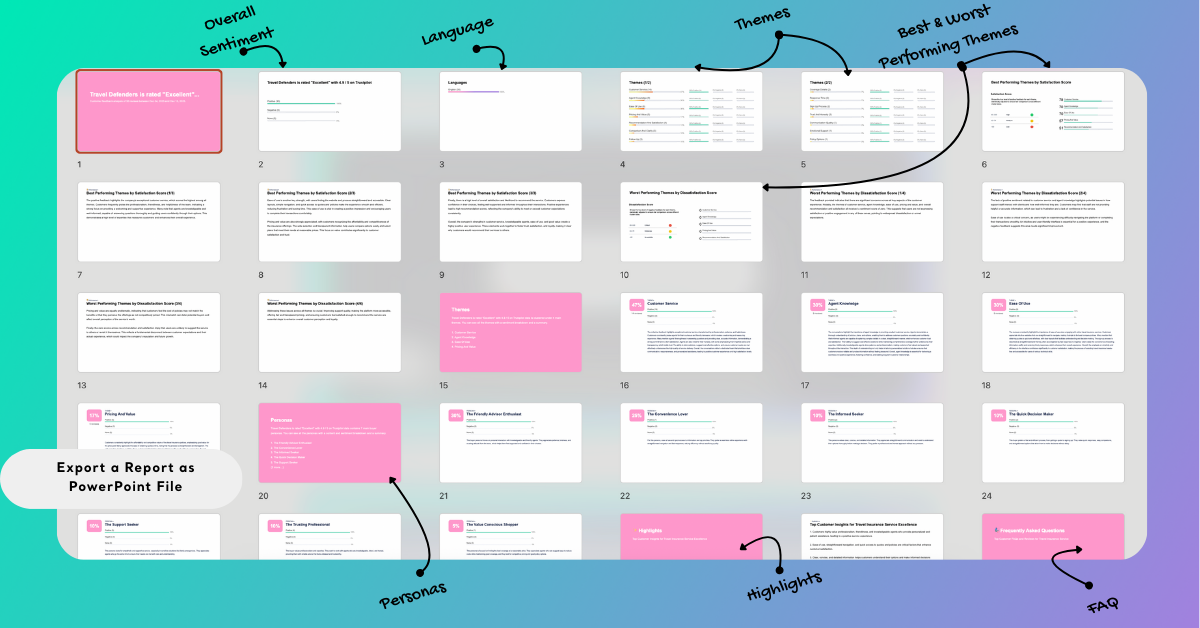
Exporting reports as PowerPoint files helps you quickly turn analysis results into clear, shareable presentations. With ready-to-use slides covering sentiment, themes, and key insights, you can focus on communicating findings rather than recreating visuals. PowerPoint exports are especially useful for stakeholder meetings, executive briefings, and client presentations, allowing you to present Kimola insights confidently and efficiently.