How to Scrape and Analyze Trendyol Reviews
8 mins read - Updated on Jun 05, 2026Product reviews on Trendyol offer more than surface-level feedback. They reflect how customers experience products, what they expect before purchase, and how those expectations evolve after use. When analyzed collectively, these reviews reveal patterns that go beyond individual opinions and begin to explain broader consumer behavior.
With Kimola, this process becomes both structured and accessible. Instead of manually collecting and organizing data, you can initiate the entire workflow by simply entering a product link. From that point on, data collection, dataset creation, and analysis are handled automatically, allowing you to focus on interpreting insights rather than preparing inputs.
This guide walks you through how to collect and analyze Trendyol reviews using this automated workflow.
To begin, create a free account or log in to your existing Kimola account. Once inside the platform, no additional setup is required.
Automatically Scrape Trendyol Reviews
This method allows you to generate a report by submitting a Trendyol product link. Reviews are collected automatically and prepared for analysis without requiring manual input.
When a product link is added, Kimola recognizes the source, retrieves available customer reviews, and builds the dataset in the background. The data is then processed according to the selected report configuration.
This workflow can be used for analyzing a single product or comparing multiple products across different categories or sellers.
Follow the steps below to create your report.
Step 1: Get the Trendyol Product Link
The first step is to navigate to the product page you want to analyze on Trendyol and copy its URL. It is important to ensure that the link corresponds to a product detail page, as this is where customer reviews are hosted.
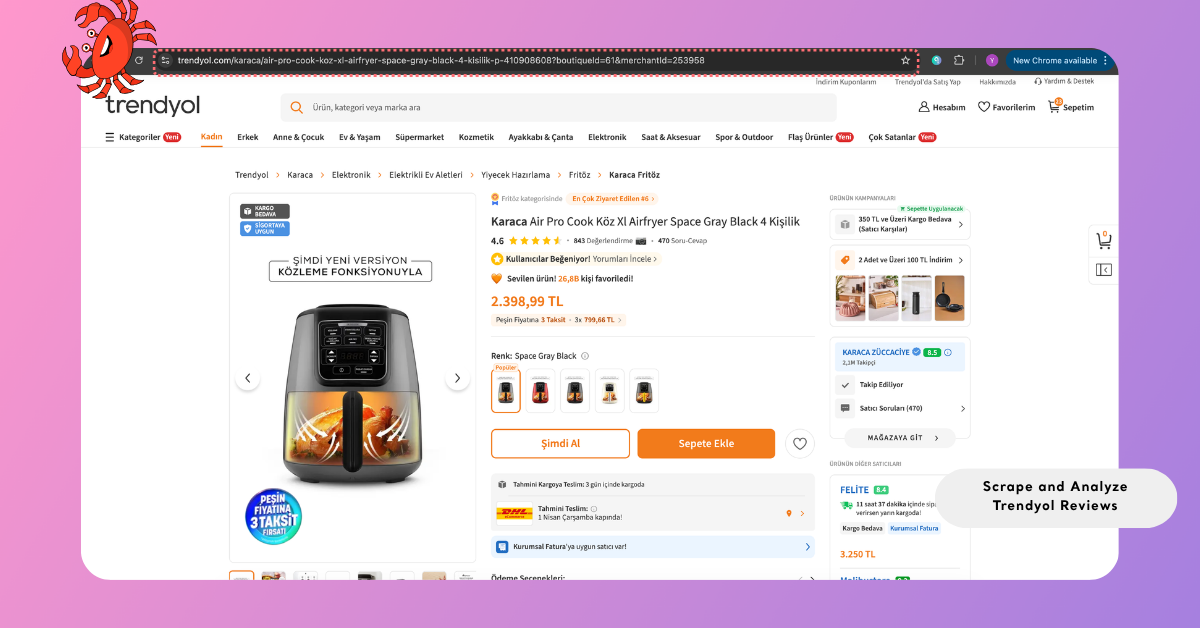
This step may seem simple, but it defines the scope of your analysis. Whether you are focusing on a single product or planning a comparative study across multiple listings, the links you choose will shape the dataset and ultimately the insights you generate.
For an overview of all platforms that support auto-scraping, refer to Supported Platforms for Creating Reports from Links, where platform-specific details are also provided.
Step 2: Add the Link to Kimola
Once you have the product link, go to the Kimola dashboard and locate the “Create your report” section on the homepage. Paste the Trendyol product URL into the input field and click the Start button to initiate the process. After submitting the link, Kimola automatically checks whether the URL is valid and supported. If the link is correct, it proceeds directly to data collection; if there is an issue, the platform highlights the problem so you can fix or replace the link before continuing.
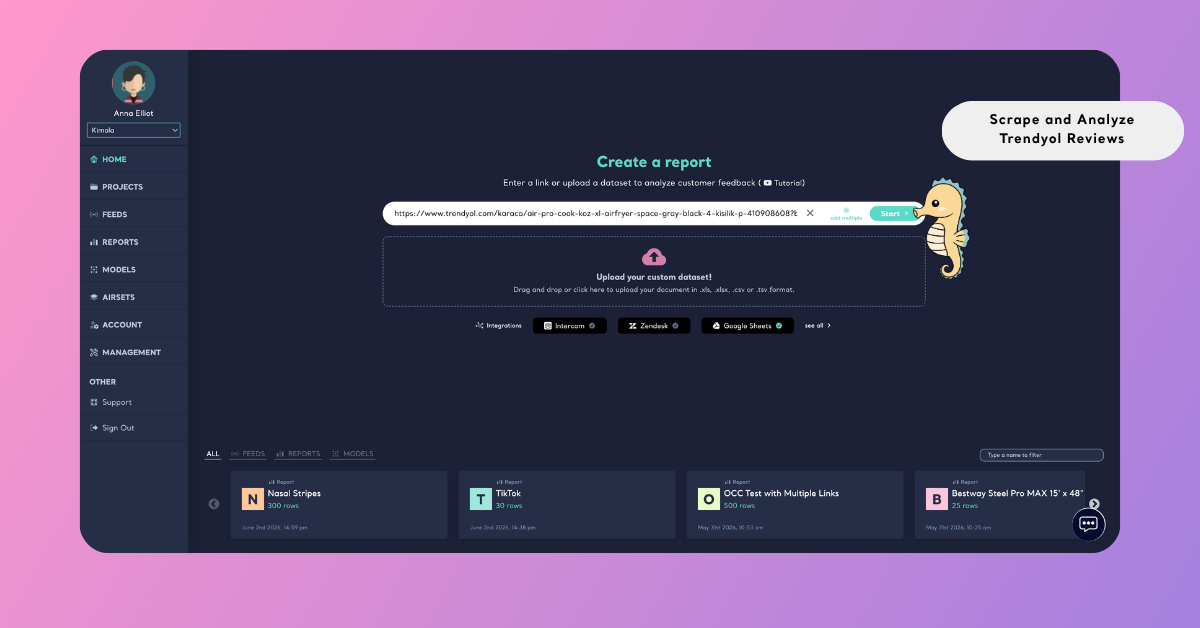
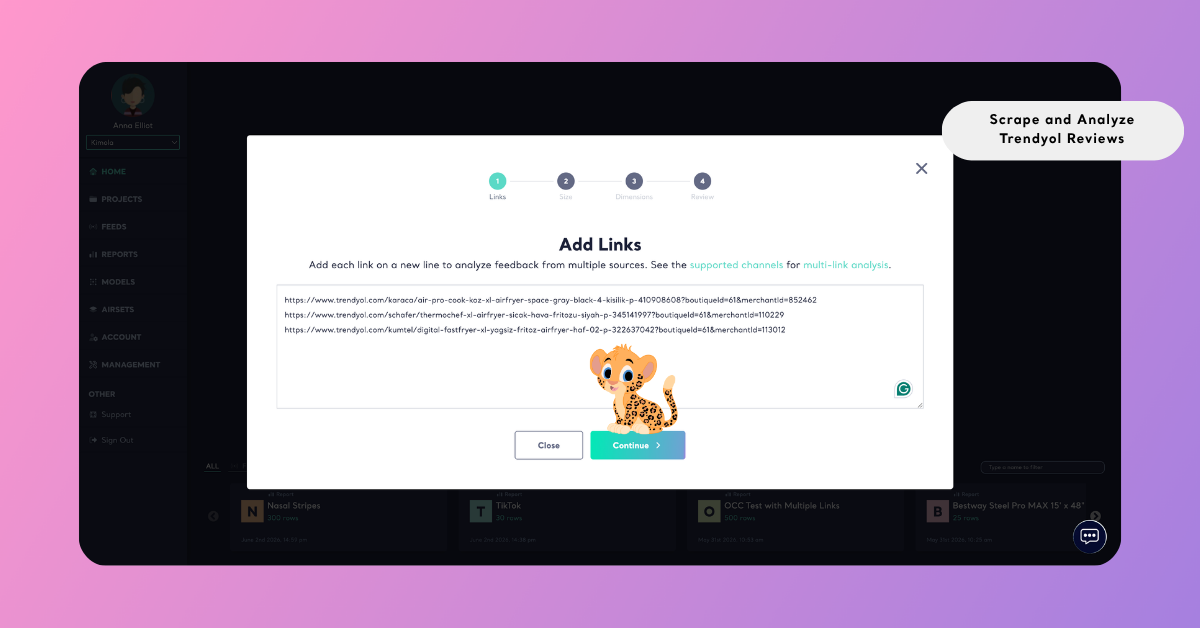
If you need a broader perspective, you can also include multiple product links within the same report. To do this, select the “Add Multiple” option in the same input area and paste each Trendyol link on a separate line. Once submitted, Kimola validates all links individually and combines the collected reviews into a single dataset. This allows you to analyze multiple products together, making it easier to compare performance, identify shared pain points, or understand category-level patterns across competing products.
Step 3: Select the Report Size
After the links are entered, the next step is to define the size of the dataset. This determines how many reviews will be collected and analyzed within the report.
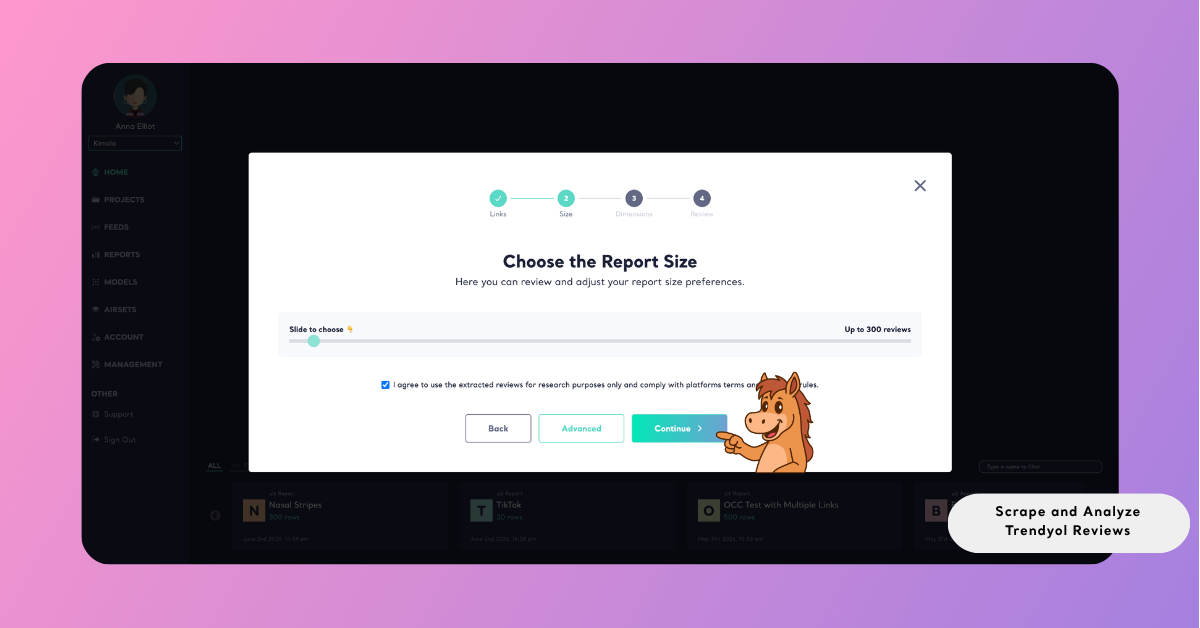
Choosing the dataset size is not just a technical step; it directly impacts the depth of your analysis. Smaller datasets can provide quick directional insights, while larger datasets allow for more reliable pattern detection and richer dimensions. When multiple product links are included, the dataset is distributed across them in a balanced way, ensuring that the analysis remains consistent.
Leveraging Product Attributes in Trendyol Reviews
While automatically collecting Trendyol reviews, Kimola also captures a set of structured attributes alongside the review text. In addition to the core review content, fields such as rating, title, platform, URL, product URL, and seller name are included in the dataset.
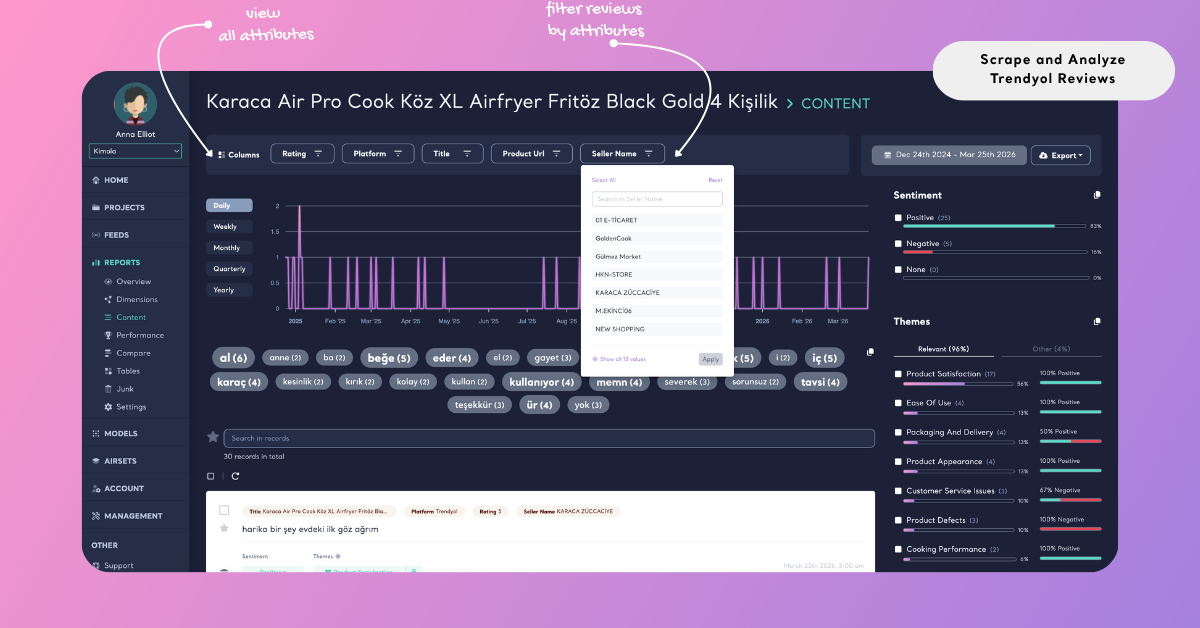
Once the report is created, these attributes appear as filterable dimensions within the analysis. This allows you to move beyond a single stream of feedback and examine how customer opinions vary across different conditions. For example, reviews can be segmented by rating to understand how sentiment shifts between positive and negative experiences, or grouped by seller to identify differences in performance across vendors offering similar products.
This structure makes it possible to analyze reviews not only as text, but as part of a broader system of relationships. Instead of asking only what customers are saying, you can begin to explore how those opinions are distributed, where they originate, and what factors influence them.
Analyze Trendyol Reviews
Once the dataset is ready, the focus shifts from collection to dimension. This is where unstructured review data is transformed into structured insights.
Rather than reading reviews individually, Kimola analyzes them collectively to identify recurring themes, sentiment patterns, and underlying motivations. This allows you to see not only what customers are saying, but also how frequently certain topics appear and how they are emotionally framed.
At this stage, the analysis begins to reveal patterns that would be difficult to detect manually, especially when working with large datasets.
Beyond one-time analysis, you can also monitor Trendyol product reviews on an ongoing basis by setting up a Feed, which delivers recurring reports and updates directly within Kimola.
Choose Dimensions
To move beyond surface-level analysis, you can apply additional interpretive layers such as customer personas, pain points, and usage motivations. These dimensions reorganize raw review data into structured frameworks, making it easier to connect individual feedback to broader behavioral patterns.
To apply them, dimensions step during report creation. From this screen, you can browse available dimension types and select the ones that align with your research objective. As you make selections, they are added to your list, allowing you to review and adjust them before proceeding.
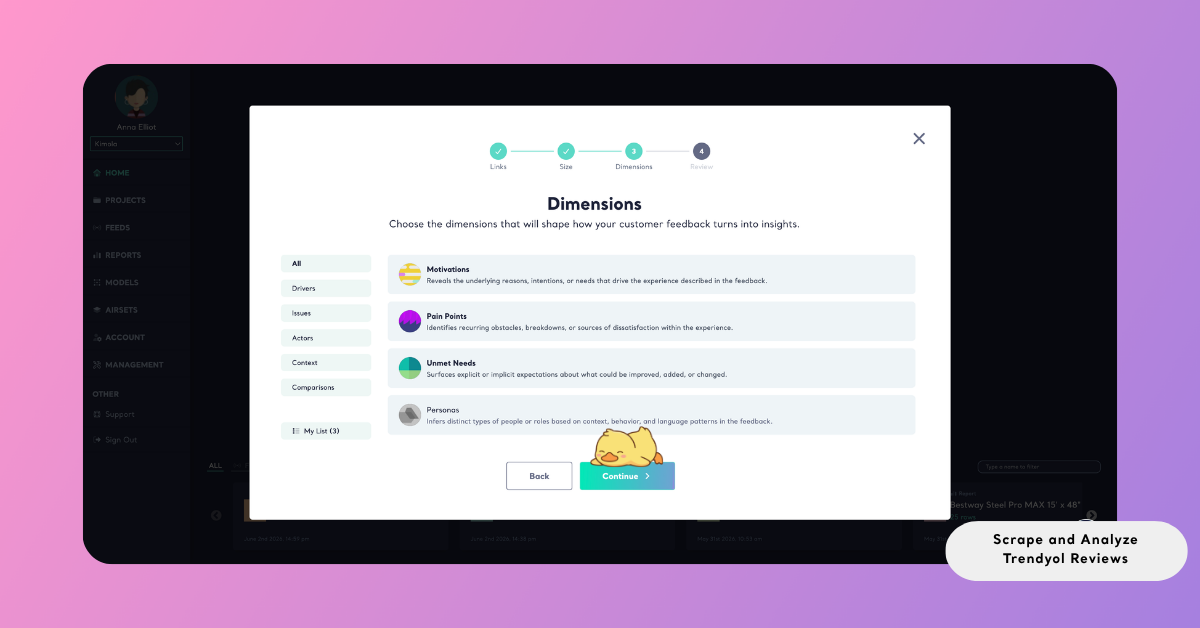
At this stage, the analysis shifts from identifying what is being said to understanding why it is being said. Instead of treating themes as isolated observations, you begin to uncover the underlying drivers behind them and how they relate to customer expectations, product experience, and decision-making processes.
This added layer of dimension transforms review data from descriptive output into actionable insight, allowing you to draw clearer connections between customer feedback and strategic opportunities.
Selected dimensions appear under My List on the left side, allowing you to review and adjust them before creating the report.
Review Report Settings
After completing the dimension step, the Review screen appears as the final stage before running the analysis. This screen brings together all selected configurations, allowing you to review and adjust them before proceeding.
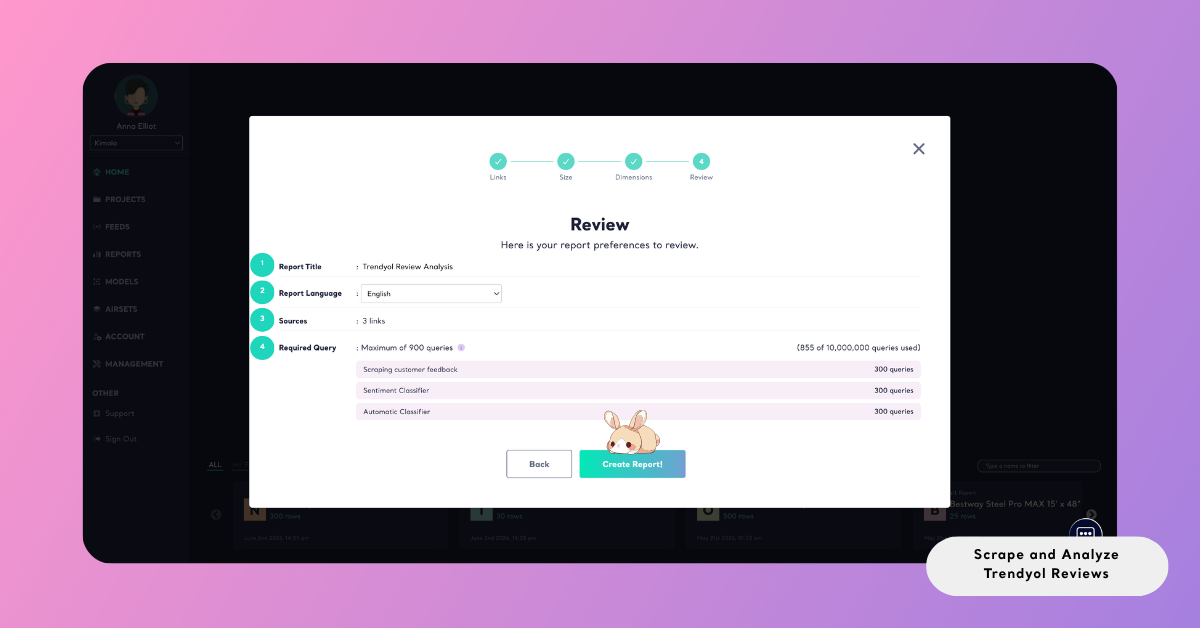
The report title is automatically generated when creating a report from a single product link, typically based on the product name. In most cases, this does not require editing. However, when working with multiple links or a combined dataset, the title must be entered manually before continuing.
The source or dataset field indicates where the data is coming from. For link-based reports, this reflects the detected platform, while for dataset-based workflows, it shows the name of the uploaded or generated dataset.
You can also define the output language of the report. This setting determines the language used across all analysis outputs, including sentiment labels, detected themes, summaries, and dimension results.
Finally, the required query section provides a breakdown of how the analysis will use your available queries. This includes queries used for data collection, sentiment classification, and any additional analysis layers based on selected dimensions. The total number represents the maximum query usage for the report, giving you clear visibility into how dataset size and analysis scope will impact your plan before the process begins.
Create the Report
To initiate the analysis, click Create Report. From this point forward, Kimola executes the entire workflow in the background — collecting the selected data, applying the configured analyses, and assembling the results into a structured report.
Once the report is ready, it becomes accessible under the Reports section. Here, you can explore the findings in detail, organize reports within Projects to keep related work grouped, or prepare the outputs for sharing.
Reports can be exported in multiple formats depending on your needs. You can download the data as an Excel file for deeper analysis, export it as PowerPoint or PDF for presentations, or share it via email for easy distribution.
This flexibility ensures that insights generated from Trendyol reviews can be seamlessly integrated into your reporting workflows and decision-making processes.
Conclusion
Kimola is designed with a simple principle in mind: better decisions come from understanding real customer experiences. Because every analysis starts with data, the platform is built to make data collection both accessible and structured, while maintaining flexibility across different research needs. By automating the process of gathering and analyzing Trendyol reviews, Kimola allows you to focus less on how to collect data and more on how to interpret it.
At the same time, it is important to use review data responsibly. All data should be collected and analyzed strictly for research and internal use, without redistributing or republishing content in ways that conflict with platform policies or copyright regulations. Ensuring compliance with these guidelines remains the responsibility of the user.