How to Scrape and Analyze Etsy Reviews
7 mins read - Updated on Jun 05, 2026Customer reviews on Etsy offer a detailed look into how buyers evaluate both products and sellers. Beyond basic feedback, these reviews often reflect expectations around craftsmanship, personalization, communication, and overall purchase experience.
When examined collectively, this feedback can reveal recurring patterns in customer satisfaction, common friction points, and the factors that shape perception across different shops and products.
With Kimola, you can capture and analyze Etsy reviews through a structured workflow. By collecting reviews directly from product pages and organizing them into datasets, the platform helps transform scattered feedback into insights that can inform product, brand, and experience decisions.
Create a free account or sign in to your existing Kimola account.
Manually Scrape Etsy Reviews
Manual scraping allows you to collect Etsy reviews directly while browsing product pages using Kimola’s browser extension. Instead of starting with a link inside the platform, this workflow lets you capture review data in real time and store it for later analysis.
To support this process, Kimola provides a browser extension that detects available reviews on the page and saves them as a dataset in your account.
Before you begin, make sure the Airset Generator is installed and properly set up. You should also be logged in to your Kimola account with your API Key connected. If the setup is not complete, follow the extension setup guide before proceeding.
Collected reviews are stored as datasets in your Kimola account. This approach is especially useful when working on broader research projects or when gathering feedback across multiple products or categories over time. Instead of analyzing data immediately, you can first build your dataset and then decide when and how to run the analysis by creating a report.
Unlike automatic scraping, collecting data through the browser extension does not use queries from your plan. This means you can gather customer feedback freely, even on the free plan, without worrying about query limits.
Step 1: Open the Etsy Product Page
Go to the etsy.com product page you want to analyze and scroll down to the reviews section. If available, open the full review view to access more entries.
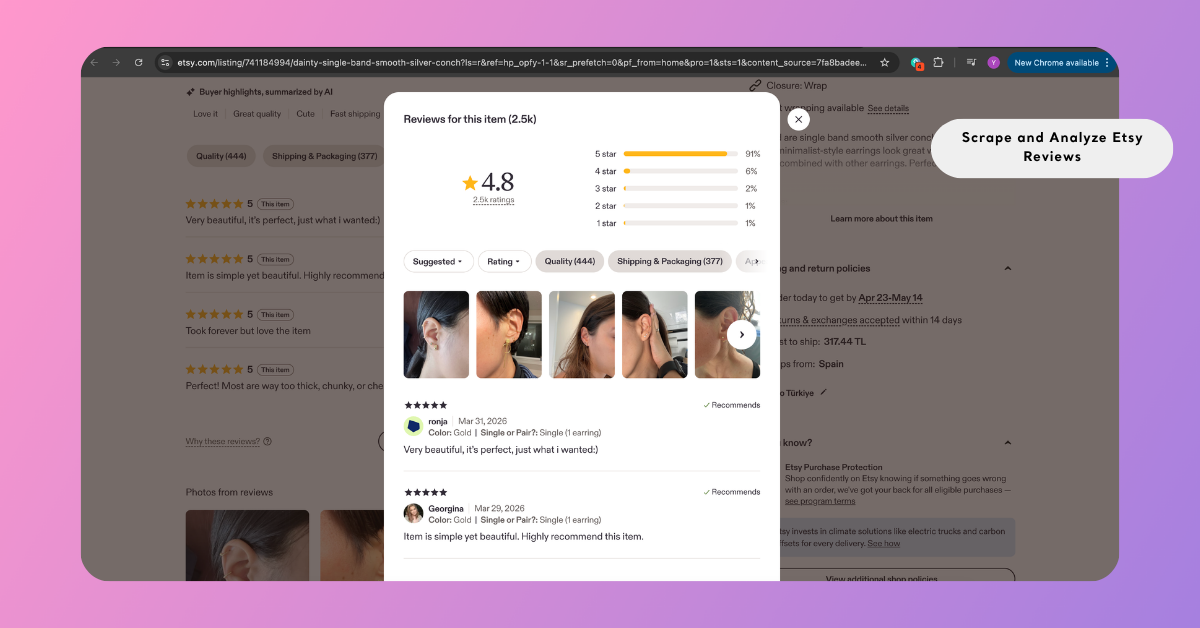
Because the extension captures only the content visible in your browser, expanding the review list ensures that a larger portion of data can be collected.
You can pin the Airset Generator next to your browser’s address bar for quick access. While browsing, the extension automatically surfaces the number of available reviews on each page as a small badge.
Step 2: Start Collecting Reviews
Once you are on the Etsy product page, the browser extension icon in your toolbar may display a small badge indicating the number of reviews currently detected on the page. This icon is typically located in the top-right corner of your browser. If no badge appears, make sure that the reviews section is visible and fully loaded.
Click the extension icon to open it. The product name is displayed for confirmation. Then, use the available action button "Generate" to begin collecting the reviews currently visible on the page.
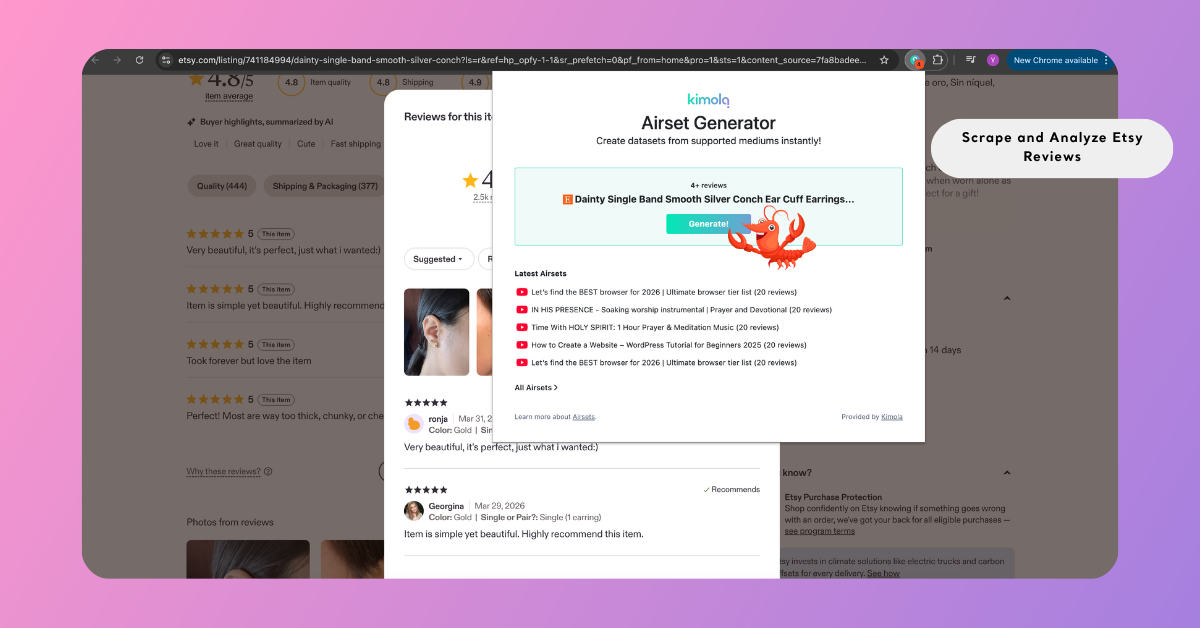
During collection, the extension may navigate through additional review pages or load more entries to gather a larger dataset. To ensure the process completes successfully, keep the browser tab active and avoid closing or refreshing the page until the collection is finished.
Step 3: Complete the Collection
During the collection process, the browser extension continues gathering reviews by navigating through additional pages or loading more entries where available. This allows it to capture a larger portion of the available data automatically.
If needed, you can stop the process at any time by clicking the Continuing button in the extension. Otherwise, the collection will proceed until all accessible reviews have been captured.
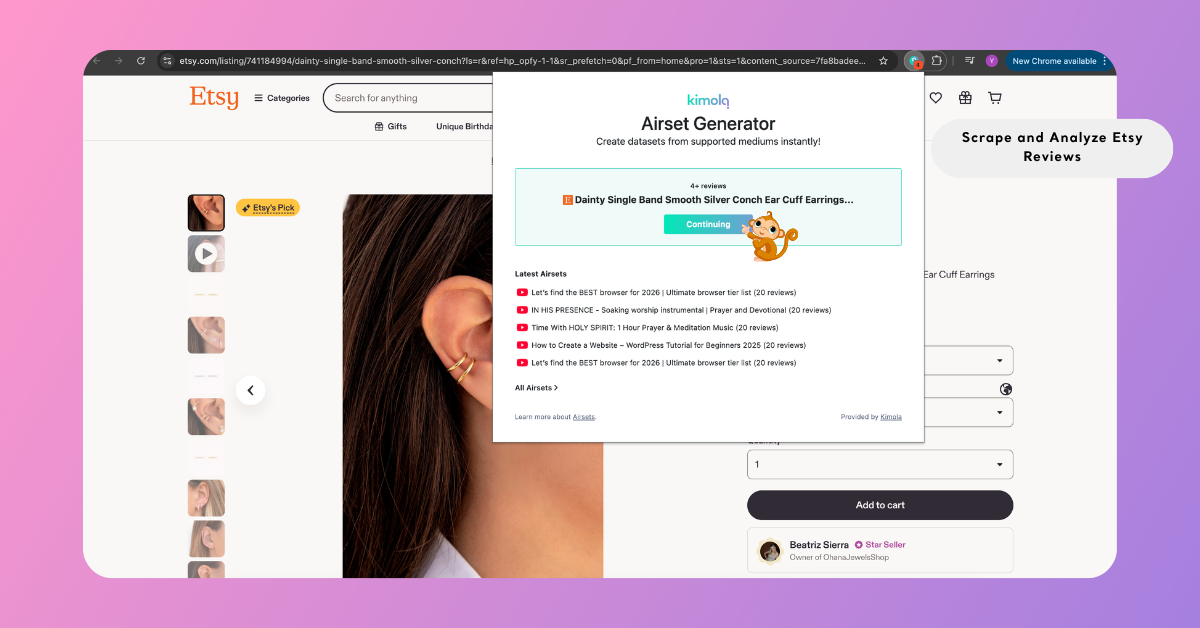
Once the process is complete — whether stopped manually or finished automatically — a dataset is created and saved to your Kimola account. It appears in the extension alongside your recent datasets and can also be accessed from the dashboard, where you can review, manage, or analyze the data by creating a report.
The Airset Generator attempts to collect the maximum number of available customer reviews, but platform-specific limitations apply.
Step 4: Create a Report from the Airset
To analyze the collected reviews, go to the Kimola dashboard and navigate to the Airsets section. From there, select your dataset and click Create Report.
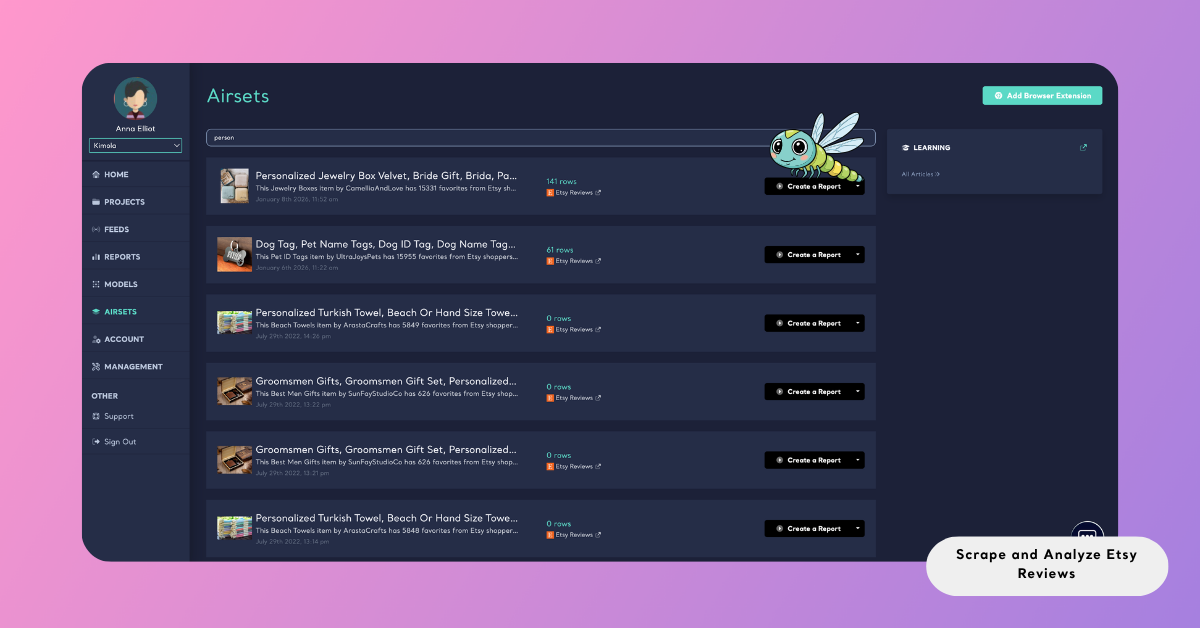
Next, choose the column that contains the main review text and optionally include additional fields such as date or URL. These selections define how your dataset will be processed during analysis.
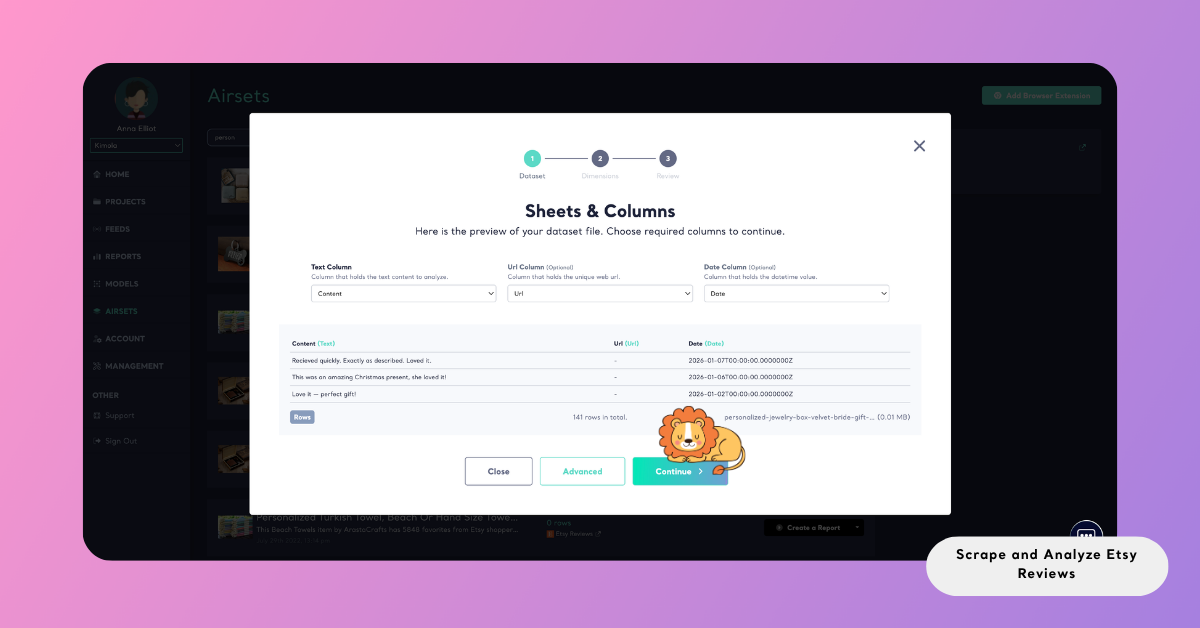
Analyze Etsy Reviews
Once your dataset is ready, reviews can be analyzed systematically to uncover recurring themes, sentiment patterns, pain points, and underlying customer expectations.
Etsy reviews often contain detailed, experience-driven feedback that combines product quality with service experience. By analyzing reviews collectively, you can identify patterns that would be difficult to detect manually, especially across larger datasets.
Kimola transforms this unstructured feedback into structured insights that support product, marketing, and positioning decisions.
In addition to one-time analysis, you can automatically track Etsy product reviews by creating a Feed, which provides regular reports and alerts in Kimola.
Choose Dimensions
To deepen your analysis, you can apply additional dimensions that organize review data into more meaningful layers.
During report creation, you will be guided to the Dimensions step after setting up your dataset. From this screen, you can browse available dimension types and select those that align with your research goals. As you make selections, they are added to the My List panel, where you can review and remove them before continuing.
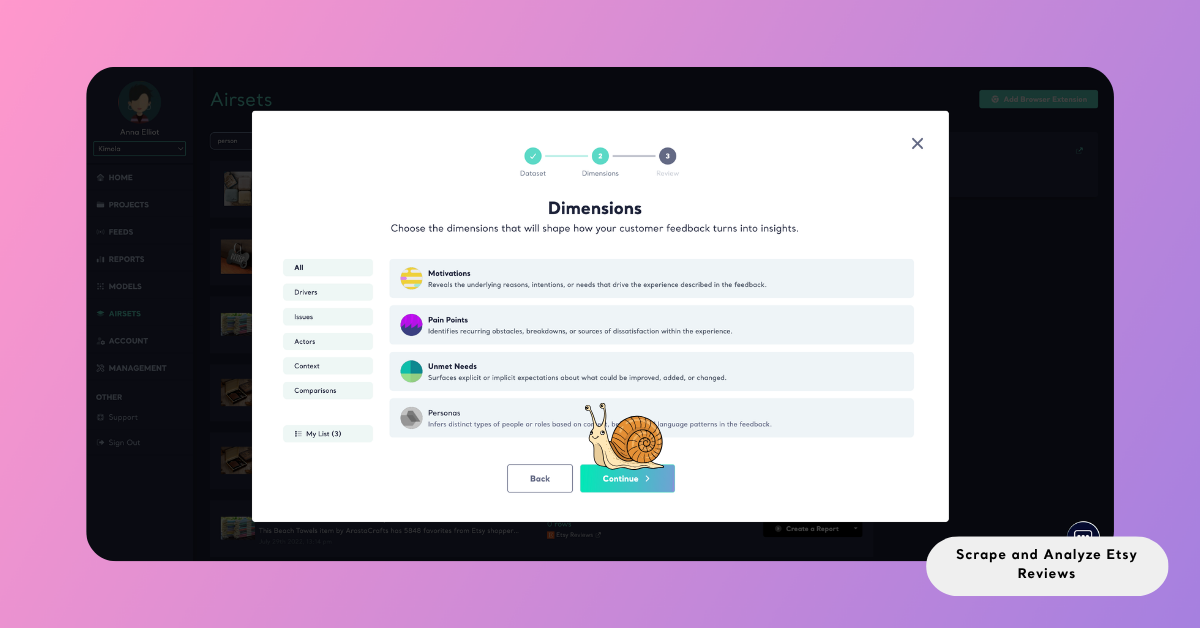
Once applied, these dimensions structure the dataset within the report, allowing you to explore relationships between feedback, context, and customer behavior.
Review Report Settings
After completing the Dimensions step, you will be taken to the Review screen — the final stage before starting the analysis.
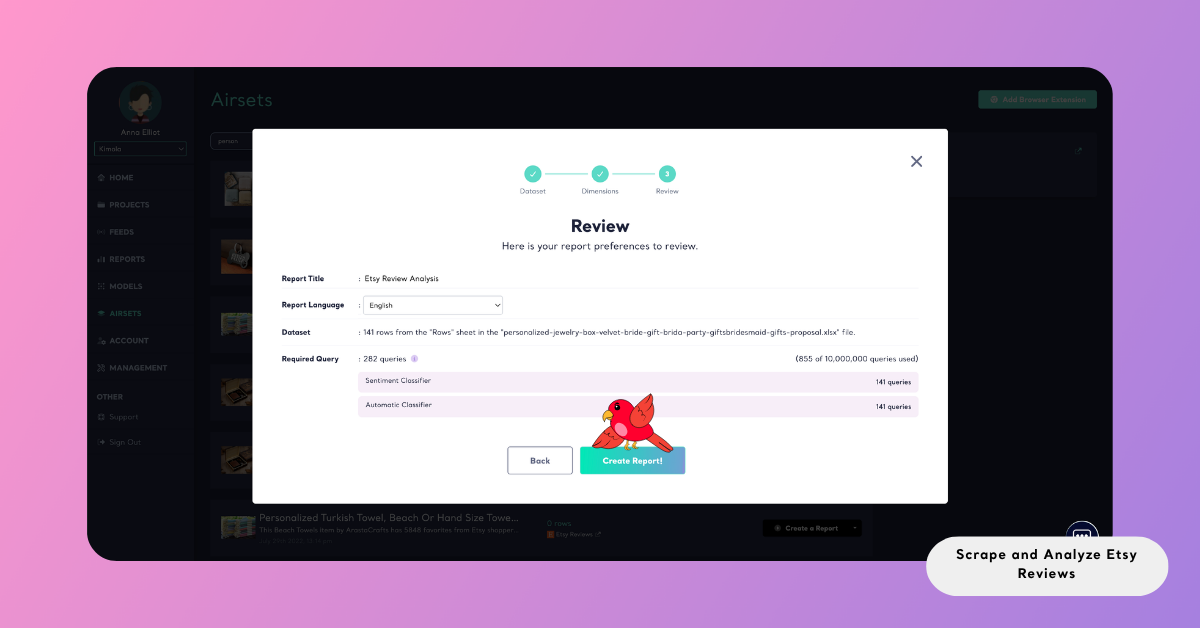
This screen provides a complete overview of your report setup. You can enter and review the Report Title, confirm the Source, adjust the Report Language, and check the Required Query breakdown.
The Required Query section shows how your queries will be used across different steps, giving you visibility into the expected resource usage before running the report.
If needed, you can go back and update your selections. Once everything is set, you can proceed with confidence.
Create the Report
To start the analysis, click Create Report. Kimola then processes the collected data, applies the selected analyses, and generates the report automatically.
Once the report is ready, it appears under the Reports section. From there, you can explore the results, organize reports under Projects, or export the outputs for further use.
Reports can be exported in multiple formats depending on your workflow. You can download them as Excel files for deeper analysis, export them as PowerPoint or PDF for presentations, or share them via email for easy distribution.
Conclusion
Etsy reviews provide a rich combination of product feedback and customer experience, reflecting both functional and emotional aspects of purchasing decisions.
By collecting and analyzing this data through a structured workflow, you can move beyond individual reviews and identify the patterns that shape customer perception and satisfaction.
As with any platform-based data, all collection and analysis should be conducted responsibly and in accordance with platform policies and applicable regulations.